Thứ Hai, 28 tháng 5, 2012

NetBeans 7.2 beta: Faster and More Helpful

There has been significant excitement about the beta release of NetBeans 7.2. In this post, I look briefly at what makes this release so exciting (including better performance, providing more hints, and integrating FindBugs).

NetBeans 7.2 beta is available in the typical download bundles, ranging from the smaller Java SE, C/C++, and PHP bundles to the larger Java EE and "All" bundles. Installation of NetBeans 7.2 is as easy as ever and there are installation instructions for multiple platforms.

Speed!

The NetBeans IDE 7.2 Beta Release Notes include a section called What's New in 7.2 Beta which states of NetBeans 7.2, "Significant performance increase on remote filesystems, improved project scanning speed, and background project scanning." As I discussed in my recent post NetBeans Usability Tips, larger projects or numerous associated projects can lead to significant NetBeans performance degradation. In that post, I looked at how one can turn off that background source scanning to avoid this when necessary. The NetBeans development team has apparently heard many others wish for quicker scanning and they have focused on this and quicker startup for NetBeans 7.2 beta

The NetBeans 72 NewAndNoteworthy page provides additional information on the quicker performance. It states, "The indexes and indexing infrastructure were rewritten to use transactions. The project scanning and up to date check do not block editor features nor navigation. These features use the previous committed index. Also the write transactions are suspended by read transactions, so the background indexing has lower priority than user actions." That same page also states, "The binary indexers run in parallel which makes indexing of java project faster."

New NetBeans Hints

I like NetBeans's hints so much that I have written multiple posts about them: Seven Indispensable NetBeans Java Hints, Seven NetBeans Hints for Modernizing Java Code, and Creating a NetBeans 7.1 Custom Hint. NetBeans 7.2 adds several new hints including "Generate Implementing/Extending Class," "Zero Element Array Passed to Collection.toArray," "Method Result not Checked" (uses the FindBugs annotation @CheckReturnValue), "Generate switch Clauses," and "Fix Missing return Statement."

One of the new hints added in NetBeans 7.2 would have fit nicely in my post Seven NetBeans Hints for Modernizing Java Code. The "Add Underscores to Integer Literals" hint can help "modernize" Java code bases to leverage this new Java 7 feature.

The following screen snapshots demonstrate the utility of the new NetBeans 7.2 hint for including underscores in integer literals to improve readability. As the first screen snapshot indicates, there is some configuration available related to this hint. Also note that in my case of upgrading from NetBeans 7.1.1 to NetBeans 7.2 beta, this hint was not enabled (not checked) in the Tools | Options | Editor | Hint area.

FindBugs Integration

NetBeans 7.2 beta integrates FindBugs into the IDE. This makes it even easier and more intuitive to apply FindBugs to Java code in NetBeans than use of the Software Quality Environment I discussed in the post NetBeans 7 and Software Quality Environment.

The FindBugs Integration Plugin can be installed on NetBeans 7.2 beta using the Tools | Plugins | Available Plugins approach shown in the next screen snapshot.

An alternative approach for acquiring and installing the FindBugs Integration Plugin is through the source code inspection process. This can be done by selecting Source | Inspect (shown in next two images).

Note that FindBugs Integration is one of the items that can be explicitly selected, but I prefer to use "All Analzyers." Click on the "Install" button to see what "additional plugins [are] required for the selected configuration." In the case of the newly installed NetBeans 7.2 beta, the following appeared when I clicked on that "Install" button.

Once FindBugs Integration 1.8 plugin is installed, NetBeans begins reported FindBugs findings.

As noted in this post's section on the new NetBeans hints, the FindBugs annotation @CheckReturnValue is also now supported by a NetBeans hint.

JavaFX SceneBuilder Support

The SceneBuilder tool is an IDE-independent standalone tool announced at JavaOne 2011 for generating JavaFX interfaces that was released to the public earlier this year. As Cindy Castillo states in the post JavaFX Scene Builder Docs Updated, the Getting Started with JavaFX Scene Builder documentation now discusses (in fact, requires) use of NetBeans 7.2 beta for the tutorial. The SceneBuilder is still a separate tool, but it can be opened from NetBeans by simply clicking on an FXML file. The clicked-on FXML file will be loaded in the SceneBuilder instance that is started.

Miscellaneous Improvements

NetBeans 7.2 beta includes several other improvement including supporting and bundling of Ant 1.8.3, bundling Maven 3.0.4, C++11 support, support for Java 7 Update 4, and support for Oracle Cloud. The NetBeans 7.2 integration of TestNG is also interesting.

Conclusion

There's a lot to like about NetBeans 7.2, even in its beta release. It is faster and more helpful than its direct predecessors and integrates with many of the most popular Java and software tools and frameworks available today. The NetBeans 7.2 beta fanfare even attracted a self-proclaimed Eclipse user to try it out. There is substance behind the fanfare in this case. As Chris Mayer has stated regarding NetBeans 7.2 beta, "The most inclusive IDE just got a little bit sweeter."

Thứ Tư, 23 tháng 5, 2012

Java: Jury Says Google Did Not Infringe / Comprehensive JVM Options List

Jury Says No Google Patent Infringement with Android

The biggest news in Javadom today is covered in the post Day 23, From the Courtroom: Oracle v. Google Trial - Jury: No Patent Infringement. This comprehensive post covers the day's events and talks about the future of the legal acrimony between Oracle and Google over Java and Android. James Gosling references the Wired article Jury Says Google’s Android Does Not Infringe Java Patents and writes:

Court cases are never about right and wrong, they're about the law and what you can convince a jury of. For those of us at Sun who felt trampled-on and abused by Google's callous self-righteousness, I would have preferred a different outcome - not from the court case as much as from events of years past.
Comprehensive List of Java VM "Product" Options

On a completely unrelated note, I found the post Hotspot JVM Options - The complete reference to be interesting and worth bookmarking. The post's author talks about the limited nature of the Java HotSpot VM Options document and how he downloaded OpenJDK and extracted options details out of the open source. He lists the four categories of options (product, diagnostic, develop, and experimental) and then lists all of the options for one of those categories ("product"). This is a good example of a blog post that can be of high value to numerous other Java developers as a reference more thorough than that available in the standard documentation.

Thứ Bảy, 19 tháng 5, 2012

The Developer/Non-Developer Impedance Mismatch

Most software developers have probably heard of and even had experiences with the object-relational impedance mismatch (often addressed with ORM tools), the object-XML impedance mismatch (often addressed with OXM tools), and even the developer-DBA impedance mismatch. I don't believe that these impedance mismatches are as difficult as they are sometimes made out to be, but for those wishing to mitigate them, we have tools such as Java Persistence API implementations and JDO implementations for dealing with the object-relational mismatch (and some of the developer-DBA impedance mismatch) and similarly have approaches such as JAXB, XMLBeans, JiBX and Apache Commons Digester for dealing with the object-XML mismatch (and .NET's LINQ deals with both ORM and OXM mismatches). At this point in my career, I believe the developer/non-developer impedance mismatch is perhaps the most frustrating impedance mismatch I have run into.

Although there are numerous tools and approaches for dealing with these other types of impedance mismatches, it seems we're woefully short on similarly powerful tools, approaches, and proven practices (my new preferred term for what I think "best practices" was originally intended to mean) for dealing with the developer/non-developer mismatch. In this post, I look at some of the most common areas of developer/non-developer mismatch and speculate as to why they occur and what can be done to address these specific areas of developer/non-developer impedance mismatch.

Sadly, we have much less control over the developer/non-developer impedance mismatch than we do over object-relational or object-XML impedance mismatches. Although in general things like improved communication and education can help, these answers are not as tangible as the ones we're used to for dealing with other types of software development impedance mismatches. As difficult as it is to deal with the developer/non-developer impedance mismatch, we must do so because there are numerous significant stakeholders in the software development process that are not necessarily developers (managers, clients, testers, customers, business analysts, sales people, and more).

DRY Principle / Modularity

Almost to a fault, developers have generally adopted (at least in a theory if not always in practice) the DRY (Don't Repeat Yourself) principles coined in the often-referenced book The Pragmatic Programmer: From Journeyman to Master. Although the term was coined in this 1999 book, the practice had been one that developers for decades had understood to some degree. Regardless of native spoken language or favorite programming language, developers today widely recognize virtues of some degree of DRY-ness. There may be some debate as to what level this should be taken (I've seen it taken past the point of common sense), but most of us agree with the perils of repeated documentation at different levels of the software product or of repeated code (copy-and-paste development).

Benjamin Denckla, in the post "Faith in DRY; no hope for software," writes, "Today we produce software through a laborious, undisciplined process that combines the low quality work of many with the heroic high quality work of a few. ... Not enough people believe in DRY and other good practices like it." I believe this is especially true when one considers the non-developers involved in a software development project. In my experience, the developers generally do see the value in some significant degree of DRY, but non-developer stakeholders see little value in DRY principles.

For purposes of this discussion, I'm including modularity in what I'm calling DRY practices. Most developers know there are numerous reasons to not copy-and-paste the same code into multiple places. For many decades, developers have known to place reusable code in methods, functions, modules, or other constructs that allow the same code to be used in multiple contexts and situations. It doesn't take long for this to become second nature to the experienced developer. Sadly, many non-developers seem to not acknowledge the risks and problems associated with redundant information copied from place to place or believe these risks and problems are more theoretical than real. Although it may not be code we're talking about when we discuss non-developers (it may be documentation, requirements, specifications, test procedures, or a host of other non-code things), the principle still applies: reproducing anything in multiple places leads to problems down the road in terms of maintenance and keeping the many versions synchronized with the latest and greatest. Developers seem to almost intrinsically "get it," but I see it less well received from many non-developers.

Readable and Maintainable Code

Many new software developers and even more non-developers do not recognize the value of code that is more readable and more maintainable. Perhaps the best experience a young developer can have is to maintain and reuse someone else's code. Doing so helps a young developer to recognize the value of writing code as cleanly as possible. Because non-developers never really get this experience, it is not surprising that they don't value cleanness, maintainability, and readability to the same degree as the experienced developer. Many legitimate cries for time to refactor a code base to improve its future maintainability and readability are ignored or promptly dismissed because such efforts' value is not obvious to those making the decisions.

Overbearing Processes and Management Decisions

I have occasionally seen non-developers in management roles trying to coerce developers into very narrow and specific behaviors that they (the managers) believe is best (or worse, that they perceive as giving them the power). These folks rarely have the experience to know the full ramifications of their decisions. Good managers listen to their developers (particularly those with significant experience and in technical leadership roles) before pushing out every "good idea" they have. Experienced developers usually know what it takes to write high-quality software, but it almost takes another experienced software developer to appreciate what they argue for. Alternatively, a manager lacking software development experience can sometimes make better decisions by choosing an experienced developer that he or she trusts with technical decisions. The best non-technical managers recognize their own lack of technical knowledge and work with a trusted technical expert to make good decisions.

Bean Counting and Pencil Pushing

Most software development is done as part of a business venture and it is often inevitable that some degree of bean counting and pencil-pushing will be required.. Clients or consumers directly or indirectly finance the creation of software. It can be difficult for developers to recognize and appreciate the legitimate management and metrics collection that goes on during these business-oriented phases. It can be equally difficult for managers and other non-developers to understand that some things are more subtle than the apparent "bottom line." Non-developers may over-emphasize short-term "bottom line" considerations at the expense of long-term quality and maintainability of the product while developers may overly neglect bottom line considerations and create software products that require too much time and investment to justify their likely return on investment.

The bean counter wants nothing more than to be able to count things like beans. He or she wants to use lines of code, number of defects in various states, number of requirements, and so forth to feel like he or she has a handle on the software development progress being made. It doesn't really matter that these are not created equally and should not be counted as if they are equal.

Battle for Control

It seems to be human nature and common in many relationships between humans to have battles for control. Tension can increase in the relationship between developers and non-developers as each group tries to exert control. Many non-developers, especially if they don't understand development or coding well, resent not being able to control what is added to the baseline. Many developers resent being told what they can put into the baseline, especially when they strongly believe that the non-developer is making arbitrary calls while lacking sufficient knowledge and background to make that call.

The battle for control can become very onerous when both sides are "know-it-alls." When either side is convinced of its superiority, it can be very difficult to get either to budge. Developers often feel their experience and skillset best qualifies them for making all software decisions while clients, managers, and others often feel their position does the same for them.

Coding: Job for a Craftsman or for a Technician?

Good software development managers recognize that software development can be a highly creative and challenging effort and requires skilled people who take pride in their work. Other not-so-good software managers consider software development to be a technician's job. To them, the software developer is not much more than a typist who speaks a programming language. To these managers, a good enough set of requirements and high-level design should and can be implemented by the lowest paid software developers. Some software development is easier than other software development, but the simple technician work has been largely replaced by automation and code generation at this point.

Perhaps the perceptions of technician versus craftsman explain why non-developers tend to be more likely to believe that all developers are plug-and-play while experienced developers realize that there can be a wide disparity in skillsets and knowledge between any two developers.

Appreciation of Software Development Nuances and Subtleties

It usually does not take long for a developer to realize that relatively little in software development is cut and dry. Software development often has a large amount of creativity to it and there are numerous judgment calls to be made. We sometimes call these design decisions or architecture trade-offs. Unfortunately, many who are not software developers do not understand that there are nuances and subtleties and even large amounts of creativity involved in software development. Without lack of these subtle shades, it's not surprising that many of these people without development experience can only think in extremes (technique "A" is good and must be be used by everyone all of the time or technique "A" is always wrong and should be absolutely avoided no matter what). New developers often exhibit this trait as well, but experience usually teaches them to be more willing to judge approaches and techniques against particular contexts and reduce the amount of generalization and assumptions.

Developers Aren't So Different from Others, But Then They Are

The Mythical Man-Month is one of the most often-quoted books in the areas of software development and software development management. One of its great quotes is made early in the work (first sentence of Preface to the First Edition): "In many ways, managing a large computer programming project is like managing any other large undertaking—in more ways than most programmers believe. But in many other ways it is different—in more ways than most professional managers expect." One of the key explanations of the impedance mismatch between developers and non-developer managers seems to lie in this profound statement. Developers, as a group, probably should be more willing to buy into certain proven "traditional" management approaches, but managers need to avoid falling into the trap of thinking that the tactics outlined in the latest business management book will be sufficient for managing software developers.

Opinions on What Values Most

Software developers are people too. As such, they do exhibit the same behaviors as other people. However, there are gross stereotypes of software developers that are not completely without some basis because of the high frequency of those stereotyped traits among software developers. There is great diversity in the software development community in terms of political opinions, interests, and so forth, but the idea of what is most important (quality design and code, work to be proud of, etc.) are fairly common across the industry. On the other hand, software developers (similarly to engineers in various engineering disciplines) seem to overly trivialize the need to respect the bottom line. They often cannot understand when an arguably adequate but not "best" or "perfect" solution is chosen over a better technical solution for non-technical reasons.

Conclusion

We in the software development community tend to deal with mismatches all the time. We often spend significant energy and time "gluing" things together that weren't necessarily designed to go together. Despite all of this technical experience we have making incongruent pieces work together, we still seem to have difficulty resolving perhaps the most difficult and most important mismatch of all: the mismatch between software developers and people who are not software developers. Although there are some positives that come from this (such as checks-and-balances on "science fair projects"), there is significant dysfunction, angst, resentment, and demoralization caused by this impedance mismatch.

Thứ Ba, 15 tháng 5, 2012

NetBeans Usability Tips

Java IDEs have come a long way since the days of JBuilder (though JBuilder seemed like a welcome advance at the time). Today's Java IDEs (such as NetBeans, Eclipse, IntelliJ IDEA, and JDeveloper) are very advanced tools that most Java developers embrace for writing significant Java code. As advanced as these IDEs are, they all still have their own quirks and each seems better and easier to use when one understands some key tips (or "tricks") to using that IDE more efficiently. In this post, I look at some tips I have found useful when using NetBeans.

Disabling Automatic Scanning

A problem that can be especially onerous when using NetBeans on a large code base with many related projects open is the occasionally too-frequent automatic scanning that NetBeans performs. This is supposed to only occur intermittently and its intention is good, but sometimes the intended behavior's value is worth less than the performance-degrading cost justifies. Fortunately, this option can be disabled when its cost is greater than its benefit. In the NetBeans for PHP blog post Enable auto-scanning of sources - Scan for External Changes, Petr Pisl covers how to do this in NetBeans 6.9.

This feature is also supported in NetBeans 7.1 as shown in the following screen snapshot (window shown is accessible by selecting Tools ⇒ Options ⇒ Miscellaneous ⇒ Files).

If the benefits of automatic scanning are desired (because, for example, multiple people are changing source code underneath each other frequently or because different editors are being used on the same versions of files), but less of it is wanted, another tip is to reduce the number of NetBeans projects and files that are open in NetBeans.

Controlling Level of NetBeans Hints

NetBeans's Java hints can aid the Java developer in improving and modernizing his or her Java code. The hints cover topics as diverse as performance, safety, conciseness, coding standards, likely bugs, latest JDK standards, and best practices. I do not cover these useful hints in more detail here because I've already covered them in multiple previous posts. I introduced NetBeans hints and how to enable them , configure them as warnings or errors, and introduced seven of the most important hints in my blog post Seven Indispensable NetBeans Java Hints. In the blog post Seven NetBeans Hints for Modernizing Java Code, I discussed seven more hints that are useful for bridging legacy Java code forward to use the best features of newer SDKs (J2SE 5, Java SE 6, and Java SE 7). My post Creating a NetBeans 7.1 Custom Hint demonstrates writing custom hints to further expand NetBeans hinting capability beyond the out-of-the-box hints.

Setting Source/Target JDK Appropriately

In the blog post Specifying Appropriate NetBeans JDK Source Release, I looked at several advantages of setting the JDK level for the NetBeans projects' source/target JDKs appropriately. This can make a major difference for developers using JDK 7 as it helps the hints covered in the previous tip to show areas where pre-JDK 7 code can be migrated to JDK 7 constructs. However, even developers using JDK 6 or JDK 5 can find value to having this set appropriately. The appropriate setting not only advertises features that are available, but it also prevents developers from mistakenly using newer versions when they are not yet available in the actual version of code the developer should be using. NetBeans will warn the developer that certain features are not available for that JDK setting, so it is important to have it set properly.

Leveraging NetBeans Keyboard Commands

Whether it's vi, emacs, Eclipse, NetBeans, or any other editor, the masters of the respective editors know and frequently use keyboard commands to get work done quickly. NetBeans offers so many keyboard-based commands that it's difficult to summarize them. However, some good starting points include Highlights of NetBeans IDE 7.0 Keyboard Shortcuts and Code Templates, NetBeans Tips and Tricks, Keyboard Shortcuts I Use All the Time, NetBeans IDE Keyboard Shortcuts, and NetBeans Shortcut Keys. NetBeans even supports Eclipse key bindings!

Hiding Clutter and Noise with Code Folding

My preference is to have as clean of code as possible. Sometimes, however, I am forced to deal with code that has a lot of unimportant junk or noise in it. In such cases, NetBeans's code folding support is welcome because I can hide that noise. It would obviously better if I could remove the unnecessary noise and code folding can be abused, but I am appreciative of the feature when it's my only option for reducing clutter and noise so that I can focus on what matters. I discussed NetBeans code folding in further detail in the post NetBeans Code Folding and the Case for Code Folding.

Other NetBeans Tips

There are numerous other useful NetBeans tips available online.

Roman Strobl's NetBeans Quick Tips

In the blog he maintained while working at Sun Microsystems, Roman Strobl wrote several "NetBeans Quick Tip" posts (although dated [mid-2000s], several of these are still applicable):

  1. NetBeans Quick Tip #1 - Setting Target JDK.
  2. NetBeans Quick Tip #2 - Generating Getters and Setters
  3. NetBeans Quick Tip #3 - Increasing Font Size
  4. NetBeans Quick Tip #4 - Extending the Build Process
  5. NetBeans Quick Tip #5 - EOL Sweeper
  6. NetBeans Quick Tip #6 - Abbreviations in Editor
  7. Quick Tip #7 - Macros in Editor
  8. NetBeans Quick Tip #8 - Using Custom Folds
  9. Quick Tip #9 - Better Responsivenes of Error Marks and Hints
  10. NetBeans Quick Tip #10 - Diffing Two Files
  11. NetBeans Quick Tip #11 - How to Save As...
  12. Netbeans Quick Tip #12 - Fast Navigation to Methods and Fields
  13. NetBeans Quick Tip #13 - Define a Shortcut for Ant Target
  14. NetBeans Quick Tip #14 - Accessing Files Outside Projects
  15. NetBeans Quick Tip #15 - Adding Multiple Components with Matisse
  16. NetBeans Quick Tip #16 - Using Dependent Projects
  17. NetBeans Quick Tip #17 - Faster Building of Projects with Dependencies
  18. NetBeans Quick Tip #18: What to Do when Things Go Wrong?
  19. NetBeans Quick Tip #19 - Positioning without Guidelines in Matisse
  20. NetBeans Quick Tip #20 - Killing Processes
  21. NetBeans Quick Tip #21 - Achieving Same Size
  22. NetBeans Quick Tip #22 - Using Matisse's Connection Manager
  23. NetBeans Quick Tip #23 - Changing Code in Blue Guarded Blocks
  24. NetBeans Quick Tip #24 - Correct Javadoc
  25. NetBeans Quick Tip #25 - Case Insensitive Code Completion
  26. NetBeans Quick Tip #26 - Short Package Names
  27. NetBeans Quick Tip #27 - Implementing Abstract Methods
  28. NetBeans Quick Tip #28 - Configuring Derby Database in NetBeans 5.0
  29. NetBeans Quick Tip #29 - Monitoring HTTP Communication
  30. NetBeans Quick Tip #30 - When GroupLayout Fails
  31. NetBeans Quick Tip #31 - Changing the Look and Feel
  32. NetBeans Quick Tip #32 - Faster and More Stable Ruby Support
  33. NetBeans Quick Tip #33 - Show Error Using Keyboard
  34. Keyboard Shortcuts I Use All the Time
Other Posts on NetBeans Tips

Your Favorite NetBeans Tip or Trick?

What is your favorite NetBeans tip or trick?

Thứ Ba, 8 tháng 5, 2012

JavaFX-Based SimpleDateFormat Demonstrator

One of the things that can be a little tricky for developers new to Java or even for experienced Java developers new to formatting with Java Dates, is the specification of a date/time format using SimpleDateFormat. The class-level Javadoc-based documentation for SimpleDateFormat is pretty thorough in its coverage of patterns representing various components of a date/time. However, unless one carefully reads and understands these various patterns, it can be tricky to remember the difference between lowercase 'd' for day in the month and uppercase 'D' for day in the year or to remember if it's lowercase 'm' or uppercase 'M' used for months versus minutes. In this post, I look at a simple application written in JavaFX that allows a developer to quickly try arbitrary patterns to see how SimpleDateFormat will render the current date/time given the arbitrary pattern. In theory, a developer could use this simple tool to quickly determine the effect of his or her date/time pattern, but it's really more of an excuse to apply JavaFX.

The code listing below contains the complete JavaFX 2.x-based application.


package dustin.examples;

import java.text.SimpleDateFormat;
import java.util.Date;
import javafx.application.Application;
import javafx.event.EventHandler;
import javafx.geometry.Pos;
import javafx.scene.Group;
import javafx.scene.Scene;
import javafx.scene.control.Button;
import javafx.scene.control.TextField;
import javafx.scene.control.TextFieldBuilder;
import javafx.scene.input.MouseEvent;
import javafx.scene.layout.Pane;
import javafx.scene.layout.VBox;
import javafx.scene.paint.Color;
import javafx.stage.Stage;

/**
* JavaFX application allowing for testing and demonstration of various String
* formats for date/time.
*
* @author Dustin
*/
public class DateTimeStringFormatDemonstrator extends Application
{
/**
* Generate the application's main pane.
*
* @return Main pane for the application.
*/
private Pane generateMainPane()
{
final VBox vbox = new VBox();
final TextField dateTimeFormatField =
TextFieldBuilder.create().prefWidth(350).alignment(Pos.CENTER)
.promptText("Enter DateFormat")
.build();
vbox.getChildren().add(dateTimeFormatField);
final TextField formattedDateField =
TextFieldBuilder.create().prefWidth(350).alignment(Pos.BASELINE_CENTER)
.promptText("Date Output Goes Here").build();
formattedDateField.setEditable(false);
final Button applyButton = new Button("Apply Format");
applyButton.setPrefWidth(350);
applyButton.setOnMousePressed(
new EventHandler<MouseEvent>()
{
@Override
public void handle(MouseEvent mouseEvent)
{
try
{
final SimpleDateFormat sdf =
new SimpleDateFormat(dateTimeFormatField.getText());
formattedDateField.setText(sdf.format(new Date()));
formattedDateField.setAlignment(Pos.CENTER);
}
catch (Exception ex)
{
formattedDateField.setText("ERROR");
formattedDateField.setAlignment(Pos.CENTER);
}
formattedDateField.setAlignment(Pos.BASELINE_CENTER);
}
});
vbox.getChildren().add(applyButton);
vbox.getChildren().add(formattedDateField);
return vbox;
}

/**
* The method overridden from Application for starting the application.
*
* @param stage Primary stage.
* @throws Exception Exceptions throwing during execution of JavaFX application.
*/
@Override
public void start(final Stage stage) throws Exception
{
stage.setTitle("JavaFX Date/Time String Format Presenter");
final Group group = new Group();
group.getChildren().add(generateMainPane());
final Scene scene = new Scene(group, 350, 65, Color.DARKKHAKI);
stage.setScene(scene);
stage.show();
}

/**
* Main function for running date/time format JavaFX application.
*
* @param arguments Command-line arguments; none expected.
*/
public static void main(final String[] arguments)
{
Application.launch(arguments);
}
}

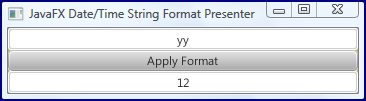
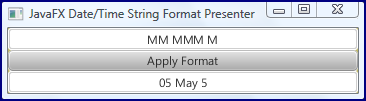
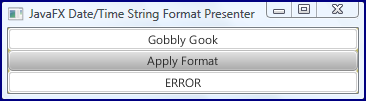
The simple JavaFX 2-based application shown above makes it easy to try out different date/time format patterns to see what SimpleDateFormat will do with each. A series of these used on the evening of Tuesday, 8 May 2012, are shown next. These examples demonstrate several key aspects of using SimpleDateFormat:

  • Uppercase 'M' is used for months while lowercase 'm' is used for minutes.
  • Number of 'M' characters represents month's representation (example: 5, 05, or 'May' for May).
  • Uppercase 'D' is for the number of the day of the year (since January 1) while lowercase 'd' is the number of the day of the month (since May 1 in this case).
  • Two 'y' or 'Y' digits represent 2-digit year, but 3 or 4 'Y' or 'y' digits can be used for a 4-digit year.

The simple example highlighted in this blog post demonstrates the simplicity of JavaFX and provides an example of how JavaFX can provide graphical interfaces to make Java applications more intuitive. As part of this, mouse event handling in JavaFX and the common JavaFX idiom of using builders are both demonstrated. A practical use of this application is to quickly and easily determine the representation that is provided by SimpleDateFormat for a given pattern.

Thứ Bảy, 5 tháng 5, 2012

Creating a NetBeans 7.1 Custom Hint

I have talked about some of my favorite NetBeans hints in the posts Seven NetBeans Hints for Modernizing Java Code and Seven Indispensable NetBeans Java Hints. The fourteen hints covered in those two posts are a small fraction of the total number of hints that NetBeans supports "out of the box." However, even greater flexibility is available to the NetBeans user because NetBeans 7.1 makes it possible to write custom hints. I look at a simple example of this in this post.

Geertjan Wielenga's post Custom Declarative Hints in NetBeans IDE 7.1 begins with coverage of NetBeans's "Inspect and Transform" (AKA "Inspect and Refactor") dialog, which is available from the "Refactor" menu (which in turn is available via the dropdown "Refactor" menu along the menu bar or via right-click in the NetBeans editor). The following screen snapshot shows how this looks.

The "Inspect" field of the "Inspect and Transform" dialog allows the NetBeans user to tailor which project or file should be inspected. The "Use" portion of the "Inspect and Transform" dialog allows that NetBeans user to specify which hints to inspect for. In this case, I am inspecting using custom hints and I can see that by clicking on the "Manage" button and selecting the "Custom" checkbox. Note that if "Custom" is not an option when you first bring this up, you probably need to click the "New" button in the bottom left corner.

When I click on "Manage" and check the "Custom" box, it expands and I can see the newly created "Inspection" hint. If I click on this name, I can rename it and do so in this case. The renamed inspection ("CurrentDateDoesNotNeedSystemCurrentMillis") is shown in the next screen snapshot.

To create the hint and provide the description seen in the box, I can click on the "Edit Script" button. Doing so leads to the small editor window shown in the next screen snapshot.

If more space is desired for editing the custom inspection/hint, the "Open in Editor" button will lead to the text being opened in the NetBeans text editor in which normal Java code and XML code is edited.

With the custom inspection/hint in place, it's time to try it out on some Java code. The following code listing uses an extraneous call to System.currentTimeMillis() and passes its result to the java.util.Date single long argument constructor. This is unnecessary because Date's no-arguments constructor will automatically instantiate an instance of Date based on the current time (time now).

RedundantSystemCurrentTimeMillis.java

package dustin.examples;

import static java.lang.System.out;
import java.util.Date;

/**
* Simple class to demonstrate NetBeans custom hint.
*
* @author Dustin
*/
public class RedundantSystemCurrentTimeMillis
{
public static void main(final String[] arguments)
{
final Date date = new Date(System.currentTimeMillis());
out.println(date);
}
}

The above code works properly, but could be more concise. When I tell NetBeans to associate my new inspection with this project in the "Inspect and Transform" dialog, NetBeans is able to flag this for me and recommend the fix. The next three screen snapshots demonstrate that NetBeans will flag the warning with the yellow light bulb icon and yellow underlining, will recommend the fix when I click on the light bulb, and implements the suggested fix when I select it.

As the above has shown, a simple custom hint allows NetBeans to identify, flag, and fix at my request the unnecessary uses of System.curentTimeMillis(). I've written before that NetBeans's hints are so handy because they do in fact do three things for the Java developer: automatically flag areas for code improvement for the developer, often automatically fix the issue if so desired, and communicate better ways of writing Java. For the last benefit in this case, the existence of this custom hint helps convey to other Java developers a little more knowledge about the Date class and a better way to instantiate it when current date/time is desired.

The most difficult aspect of using NetBeans's custom hints is finding documentation on how to use them. The best sources currently available appear to be the NetBeans 7.1 Release Notes, several Wielenga posts (Custom Declarative Hints in NetBeans IDE 7.1, Oh No Vector!, Oh No @Override! / Oh No Utilities.loadImage!), and Jan Lahoda's jackpot30 Rules Language (covers the rules language syntax used by the custom inspections/hints and shown in the simple example above). The Refactoring with Inspect and Transform in the NetBeans IDE Java Editor tutorial also includes a section on managing custom hints. Hopefully, the addressing of Bug 210023 will help out with this situation.

My example custom NetBeans hint works specifically with the Date class. An interesting and somewhat related StackOverflow thread asks if a NetBeans custom hint could be created to recommend use of Joda Time instead of Date or Calendar. A response on that thread refers to the NetBeans Java Hint Module Tutorial. Looking over that tutorial reminds me that the approach outlined in this post and available in NetBeans 7.1 is certainly improved and easier to use.

Incidentally, a hint like that asked for in the referenced StackOverflow thread is easy to write in NetBeans 7.1. There is no transform in this example because a change of the Date class to a Joda Time class would likely require more changes in the code than the simple transform could handle. This hint therefore becomes one that simply recommends changing to Joda Time. The next screen snapshots show the simple hint and how they appear in the NetBeans editor.

Each release of NetBeans seems to add more useful hints to the already large number of helpful hints that NetBeans supports. However, it is impossible for the NetBeans developers to add every hint that every team or project might want. Furthermore, it is not desirable to have every possible hint that every community member might come up with added to the IDE. For this reason, the ability to specify custom hints in NetBeans and the ability to apply those hints selectively to projects and files are both highly desirable capabilities.

Thứ Ba, 1 tháng 5, 2012

Recent Interesting Software Development Posts - 1 May 2012

This post references and very briefly summarizes several recent posts on subjects of interest to software developers such as NetBeans 7.1.2, progress on Java 8's Lambda Expressions, Guava Release 12, TestNG, Scala, and the expense of ineffective meetings.

NetBeans 7.1.2

The release of NetBeans 7.1.2 includes JDK 7 Update 4 (first version of Java SE 7 for Mac OS X).

State of the Lambda: Libraries Edition

After attending JavaOne 2011, I believe that lambda expressions are going to dramatically change how we write Java. Therefore, it is always interesting to read about progress related to Lambda expressions. In the April 2012 post State of the Lambda: Libraries Edition, Brian Goetz "describes the design approach taken in the rough prototype that has been implemented in the Lambda Project repository." He points out that this description is "intended as a working straw-man proposal" and that "the final version may look different." Another Goetz April 2012 post (Translation of Lambda Expressions) "outlines the strategy for translating lambda expressions and method references from Java source code into bytecode."

Guava Release 12

Guava Release 12 was released this week. According to the Guava Release 12 Release Notes, this is the first release of Guava that requires Java SE 6: "Guava 12.0 is the first release to require JDK6. Users requiring JDK5 compatibility may continue to use Guava 11.0.2"

TestNG Rather than JUnit

Tomek Kaczanowski has posted the slides he prepared "to persuade my colleagues to migrate from JUnit to TestNG" in his post Why TestNG and Not JUnit?

Scala or Java? Exploring Myths and Facts

The post Scala or Java? Exploring myths and facts addresses some of the alleged pros and cons of Scala articulated online. The author addresses questions about productivity, complexity, concurrency support, tooling, extensibility, interoperability, performance, and backwards compatibility.

The Expense of Ineffective Meetings

Jeffrey Scott Klubeck's post The Expense of Ineffective Meetings is not necessarily new, but it is new to me. This short post is well worth the couple of minutes to read and articulates well what many of us have felt after having a particularly useless meeting foisted upon us. I love the quote, "Patrick Lencioni, author of Death by Meeting, says that bad meetings not only exact a toll on the attendees as they suffer through them, but also cause real human anguish in the form of anger, lethargy, cynicism, and even in the form of lower self-esteem."

10 Hard Truths Developer Must Accept

In the post 10 hard truths developers must learn to accept, Peter Wayner offers ten things that are reminders that "programming offers an array of bitter pills to swallow."

SSH Tunneling Explained

Buddhika Chamith's post SSH Tunneling Explained is a detailed and illustrated overview of SSH tunneling.

Conclusion

This post has referenced a small set of other blog posts, articles, and announcements that I have found particularly interesting in recent weeks.