Thứ Bảy, 4 tháng 6, 2011

Ten Groovy One Liners to Impress Your Friends

I started working on this blog post and the associated code examples after reading the plethora of blog posts this week discussing "ten" one liners in various programming languages. It all seems to have started with Marcus Kazmierczak's 10 Scala One Liners to Impress Your Friends, which then led to (not in this order) 10 Ruby One Liners to Impress Your Friends, 10 Python one liners to impress your friends, 10 Clojure One Liners to Impress Your Friends, F# One liners to impress your friends, 10 Haskell One Liners to Impress Your Friends, 10 CoffeeScript One Liners to Impress Your Friends, and 10 C# One Liners to Impress Your Friends.

I felt that it was an unforgivable omission to not have Groovy included in the plethora of covered languages in these posts and embarked on writing my own examples. It was only after I finished the first eight that I realized that Arturo Herrero had already addressed this glaring omission in the post 10 Groovy One Liners to Impress Your Friends. Because I had already done most of the work on my own post, I have decided to include my example and this post anyway. It is interesting to see how many things I did the same way, but there are some minor differences in some of the one-liners. I did not re-invent #9, #10, and the bonus #11 after I realized the existence of this other post. I have included the same approaches for those last three in my example here for completeness. Note that there is also a different take on the Scala example as well. If Scala gets two perspectives, shouldn't Groovy get two as well?

1. Multiply Each List Item by Two

Groovy's GDK's Collection.collect(Closure) makes this a breeze.

(1..10).collect{it * 2}

2. Summing List of Numbers

Just when you thought it couldn't get any easier...

The GDK's Collection.sum() method does just that.

(1..1000).sum()

3. Verifying Existence of List Item in String

This is an opportunity to show off Groovy's Collection.inject(Object, Closure).

def wordList = ["Groovy", "dynamic", "Grails", "Gradle", "scripting"]
def string = "This is an example blog talking about Groovy and Gradle."
wordList.inject(false){ acc, value -> acc || string.contains(value)}

4. Reading A File

Groovy's GDK's File makes reading a file's contents as a String or as a List of Strings easier than falling off a log.

new File("data.txt").text
new File("data.txt").readLines()

5. Happy Birthday to You

This one-liner prints the first verse (and only verse for most of us!) "Happy Birthday" song based on a provided parameter named 'name.'

(1..4).collect{"Happy Birthday " + ((it == 3) ? "dear ${name}" : 'to You')}.each{line -> println line}

6. Filter List of Numbers

Scala and Groovy implementations of this one liner are also covered in James Strachan's post "a groovy scala example" and the Groovy version is inspired by Guillaume Laforge's referenced Tweet (proof that one can put something of substance within 140 characters).

def (passed, failed) = [49, 58, 76, 82, 88, 90].split{it > 60}

7. Fetch/Parse an XML Web Service

def content = new XmlSlurper().parse("http://search.twitter.com/search.atom?&q=groovy")

8. Finding Minimum/Maximum in a List

It doesn't get any easier than this thanks to the apropos Groovy GDK Collection methods min() and max().

[14, 35, -7, 46, 98].min()
[14, 35, -7, 46, 98].max()

9. Parallel Processing

One of the great new features of Groovy 1.8 is the bundling of GPars 0.11 in the Groovy distribution. GPars is described as a project that "offers developers new intuitive and safe ways to handle Java or Groovy tasks concurrently, asynchronously, and distributed by utilizing the power of the Java platform and the flexibility of the Groovy language."

It was as a I was about to write an example of Groovy parallel processing using GPars that I discovered the existence of Arturo Herrero's blog post. I use a slightly adapted version of his example here. It assumes the existence of an initialized dataList and the existence of a method called processItem.

groovyx.gpars.GParsPool.withPool{def result = dataList.collectParallel{processItem(it)}}

10. Sieve of Eratosthenes

I borrowed this example from Arturo Herrero's blog post, which in turn adapted it from a comment on RJ Salicco's Groovy Prime Numbers post.

def t = 2..100
(2..Math.sqrt(t.last())).each { n -> t -= ((2*n)..(t.last())).step(n) }
println t

Bonus: FizzBuzz

The original Scala One Liners post did not have this "bonus" item, but it got introduced (CoffeeScript examples) as the dam broke and the plethora of programming language one liners posts came gushing forth. This example is based on a 2007 blog post called Using FizzBuzz to Find Developers who Grok Coding. In that Imran on Tech post, the author states an example of a FizzBuzz coding puzzle he gives to software developers in interviews:
Write a program that prints the numbers from 1 to 100. But for multiples of three print “Fizz” instead of the number and for the multiples of five print “Buzz”. For numbers which are multiples of both three and five print "FizzBuzz".

This example is unchanged from that provided in Arturo Herrero's blog post. This is arguably the "most Groovy" of all the examples here because nearly every piece of this example is Groovy goodness. It begins with Groovy-specific (meaning not available in Java) syntax for iterating from 1 through 100, uses the Groovy each to process a closure which uses the built-in println and uses Groovy's GString and placeholder syntax for good effect. In the midst of all this, a couple of ternary operators (available in Java) are thrown in for good measure and finally an Elvis operator wraps it all up.

(1..100).each{println "${it%3?'':'Fizz'}${it%5?'':'Buzz'}" ?: it }

It is arguable that the Groovy version is even more readable than the CoffeeScript versions, though that opinion is undoubtedly affected by my greater familiarity with Groovy syntax.


The Value of the One Liner Exercise

Dion Almaer has stated in an appropriately geeky way that "the 'best' programming language, doesn’t mean the one that creates the lowest wc -l." However, in the same post, he also points out that "languages such as Ruby [and] Groovy ... allow me to get closer to the zen of 'expressing everything I want, and need to get across... but not more'. Every operator/method tells me a lot."

I believe that the examples in this post and in the other "One Liners" posts provide examples and the good and the bad of one liners. Some of the examples here (such as getting the minimum and maximum from a collection, getting a file's contents, and summing a collection's elements) are concise and highly readable at the same time. Most large scale software project cannot afford the unmaintainable and unreadable code that can come from cramming a bunch of functionality into a single line via archaic representations. However, a language with a carefully crafted syntax can, as some of these examples show, allow for concise and highly readable expression. It's really advantageous when one can get readability and conciseness.

I found personal benefit from writing these examples and writing this post. For one, I was happy to realize that I'm definitely far more comfortable with Groovy and Groovy-isms than I was when I first started using Groovy. A second benefit of this exercise was exposure to new Groovy concepts. Before writing these examples, I had never used the Collection.collect(Closure) or Collection.inject(Object, Closure) methods. In trying to figure out how to implement these one liners, I also was reminded how nice the GDK API documentation is because I was able to figure out Groovy equivalents using that documentation. It was a nice challenge to work out some Groovy solutions in as concise a manner as possible and that challenge made this exercise even more useful.

A final advantage of true Groovy one liners is the ability to employ such one liners with the Groovy launcher's -e option. I have blogged about this groovy -e feature in previous posts including jrunscript and Groovy.


Can These Examples Be Even Groovier?

Although Arturo Herrero's blog post and my blog post provide Groovy implementations of these 10+1 one liners, it is likely that Groovy developers out there can make some of these examples even Groovier. If you can, please pass along those improvements via comment on this blog, via your own blog, or via Tweet. Many of the one liners posts for the other languages had community feedback on ways to improve or at least provide an alternative to the original authors' ideas.


Other Groovy One Liners

I'm not going to do it here because this post is already sufficiently lengthy, but I think an interesting idea for a future post (or for someone else to post) is another "set" of one liner implementations written in Groovy. For example, I'm a big fan of this one liner in Groovy for printing out the available TimeZones for a particular JVM implementation.

TimeZone.getAvailableIDs().sort().each{println it}

An example of running this using the Groovy native launcher and its -e option is shown next.


Conclusion

Thanks to Marcus Kazmierczak for starting off this multi-language coverage of one liners. It has made for interesting reads of others' posts and how those languages are similar and different in resolving the same issues. It has also led to a very insightful activity in implementing Groovy equivalents of these one liners. This exercise has been a reminder of the concise expressiveness of the Groovy language (the "in" crowd calls it "fluency"). Groovy is certainly a fluent language.

Thứ Năm, 2 tháng 6, 2011

jrunscript and Groovy

There are numerous tools provided with Oracle's HotSpot JDK that Java developers use everyday when they use the Java compiler ('javac'), the Java launcher ('java'), or the Java Archive Tool ('jar'). Because of its frequent use, the JDK installation's ($JAVA_HOME or %JAVA_HOME%) bin directory is typically on the Java developer's PATH. The implication of this is that many more useful tools that come with Oracle's JDK distribution are also available on the path. I have blogged about some of these tools including jvisualvm, jconsole, jps, serialver, rmiregistry, xjc, schemagen, jinfo, and jhat and jmap. In this post I cover a tool in this directory that I've not covered before: jrunscript.

The jrunscript tool is a "command line script shell" that is described on its JDK 7 tools page as "a command line script shell" that "supports both an interactive (read-eval-print) mode and a batch (-f option) mode of script execution." The page adds further description:
This is a scripting language independent shell. By default, JavaScript is the language used, but the -l option can be used to specify a different language. Through Java to scripting language communication, jrunscript supports "exploratory programming" style.

As is the case with many tools in the JDK bin directory, this tool comes with this caveat: "NOTE: This tool is experimental and may not be available in future versions of the JDK." That being stated, it has been available in both Java SE 6 and so far in Java SE 7 JDK distributions from Sun/Oracle.

The usage for jrunscript can be seen by simply typing jrunscript -help at the command prompt. The next screen snapshot demonstrates this after first showing the current version of Java and Groovy involved. Although these are fairly current versions of both languages, slightly older versions of each (Java SE 6 for example) can be used for most of my examples.


The usage of jrunscript is fairly straightforward as its usage indicates. Using the -q option instructs jrunscript to report which scripting engines are available. The default available script engine is Rhino JavaScript as is shown in the next screen snapshot.


JavaScript is not the only supported scripting language for jrunscript. In the remainder of this post, I will demonstrate use of Groovy as the scripting language used in conjunction with jrunscript.

To run a scripting language other than the out-of-the-box-provided Rhino with jrunscript, a JSR 223-compliant script engine JAR is typically needed as described in JSR-223 script engine for the Java language. Fortunately, in the case of Groovy 1.6 or later, this JSR 223 engine is built into the language.

When I place the appropriate Groovy JAR files (groovy-1.8.0.jar and asm-3.2.jar) on the classpath provided to jrunscript and pass it the -q option ("List all scripting engines available and exit") to determine which languages are supported, it now tells me that Groovy is supported in addition to the default Rhino JavaScript. This can be seen in the next screen snapshot.


Even with the applicable Groovy JAR files on the classpath, the default scripting language that jrunscript uses is JavaScript unless a different language is specified with the -l option. The next screen snapshot demonstrates this is the case.


I've gotten this far with only needing to specify two Groovy JARs on the classpath when running jrunscript. However, if I do too many operations, other JARs will be needed or else I'll see a NoClassDefFoundError.

The next screen snapshot shows invocation of jrunscript with three Groovy JARs. More than showing the use of the JARs, the output also demonstrates using jrunscript interactively to get calculate a sum, to get the current date/time via the Date class, and to get the current date/time via Calendar.getInstance(). This demonstrates the ability to interactively perform simple Groovy statements and thus do some "exploratory learning."


The above output was generated from using jrunscript with Groovy interactively. Groovy code can also be written to a file and executed via jrunscript. For example, the file groovyScript.groovy can be created as shown next.

groovyScript.groovy
def sum = 12 + 13 + 14
def date = new Date()
def calendar = Calendar.getInstance()
println "Sum: ${sum}"
println "Date: ${date}"
println "Calendar: ${calendar}"

The above file can be executed via jrunscript as shown in the next screen snapshot. Note that the -l option is specified to instruct jrunscript that the code in the file is Groovy.


The advantage of running jrunscript against a script file with Groovy code is that variables defined earlier in the script are still available in later statements.

The jrunscript tool also supports a -e option that allows script code to be passed inline to the tool. The next screen snapshot demonstrates doing just this with the -l option again specifying Groovy as the language and the -e option passing in the script to run. The partial output from running this is included in the screen snapshot.


I have demonstrated in this blog post how to use jrunscript to run Groovy code. In particular, I've shown using Groovy interactively via jrunscript, passing a Groovy script in a single string to jrunscript, and executing jrunscript against a file with Groovy script code. These options all work, but the truth is that they're really more valuable for a non-JVM scripting language like JavaScript than they are for a JVM-based scripting language like Groovy. The difference is that Groovy is already very Java-friendly and has virtually seamless integration with Java. Indeed, there are easier and arguably better ways to run Groovy code from the command line than using jrunscript. I cover these briefly now.

If I want to run Groovy code in a file, the obvious choice is to simply use the 'groovy' launcher and run the script. I have demonstrated this in many Groovy posts on this blog. This same groovy launcher also supports a -e option just like jrunscript does. The advantage of the Groovy launcher approach over use of jrunscript in both cases is a much simpler explicit classpath specification. More information on Groovy from the command line can be found in the Groovy User Guide's Groovy CLI page.

The native groovy launcher more than adequately covers jrunscript's ability to allow Groovy code in a file to be executed or Groovy code in a String to be executed in a single command. To match (and exceed) jrunscript's interactive functionality when using Groovy, the obvious choice is Groovy shell. I have covered Groovy Shell in a previous blog post. It is simple to use and is shown in the next screen snapshot.


Conclusion

For non-JVM scripting languages that provide a JSR 223 compliant scripting engine, jrunscript can be a valuable tool. In the case of Groovy, I cannot think of a good reason to pick jrunscript with Groovy over simply using the Groovy native launcher (groovy) and Groovy Shell (groovysh) directly. This might be the reason that there are not many online resources talking about using Groovy with jrunscript. For more details on use of jrunscript with scripting languages other than Groovy, see Use jrunscript to execute JavaScript scripts and Using jrunscript to create a build script.

Thứ Ba, 31 tháng 5, 2011

Groovy 1.8's @Canonical Transformation: Great Functionality, Less Code

The final example in my blog post Groovy 1.8 Transformations: @ToString, @EqualsAndHashCode, and @TupleConstructor demonstrated using the @ToString, @EqualsAndHashCode, and @TupleConstructor annotation-signified transformations on a single Groovy class. Although using the three of these together does work as shown in that post, Groovy 1.8 provides an ever easier approach for specifying all three. In this post, I look at using the @Canonical annotation-based AST transformation to have these methods all generated implicitly.

To demonstrate @Canonical, I begin by reproducing the aforementioned example that specified the three annotations separately. The Groovy class used then was called TheWholePerson and is shown in the next code listing.

TheWholePerson.groovy
@groovy.transform.TupleConstructor
@groovy.transform.EqualsAndHashCode
@groovy.transform.ToString(includeNames = true, includeFields=true)
class TheWholePerson
{
String lastName
String firstName
}

The above can be simplified by replacing the three specific annotations with the @Canonical annotation. This is shown in the next code listing.

CanonicalPerson.groovy
@groovy.transform.Canonical
class CanonicalPerson
{
String lastName
String firstName
}

There's not much code in the CanonicalPerson.groovy code listing, but there is more there than meet's the eye. For convenience, I next reproduce the test driving code listing I used in my previous post with added functionality to demonstrate CanonicalPerson in action.

demonstrateCommonMethodsAnnotationsWithCanonical.groovy
#!/usr/bin/env groovy
// demonstrateCommonMethodsAnnotationsWithCanonical.groovy

def person = new Person(lastName: 'Rubble', firstName: 'Barney')
def person2 = new Person(lastName: 'Rubble', firstName: 'Barney')
def personToString = new PersonToString(lastName: 'Rockford', firstName: 'Jim')
def personEqualsHashCode = new PersonEqualsHashCode(lastName: 'White', firstName: 'Barry')
def personEqualsHashCode2 = new PersonEqualsHashCode(lastName: 'White', firstName: 'Barry')

// Demonstrate value of @ToString
printHeader("@ToString Demonstrated")
println "Person with no special transformations: ${person}"
println "Person with @ToString transformation: ${personToString}"

// Demonstrate value of @EqualsAndHashCode
printHeader("@EqualsAndHashCode Demonstrated")
println "${person} ${person == person2 ? 'IS' : 'is NOT'} same as ${person2}."
println "${personEqualsHashCode} ${personEqualsHashCode == personEqualsHashCode2 ? 'IS' : 'is NOT'} same as ${personEqualsHashCode2}."

// Demonstrate value of @TupleConstructor
printHeader("@TupleConstructor Demonstrated")
def personTupleConstructor = new PersonTupleConstructor('Whyte', 'Willard')
println "Tuple Constructor #1: ${personTupleConstructor.firstName} ${personTupleConstructor.lastName}"
def personTupleConstructor2 = new PersonTupleConstructor('Prince') // first name will be null
println "Tuple Constructor #2: ${personTupleConstructor2.firstName} ${personTupleConstructor2.lastName}"

// Combine all of it!
printHeader("Bringing It All Together")
def wholePerson1 = new TheWholePerson('Blofeld', 'Ernst')
def wholePerson2 = new TheWholePerson('Blofeld', 'Ernst')
println "${wholePerson1} ${wholePerson1 == wholePerson2 ? 'IS' : 'is NOT'} same as ${wholePerson2}."

// Simplify the combination!
printHeader("Simplified via Canonical")
def canonicalPerson1 = new CanonicalPerson('Goldfinger', 'Auric');
def canonicalPerson2 = new CanonicalPerson('Goldfinger', 'Auric');
println "${canonicalPerson1} ${canonicalPerson1 == canonicalPerson2 ? 'IS' : 'is NOT'} same as ${canonicalPerson2}."

/**
* Print a header using provided String as header title.
*
* @param headerText Text to be included in header.
*/
def printHeader(String headerText)
{
println "\n${'='.multiply(75)}"
println "= ${headerText}"
println "=".multiply(75)
}

The output from running the above script is shown next. One important observation to make from this output is that the @Canonical does indeed provide implicit toString() support as well as implicit equals support. A second observation is that the output does not return name/value pairs like the example specifying the three annotation separately did for the toString() representation.


The output from using @Canonical uses default settings for toString() output. To override these settings, the @ToString annotation should be applied in conjunction with the @Canonical annotation as shown in the next version of the Groovy model class shown previously, this time called CanonicalToStringPerson.groovy.

CanonicalToStringPerson.groovy
@groovy.transform.Canonical
@groovy.transform.ToString(includeNames = true, includeFields=true)
class CanonicalToStringPerson
{
String lastName
String firstName
}

In the above code listing, the same line with @groovy.transform.ToString(includeNames = true, includeFields=true) that led to the Groovy class TheWholePerson's toString() returning field name/value pairs is added to the class using the @Canonical annotation. This allows for customization of the @ToString representation. When I add some lines of code to the test driving Groovy script shown above with new output indicates that name/value pairs are listed for the fields in the toString() representation.


There is an obvious benefit to using @Canonical if the "vanilla" versions of the three transformations it represents (ToString, EqualsAndHashCode, and TupleConstructor) are sufficient. However, once it must be overridden with one or more individual annotations for customization, it might be preferable to simply specify the individual annotations.

There are several other references for additional reading and/or different perspectives on @Canonical. The Groovy 1.8 release notes reference John Prystash's blog post Groovy 1.8: Playing with the new @Canonical Transformation. Another useful reference is mrhaki's Groovy Goodness: Canonical Annotation to Create Mutable Class.

The @Immutable AST transformation has been available since Groovy 1.6 and is preferable to @Canonical when the state of the Groovy object should not change after instantiation. The advantage of @Canonical exists when the class state does need to be modified after its original instantiation, but the developer wishes to have much of the boilerplate code automatically generated.

Javap Proves What @Canonical Adds

Although my test code listed above shows the value of @Canonical, perhaps the best way to see what it adds to a normal Groovy class is to look at the javap output of a Groovy class without any annotations and to compare that to the javap output of a Groovy class employing the @Canonical annotation. For the "control" Groovy class that doesn't use any of these annotations, I again borrow from my previous post and that class (Person.groovy) is reproduced here.

Person.java
class Person
{
String lastName
String firstName
}

The javap output for the simple Person class looks like this:

javap Output for Person Class Class
Compiled from "Person.groovy"
public class Person extends java.lang.Object implements groovy.lang.GroovyObject {
public static transient boolean __$stMC;
public static long __timeStamp;
public static long __timeStamp__239_neverHappen1306808397612;
public Person();
public java.lang.Object this$dist$invoke$1(java.lang.String, java.lang.Object);
public void this$dist$set$1(java.lang.String, java.lang.Object);
public java.lang.Object this$dist$get$1(java.lang.String);
protected groovy.lang.MetaClass $getStaticMetaClass();
public groovy.lang.MetaClass getMetaClass();
public void setMetaClass(groovy.lang.MetaClass);
public java.lang.Object invokeMethod(java.lang.String, java.lang.Object);
public java.lang.Object getProperty(java.lang.String);
public void setProperty(java.lang.String, java.lang.Object);
public static void __$swapInit();
static {};
public java.lang.String getLastName();
public void setLastName(java.lang.String);
public java.lang.String getFirstName();
public void setFirstName(java.lang.String);
public void super$1$wait();
public java.lang.String super$1$toString();
public void super$1$wait(long);
public void super$1$wait(long, int);
public void super$1$notify();
public void super$1$notifyAll();
public java.lang.Class super$1$getClass();
public java.lang.Object super$1$clone();
public boolean super$1$equals(java.lang.Object);
public int super$1$hashCode();
public void super$1$finalize();
static java.lang.Class class$(java.lang.String);
}

The Person class has "get" and "set" methods for its fields because Groovy provides these out-of-the-box for its property support. Although we see that it has hashCode() and equals(Object) implementations from its parent class, it does not have any of its own. Now, we can contrast this output against the javap output for the class with the @Canonical annotation.

javap Output for CanonicalToStringPerson
Compiled from "CanonicalToStringPerson.groovy"
public class CanonicalToStringPerson extends java.lang.Object implements groovy.lang.GroovyObject {
public static transient boolean __$stMC;
public static long __timeStamp;
public static long __timeStamp__239_neverHappen1306808397590;
public CanonicalToStringPerson(java.lang.String, java.lang.String);
public CanonicalToStringPerson(java.lang.String);
public CanonicalToStringPerson();
public int hashCode();
public boolean equals(java.lang.Object);
public java.lang.String toString();
public java.lang.Object this$dist$invoke$1(java.lang.String, java.lang.Object);
public void this$dist$set$1(java.lang.String, java.lang.Object);
public java.lang.Object this$dist$get$1(java.lang.String);
protected groovy.lang.MetaClass $getStaticMetaClass();
public groovy.lang.MetaClass getMetaClass();
public void setMetaClass(groovy.lang.MetaClass);
public java.lang.Object invokeMethod(java.lang.String, java.lang.Object);
public java.lang.Object getProperty(java.lang.String);
public void setProperty(java.lang.String, java.lang.Object);
public static void __$swapInit();
static {};
public java.lang.String getLastName();
public void setLastName(java.lang.String);
public java.lang.String getFirstName();
public void setFirstName(java.lang.String);
public void super$1$wait();
public java.lang.String super$1$toString();
public void super$1$wait(long);
public void super$1$wait(long, int);
public void super$1$notify();
public void super$1$notifyAll();
public java.lang.Class super$1$getClass();
public java.lang.Object super$1$clone();
public boolean super$1$equals(java.lang.Object);
public int super$1$hashCode();
public void super$1$finalize();
static java.lang.Class class$(java.lang.String);
}

In the above javap output, we can see that the expected parameterized constructor provided by @TupleConstructor is available as are the equals(Object), hashCode(), and toString() methods. The @Canonical annotation and its associated AST transformation did its job.


Conclusion

The introduction of @Canonical in Groovy 1.8 continues Groovy's theme of simplifying coding and providing for concise syntax with little unnecessary verbosity. Wikipedia's primary definition of "canonical" seems to fit the use of the newly available @Canonical: "reduced to the simplest and most significant form possible without loss of generality." The @Canonical annotation and underlying AST do indeed make the Groovy data class nearly as simple as possible while maintaining the canonical functionality associated with such data classes.

Thứ Hai, 30 tháng 5, 2011

Visible Script Variables: Using Groovy 1.8's @Field AST

My most common use of Groovy is for writing scripts. As such, I enjoy its characteristics that enable an improved script development experience, but I also notice features of Groovy that are less than desirable for writing scripts. One of the minor annoyances of Groovy script writing has been the inability to have defined script variables visible to methods defined in the script. The current version of the Groovy User Guide define these rules in the Scoping and the Semantics of "def" section. This section explains the problem:
When you define a variable in a script it is always local. But methods are not part of that scope. So defining a method using different variables as if they were attributes and then defining these variables normally in the script leads to problems.

The problem is that locally declared (in the script) variables are not visible to methods defined in that same script. The Groovy 1.8 Release notes describes the problem in a slightly different way: "When defining variables in a script, those variables are actually local to the script's run method, so they are not accessible from other methods of the script."

Before Groovy 1.8, the standard tactic we Groovy script developers used to deal with this situation was to not define the local variables with the def keyword or with a static type declaration. In other words, the approach has always been to declare script variables with no def or static typing. This effectively places the undefined script local variable into "the binding," which the script's methods do have access to. The Scoping and the Semantics of "def" section of the Groovy User Guide puts it this way (emphasis present in source):
When is something in the Binding and when not? That's easy. When it is not defined, it is in the binding. The trick is - and that is admittedly not easy for Java programers - to not to define the variable before using it, and it will go into the binding. Any defined variable is local. Please note: the binding exists only for scripts.

The following Groovy code listing demonstrates this issue. The script defines three variables at the script level, one without 'def' or explicit type (will be in binding), one with 'def', and one with explicit type. All three local variables are used in respective methods without passing the argument to the method using it. Only the variable in the binding will work properly and the other two lead to MissingPropertyExceptions.

demoScriptVarDefinitionsWithoutFieldAst.groovy
#!/usr/bin/env groovy
// demoScriptVarDefinitionsWithoutFieldAst.groovy

/**
* This variable is a binding variable because it lacks 'def' or type. It is
* therefore visible to methods of this script.
*/
SPEED_OF_LIGHT_M_PER_S = 299792458 // visible to script methods

/**
* This variable is a local variable because it is defined with 'def'. It would
* have similarly been considered a local variable had it been explicitly
* and statically typed to Double or BigDecimal. As a local variable, it is NOT
* visible to methods defined on this script.
*/
def SPEED_OF_SOUND_M_PER_S = 340.29 // NOT visible to script methods

/**
* This variable is a local variable because it is explicitly typed. As a local
* variable, it is NOT visible to methods defined on this script.
*/
Integer AVG_RADIUS_OF_EARTH_KM = 6371 // NOT visible to script methods

useSpeedOfLight()
useSpeedOfSound()
useRadiusOfEarth()


/** Print the speed of light. */
def useSpeedOfLight()
{
println "The speed of light is ${SPEED_OF_LIGHT_M_PER_S} m/s."
}

/** Print the speed of sound. */
def useSpeedOfSound()
{
println "The speed of sound is ${SPEED_OF_SOUND_M_PER_S} m/s."
}

/** Print the average radius of the Earth. */
def useRadiusOfEarth()
{
println "The average radius of the earth is ${AVG_RADIUS_OF_EARTH_KM} km."
}

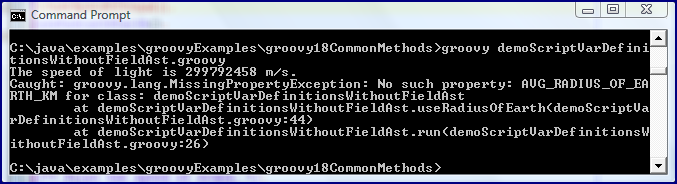
When the code above is run via Groovy as-is, the local variable for speed of sound (which is local because it was defined with 'def') will be the first to break the script's execution. This is shown in the next screen snapshot.


When I comment out the single line that calls the useSpeedOfSound() method, the exception just shown is not encountered, but a similar one for another local script variable (which is local because it was defined with a static type) will be thrown. That is shown in the next screen snapshot.


If I comment out the call to the useRadiusOfEarth() method, the script runs fine, but I don't see either of the two constants printed out. This is shown in the next screen snapshot.


With the above in mind, the obvious solution and commonly used approach up to now has been to simply remove the def keyword and to remove the explicit static type definition so that all local script variables are in the binding. Fortunately, Groovy 1.8 provides a better alternative. The Groovy 1.8 release notes state:
Fortunately, the @Field transformation provides a better alternative: by annotating your variables in your script with this annotation, the annotated variable will become a private field of the script class.

The next code listing shows the previous script adapted to use this new Groovy 1.8 @Field annotation and the AST behind it.

demoScriptVarDefinitionsWithFieldAst.groovy
#!/usr/bin/env groovy
// demoScriptVarDefinitionsWithFieldAst.groovy

import groovy.transform.Field

/**
* @Field makes this visible to script's methods.
*/
@Field SPEED_OF_LIGHT_M_PER_S = 299792458 // visible to script's methods

/**
* @Field makes this visible to script's methods.
*/
@Field def SPEED_OF_SOUND_M_PER_S = 340.29 // visible to script's methods

/**
* @Field makes this visible to script's methods.
*/
@Field Integer AVG_RADIUS_OF_EARTH_KM = 6371 // visible to script's methods

useSpeedOfLight()
useSpeedOfSound()
useRadiusOfEarth()


/** Print the speed of light. */
def useSpeedOfLight()
{
println "The speed of light is ${SPEED_OF_LIGHT_M_PER_S} m/s."
}

/** Print the speed of sound. */
def useSpeedOfSound()
{
println "The speed of sound is ${SPEED_OF_SOUND_M_PER_S} m/s."
}

/** Print the average radius of the Earth. */
def useRadiusOfEarth()
{
println "The average radius of the earth is ${AVG_RADIUS_OF_EARTH_KM} km."
}

This works beautifully as shown in the next screen snapshot.


Conclusion

The @Field annotation and associated AST don't offer anything for non-script Groovy software, but it is a much appreciated addition for the writing of scripts in Groovy 1.8.

Java Exploits Biggest Threat to PCs?

Gregg Keizer's ComputerWorld article New malware scanner finds 5% of Windows PCs infected includes the subtitle: "Java exploits remain biggest threat to PCs, says Microsoft." The part of the article that talked about freely available (for PCs with "Genuine Windows" installed) Microsoft products Microsoft Safety Scanner and Microsoft Security Essentials prompted me to run Microsoft Safety Scanner against my primary laptop. I am pleased to report I am part of the 95% without the issues discussed in this article. However, the other part of the article that interested me and is the subject of this blog post is the high number of Microsoft-identified exploits associated with Java.

The Keizer article references the blog post Microsoft Safety Scanner detects exploits du jour, which is the source of most of the information I discuss in this post. The Microsoft Malware Protection Center (MMPC) blog post by Scott Wu and Joe Faulhaber discusses the statistics gathered from the initial week following the release of Microsoft Safety Scanner earlier this month. They report that there were nearly 420,000 downloads of Microsoft Safety Scanner in that first week and nearly 20,100 computers needed to be cleaned. Here is the big news from a Java perspective: seven of the top ten exploits that Microsoft Safety Scanner identified in that first were were Java-related (including the all of the top four).

The Microsoft Safety Scanner detects exploits du jour post provides a table listing the top ten encountered threats with a "threat name," threat count, machine count, and a "note." Seven of the ten threats have "Java Exploit" as their note. The New malware scanner finds 5% of Windows PCs infected article does a nice job of associating these threats with previous Microsoft Malware Protection Center statements regarding Java and Windows security. Many of these previous statements were made in Holly Stewart's October 2010 MMPC blog post Have you checked the Java?

The Holly Stewart post postulates some possible reasons for Java being associated with so many Windows security issues, particularly in the United States. She states:
Java is ubiquitous, and, as was once true with browsers and document readers like Adobe Acrobat, people don't think to update it. On top of that, Java is a technology that runs in the background to make more visible components work. How do you know if you have Java installed or if it's running?

I now look at some of the exploits seen in the first week of Microsoft Safety Scanner's deployment that are Java-related.

CVE-2008-5353

The most frequently seen threat (in terms of threat count and fourth in terms of machines involved) in this first week of Microsoft Safety Scanner deployment was CVE-2008-5353, which Microsoft rates as Severe. Java/CVE-2008-5353 is resolved with Java SE 6 Update 11 (Sun Alert ID 244991). This issue has to deal with improper deserialization (a more general issue most commonly blamed on the much maligned Calendar class).

CVE-2010-0840

Threat CVE-2010-0840 was the second most seen threat (and was also on the second most machines). Sami Koivu provides a detailed overview of this vulnerability in Java Trusted Method Chaining (CVE-2010-0840/ZDI-10-056). The vulnerability is addressed in Java SE 6 Update 19 or through the March 2010 Patch Update.

CVE-2010-0094

The third most commonly seen threat in the first week of Microsoft Safety Scanner's deployment was CVE-2010-0094 (fifth in terms of number of machines involved). This was addressed in the March 2010 Patch Update and was resolved in the standard SDK distribution as of Java SE 6 Update 19. This little baddie is another one related to deserialization (specifically "deserialization of RMIConnectionImpl objects").

OpenConnection

Second highest by machine count and fourth highest by threat count, the OpenConnection family of threats. The OpenConnection.MW threat appears to be a particular "malicious Java applet trojan that exploits a vulnerability described in CVE-2010-0840" (quote source) and, as such, is addressed by Java SE 6 Update 19.

CVE-2009-3867

CVE-2009-3867 was the sixth most frequently seen threat both in terms of threat count and in terms of machine count. This threat is described as "A stack-based buffer overflow occurs when processing long 'file://' URL arguments in the 'HsbParser.getSoundBank()' function" and is addressed in Java SE 6 Update 17.

Mesdeh

Mesdeh is a data file intended to exploit the previously discussed CVE-2010-0094 vulnerability and, as such, is foiled by updating to at least Java SE 6 Update 19. This was ninth of the ten discovered exploits in terms of threat count as well as in terms of machine count.

OpenStream

The final Java-related exploit of the top ten exploits discovered in the first week of deployment of Microsoft Safety Scanner is named OpenStream and is a Java applet Trojan downloader (Trojan horse). It can be invoked on any web browser that runs Java, but is harmless to non-Windows operating systems because the file it downloads is a Windows-specific EXE file. Because it involves a signed JAR, the user must accept it to allow it to have its way with their machine. Just as it is said that the people of Troy allowed a horse full of Greeks in and just as it is said that people must let Vampires in, so too the user must let this baddie in.

Patching of Exploits Not Limited to Java SE 6

All of the above exploits are resolved in current versions of Java SE 6. Current versions of J2SE 5 tend to address these as well, but I focused on Java SE 6 in this post.


Java Vulnerabilities

I discussed Java-related vulnerabilities briefly in my earlier post Recent Posts of Significant Interest (Java Security, XML, Cloud Computing). In that post, I referenced the article RSA: Java is the Most Vulnerable Browser Plug-in. That article reported that RSA found the Java plug-in to be the most vulnerable to exploitation followed by Adobe Reader, Apple QuickTime, and Adobe Flash. The article also cited another article that reports that "Cisco said that Java vulnerabilities are now more exploited than those in Adobe Acrobat and Reader."


Conclusion

It appears that Java indeed is or has been related to many Windows exploits. The good news for end users is that it's generally fairly easy and doesn't take a lot of time to upload the latest JRE. Best of all, my PCs are set up so that I'm automatically reminded to perform these updates and thus don't risk "forgetting" to do so. One could probably download hundreds of JRE updates in the time it takes to download and install one iTunes update.

Thứ Bảy, 28 tháng 5, 2011

File System Management with PHP

I blogged previously on using PHP on the command line, but I did not cover using PHP to access the file system in that post in the interest of blog post size. I use this post to cover some of the basics of PHP file system management.

Many of us who write and use scripts do so for functions related to the file system. We script actions we commonly perform in the file system. Specifically, we often find ourselves needing to copy files, rename files, remove files, and open and close files. We often need to perform certain logic based on certain characteristics of files and directories. It'd be difficult to seriously consider a language as a scripting language without decent file system support. Fortunately, PHP has built-in support for file system management. This support can be used in conjunction with command line PHP.

W3Schools.com is a proven valuable resource for learning about web technologies and their coverage of PHP Filesystem Functions is another example of that. The page reminds us that the PHP filesystem functions "are part of the PHP core" and "allow you to access and manipulate the filesystem." More importantly, this page also summarizes PHP file system configuration details, PHP file system functions, and PHP file system constants. Clicking on a function name leads to a page with more details on that function as well as a PHP code example using that function. Because I'll only cover a subset of these in this post, I wanted to make sure to reference this W3Schools page early.

The following script, demoPhpFileSystemManagement.php, demonstrates several of PHP's functions for determining file information. I list the whole script here and then reproduce portions of the script again as I discuss them.

demoPhpFileSystemManagement.php
#!/usr/bin/php
<?php
//
// demoPhpFileSystemManagement.php
//

do
{
echo "\nWhich PHP File System Operation Do You Want To Run?\n\n";
echo "1. Parse File Path Information\n";
echo "2. Acquire an Absolute Path\n";
echo "3. Get File Size\n";
echo "4. Get Disk Size and Free Space\n";
echo "5. Get File Times\n";
echo "\nEnter 0 to Exit\n";
echo "\n\nYour Choice: ";
$selection = trim(fgets(STDIN));
}
while (!( ($selection == "0") || ($selection == "1") || ($selection == "2")
|| ($selection == "3") || ($selection == "4") || ($selection == "5")));


switch ($selection)
{
case "1":
echo "Enter a file path: ";
$filePath = trim(fgets(STDIN));
$filePathInfo = parseFilePath($filePath);
echo $filePathInfo;
break;
case "2":
echo "Enter path: ";
$filePath = trim(fgets(STDIN));
$realPath = convertPathToAbsolute($filePath);
echo $realPath;
break;
case "3":
echo "Enter path and name of file: ";
$filePath = trim(fgets(STDIN));
$sizeOfFile = getSizeOfFile($filePath);
echo "File ".$filePath." has a size of ".$sizeOfFile." bytes.";
break;
case "4":
echo "Enter disk label: ";
$diskLabel = trim(fgets(STDIN));
$diskSpace = getDiskSizeAndFreeSpace($diskLabel);
$percentageFree = $diskSpace[1] / $diskSpace[0];
echo "Disk ".$diskLabel." has ".$diskSpace[1]." of ".$diskSpace[0]
." bytes free (".round($percentageFree*100)."%).";
break;
case "5":
echo "Enter a file who access/changed/modified times are desired: ";
$filePath = trim(fgets(STDIN));
$fileTimes = getFileTimes($filePath);
echo "File ".$filePath." was last accessed on ".$fileTimes[0]
.", was last changed on ".$fileTimes[1]
.", and was last modified on ".$fileTimes[2];
break;
case "0":
default:
echo "\n\n";
exit();
}


/**
* Parse the provided file path. Demonstrates the following PHP functions:
*
* - basename() : Provides base portion of file path (file name).
* - dirname() : Directory name portion of file path.
* - pathinfo() : All components of path (basename, directory name, extension).
*
* @param $filePath File path to be parsed.
* @return File path information in a single String.
*/
function parseFilePath($filePath)
{
echo "Parsing file path ...", $filePath, "\n";
$fileBaseName = basename($filePath);
$fileDirectoryName = dirname($filePath);
$pathInfo = pathinfo($filePath);
return "File Name: ".$fileBaseName."\nDirectory Name: ".$fileDirectoryName
."\nFileName: ".$pathInfo['basename']."\nDirectory Name: "
.$pathInfo['dirname']."\nFile Extension: ".$pathInfo['extension']
."\nFile name without extension: ".$pathInfo['filename'];
}


/**
* Convert the provided path to an absolute path.
*
* @param $filePath File path to be made absolute.
* @return Absolute version of provided file path.
*/
function convertPathToAbsolute($filePath)
{
echo "Converting file path ", $filePath, " to absolute path...\n";
return realpath($filePath);
}


/**
* Determine size of provided file.
*
* @param? $filePath Path and name of file whose size is needed.
* @return Size of file indicated by provided file path and name (in bytes).
*/
function getSizeOfFile($filePath)
{
echo "Getting size of file ", $filePath, "...\n";
return filesize($filePath);
}


/**
* Provide disk size and free space on disk for provided disk.
*
* @param $diskLabel Label of disk whose total size and free space are to be
* provided.
* @return Array of two elements, first of which is total disk space (in bytes)
* and second of which is free disk space (in bytes).
*/
function getDiskSizeAndFreeSpace($diskLabel)
{
return array(disk_total_space($diskLabel), disk_free_space($diskLabel));
}


/**
* Provide access, changed, and modified times for given file path.
*
* @param filePath Path and name of file whose times are desired.
* @return Array of three elements with first being the file's access time,
* second being the file's changed time, and third being the file's modified
* time.
*/
function getFileTimes($filePath)
{
$dateTimeFormat = "d-m-y g:i:sa";
$fileAccessTime = fileatime($filePath);
$fileChangedTime = filectime($filePath);
$fileModifiedTime = filemtime($filePath);
return array(date($dateTimeFormat, $fileAccessTime),
date($dateTimeFormat, $fileChangedTime),
date($dateTimeFormat, $fileModifiedTime));
}
?>

Before going into more detailed coverage of the PHP file system functions used in the above example, I have observed my Java background in that PHP code. For example, I used Javadoc-style comments for the functions in the code. Fortunately, PHPDocumentor respects Javadoc-style comments when generating code documentation. The above code also demonstrates the difference of naming conventions I'm accustomed to in Java (camel case) and the naming conventions of PHP (all lowercase names with words separated by underscores) as shown by the PHP functions invoked.

The first part of the PHP script provides a simple text command-line menu that prompts the user to enter choices and file names and paths. This snippet of code does not do anything itself with the PHP file system functions, but it does demonstrate PHP standard input and output and the PHP switch statement. That first portion is reproduced here.

Command Line Menu and Input Processing
do
{
echo "\nWhich PHP File System Operation Do You Want To Run?\n\n";
echo "1. Parse File Path Information\n";
echo "2. Acquire an Absolute Path\n";
echo "3. Get File Size\n";
echo "4. Get Disk Size and Free Space\n";
echo "5. Get File Times\n";
echo "\nEnter 0 to Exit\n";
echo "\n\nYour Choice: ";
$selection = trim(fgets(STDIN));
}
while (!( ($selection == "0") || ($selection == "1") || ($selection == "2")
|| ($selection == "3") || ($selection == "4") || ($selection == "5")));


switch ($selection)
{
case "1":
echo "Enter a file path: ";
$filePath = trim(fgets(STDIN));
$filePathInfo = parseFilePath($filePath);
echo $filePathInfo;
break;
case "2":
echo "Enter path: ";
$filePath = trim(fgets(STDIN));
$realPath = convertPathToAbsolute($filePath);
echo $realPath;
break;
case "3":
echo "Enter path and name of file: ";
$filePath = trim(fgets(STDIN));
$sizeOfFile = getSizeOfFile($filePath);
echo "File ".$filePath." has a size of ".$sizeOfFile." bytes.";
break;
case "4":
echo "Enter disk label: ";
$diskLabel = trim(fgets(STDIN));
$diskSpace = getDiskSizeAndFreeSpace($diskLabel);
$percentageFree = $diskSpace[1] / $diskSpace[0];
echo "Disk ".$diskLabel." has ".$diskSpace[1]." of ".$diskSpace[0]
." bytes free (".round($percentageFree*100)."%).";
break;
case "5":
echo "Enter a file who access/changed/modified times are desired: ";
$filePath = trim(fgets(STDIN));
$fileTimes = getFileTimes($filePath);
echo "File ".$filePath." was last accessed on ".$fileTimes[0]
.", was last changed on ".$fileTimes[1]
.", and was last modified on ".$fileTimes[2];
break;
case "0":
default:
echo "\n\n";
exit();
}

The remainder of the PHP script contains functions that use and demonstrate the PHP file system management functions.

PHP provides functions for easy access to file path details such as the directory of the file, the full name of the file itself, the file's extension, and the name of the file without extension. Some of these are demonstrated in the above example in the parseFilePath function, which is reproduced next. The function shows off PHP's basename, dirname, and pathinfo functions.

PHP Provides File Path Information
/**
* Parse the provided file path. Demonstrates the following PHP functions:
*
* - basename() : Provides base portion of file path (file name).
* - dirname() : Directory name portion of file path.
* - pathinfo() : All components of path (basename, directory name, extension).
*
* @param $filePath File path to be parsed.
* @return File path information in a single String.
*/
function parseFilePath($filePath)
{
echo "Parsing file path ...", $filePath, "\n";
$fileBaseName = basename($filePath);
$fileDirectoryName = dirname($filePath);
$pathInfo = pathinfo($filePath);
return "File Name: ".$fileBaseName."\nDirectory Name: ".$fileDirectoryName
."\nFileName: ".$pathInfo['basename']."\nDirectory Name: "
.$pathInfo['dirname']."\nFile Extension: ".$pathInfo['extension']
."\nFile name without extension: ".$pathInfo['filename'];
}

The output from running the above against an example file is now shown.


PHP provide a useful realpath function that provides an absolute version of a provided path. For example, it will resolve soft links and relative directories to return the absolute path. This is demonstrated in the convertPathToAbsolute function in my example (and reproduced in the next code listing).

Demonstrating Absolute Paths via realpath
/**
* Convert the provided path to an absolute path.
*
* @param $filePath File path to be made absolute.
* @return Absolute version of provided file path.
*/
function convertPathToAbsolute($filePath)
{
echo "Converting file path ", $filePath, " to absolute path...\n";
return realpath($filePath);
}

The above portion of the script produces the following output.


PHP makes it easy to determine the size of a file with the aptly named filesize function. My getSizeOfFile function demonstrates this and is listed on its own in the next code listing.

Getting File Size in PHP
/**
* Determine size of provided file.
*
* @param? $filePath Path and name of file whose size is needed.
* @return Size of file indicated by provided file path and name (in bytes).
*/
function getSizeOfFile($filePath)
{
echo "Getting size of file ", $filePath, "...\n";
return filesize($filePath);
}

The code leads to the output shown in the next image.


PHP also makes it easy to get disk space information. PHP's disk_total_space and disk_free_space functions are demonstrated in the code listing below for my getDiskSizeAndFreeSpace function.

PHP Disk Size and Free Space
/**
* Provide disk size and free space on disk for provided disk.
*
* @param $diskLabel Label of disk whose total size and free space are to be
* provided.
* @return Array of two elements, first of which is total disk space (in bytes)
* and second of which is free disk space (in bytes).
*/
function getDiskSizeAndFreeSpace($diskLabel)
{
return array(disk_total_space($diskLabel), disk_free_space($diskLabel));
}

The above example is not only demonstrates PHP's disk_total_space and disk_free_space functions, but it also demonstrates using PHP's array function to create an array and place elements within the array in a single statement.

The output of this portion of the script is shown next.


The final function in my script is getFileTimes and its purpose is to demonstrate three PHP methods for accessing dates/times associated with files. Specifically, the fileatime, filectime, and filemtime functions are demonstrated.

PHP File Times
/**
* Provide access, changed, and modified times for given file path.
*
* @param filePath Path and name of file whose times are desired.
* @return Array of three elements with first being the file's access time,
* second being the file's changed time, and third being the file's modified
* time.
*/
function getFileTimes($filePath)
{
$dateTimeFormat = "d-m-y g:i:sa";
$fileAccessTime = fileatime($filePath);
$fileChangedTime = filectime($filePath);
$fileModifiedTime = filemtime($filePath);
return array(date($dateTimeFormat, $fileAccessTime),
date($dateTimeFormat, $fileChangedTime),
date($dateTimeFormat, $fileModifiedTime));
}

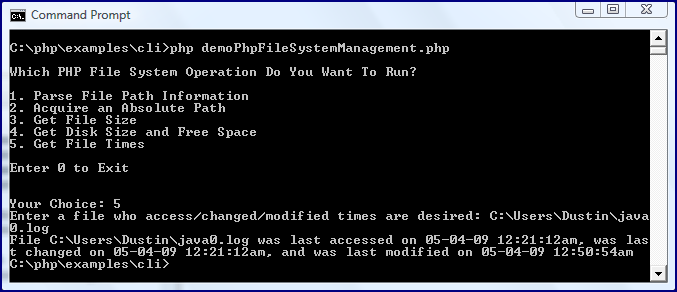
The above code demonstrates the three methods fileatime, filectime, and filemtime. One of my first questions when running across these methods was, "What is the difference between 'changed time' and 'modified time'?" The answer is available in the PHP Manual which differentiate filemtime returning the last time the contents of the file were changed versus filectime which returns the "inode change time" of the file.

The output from running the above piece of the script is shown next.


Conclusion

PHP provides an impressive set of built-in functions for determining information about files, directories, and the file system in general. These functions can be very important in different types of scripts.

JavaFX 2 Beta: Time to Reevaluate JavaFX?

JavaFX 2 beta was released earlier this week. The main JavaFX download page states the following regarding this release:
JavaFX 2.0 Beta is the latest major update release for JavaFX. Many of the new features introduced in JavaFX 2.0 Beta are incompatible with JavaFX 1.3. If you are developing a new application in JavaFX, it is recommended that you start with JavaFX 2.0 Beta.

I posted O JavaFx, What Are Thou? a year ago. Much has changed in JavaFX since then. Most notable of these changes were the JavaOne 2010 announcements related to JavaFX's direction. As I blogged about at JavaOne 2010, I thought Oracle's plans to move to a standard Java API for JavaFX to replace a separate and highly unrelated F3-based JavaFX Script language was the correct decision for any possibility of long-term and wide-spread adoption of the technology. Although a small minority of developers really like JavaFX Script, that direction did not seem to appeal to the vast majority. The good news for those who want to continue using JavaFX Script is the spawning of Visage. I was excited about Oracle's new announced direction for JavaFX, but we all knew that we needed to wait to see if Oracle would deliver.

With the announcement regarding JavaFX 2 beta, a natural question is, "Is it time to reconsider JavaFX?" My previously mentioned post O JavaFX, What Art Thou? brought up several of the issues that concerned developers considering adoption of JavaFX. Most of this post asks those questions again in light of JavaFX 2 beta.


Is JavaFX Java?

One of the questions in that post, "Is JavaFX Java?" seems to be answered somewhat (and more than before) in the affirmative. Because JavaFX 2 will support standard Java APIs, it will at least be "Java" in the sense that any third-party library like Hibernate or the Spring Framework is "Java." It still may not be Java in the sense that it's neither part of the Java SE specification or the Java EE specification.


Is JavaFX Standard?

I've seen nothing to indicate that JavaFX 2 will be any more "standard" than previous versions. As far as I can tell, JavaFX remains a product with no standard specification and only a single implementation (Oracle's). There are no specifications that others might implement.


Is JavaFX Open Source?

This is another question that probably won't be fully answered until JavaFX 2 is formally released in production version. My best guess is that it will consist of a similar mixture of licenses (some open source) as earlier versions did.


What is JavaFX's license?

This is one more question to add to the list of questions to ask again with the formal release of JavaFX 2 non-beta release. My best guess, similar to my guess regarding its open source status, is that JavaFX's licenses will remain somewhat similar to those for previous versions of JavaFX. I also expect JavaFX licensing to follow the Flex/Flash licensing model with the compiler and language tools tending to be open source and the runtime tending to be proprietary.

The Oracle Early Technology Adopter License Terms seem to apply for the beta release. The Charles Humble interview of Richard Bair in JavaFX 2.0 Will Bring Hardware Accelerated Graphics and Better Licensing Terms to the Platform includes brief mention of licensing plans. Regarding licensing of the JavaFX runtime, Bair states, "The JavaFX license is expected to be consistent with the JRE license, which allows such distribution under specific conditions."


How is JavaFX's Deployment?

Although I believe that one of the largest drawbacks of JavaFX adoption in the past was the need to learn another non-Java language in JavaFX Script, there is no question that issues with the deployment model competed for most important disadvantage of JavaFX. Max Katz has stated, "I think JavaFX failed to gain any significant momentum mainly because of deployment problems." He discussed these deployment problems in a separate post.

The crux of the problem with JavaFX deployment seemed to revolve around its applet foundation. In the previously mentioned Max Katz post, he stated:
As the mantra in real estate is: location, location, location. The mantra in JavaFX is: deployment, deployment, deployment. Unfortunately, this is where JavaFX has failed miserably. The original Java applets failed miserably in deployment and JavaFX (which was supposed to be the next applet technology or applets 2.0) has inherited the failed deployment with it. In other words, nothing has really changed since 1995.

Although the "Next Generation in Applet Java Plug-in Technology" did bring improvements to the applet deployment environment, it simply wasn't enough. Developers were widely unhappy about its performance and usability when compared to environments such as Flash, HTML/JavaScript, and Silverlight. Unfortunately, it may be too late to salvage the applet at this point.

Oracle appears to be addressing the deployment issue in JavaFX 2. In Deploying JavaFX Applications, Nancy Hildebrandt writes about "three basic types of [JavaFX] application deployment": the maligned applet, Web Start, and standalone desktop. I'm particularly excited about the non-browser deployment environments.

In her article, Hildebrandt talks about JavaFX 2 Beta Deployment Features that are specific to each deployment environment (improvements for applet/browser and Web Start environments) as well as general deployment features. I particularly like two of these general deployment features that are highly related:
  • "The same JavaFX source code works for applets, Web Start applications, and standalone desktop applications."
  • "The same JavaFX JAR file can be deployed as an applet, a Web Start application, or a standalone application."


Is It Time to Revisit JavaFX?

Since my initial significant disappointment with JavaFX since the now infamous 2007 JavaOne announcement, I have been a skeptic of JavaFX's future. Beginning with the JavaOne 2010 opening keynote announcement regarding Oracle's change of direction for JavaFX, I have begun to think that JavaFX has an outside chance at a real future in application development. Oracle does seem to be delivering on their announced plans. If they continue to do so, JavaFX is likely to be a more compelling choice than it's ever been.

My previous concerns regarding JavaFX all involved a common theme: it had nothing to really distinguish itself from a host of more mature products with wider communities and support. Because JavaFX had its own language in JavaFX Script, it really was no "easier" for a Java developer to learn than Flex/MXML/ActionScript. Flash and Silverlight are proprietary, but so is the JavaFX runtime. JavaFX was (and is) no more standards-based than any of the competitors. Flash and Silverlight have also boasted better runtime experiences than JavaFX. HTML5 is a recent entry to provide formidable competition for JavaFX.

Oracle appears to be changing JavaFX to distinguish itself better from other technologies. By allowing for standard Java APIs and for non-browser JavaFX applications, JavaFX becomes more attractive to the massive Java developer base. JavaFX will have the most difficulty competing in the browser space with Flex/Flash, Silverlight, and HTML5 already entrenching themselves there. However, I think JavaFX can find some success in the Web Start and standalone desktop environments against tools like Adobe AIR. AIR has been aimed at Flex developers who wish to developer desktop applications. JavaFX may just reintroduce the Java advantage of the same code/same JAR being able to run in the browser or on the desktop.

Because I have a lot on my plate already (starting to really use PHP for instance), I'll probably monitor others' reports of their use of JavaFX 2 beta in blog posts and other online forums. Assuming more good reports than bad, I hope to start trying JavaFX out for myself between now and JavaOne 2011 (where I expect to see heavy emphasis on JavaFX coupled with releases and other news).

Although lack of time is my biggest reason for not starting to use JavaFX 2 beta today, there are other reasons that may keep some from starting to use JavaFX 2 beta immediately. First, it is not available for all of the major operating systems platforms. The JavaFX 2.0 Beta System Requirements page states which operating systems and web browsers are currently supported. In general, the supported operating systems are 32-bit and 64-bit versions of Windows (Windows XP, Windows Vista, and Windows 7). Although Safari and Opera are not explicitly listed as supported, recent versions of the three most popular web browsers are explicitly supported: Chrome, Firefox 3.6 and Firefox 4, and Internet Explorer 8. Many of us hope, of course, that JavaFX will ultimately be available not only for other desktop machines (Linux or Mac), but will be available for mobile devices. This can be seen in the comments on Richard Bair's post Is JavaFX 2.0 Cross Platform?

The JavaFX 2.0 Beta System Requirements page also states that JDK 6 Update 24 (perhaps better known for patching a significant security hole) or later is required. In addition, it points out that 32-bit JavaFX runtime and 32-bit JDK are supported on the Windows environments, even for 64-bit Windows versions.

The JavaOne 2010 opening keynote focused largely on continued inclusion of Prism in JavaFX 2 and other desktop Java technologies. The JavaFX 2.0 Beta System Requirements page states which graphics cards are known to be support Prism. JavaFX will work without these graphics cards, but the Java 2D pipeline is used instead of Prism in such cases.


Conclusion

Oracle's JavaOne 2010 plans for JavaFX and their recent release of JavaFX 2.0 beta have piqued my curiosity. Once I have a little more time and once a few of the wrinkles commonly associated with beta software have been ironed out, I do plan to reevaluate JavaFX. This could change based on others' documented experiences, but my current plan is to start using JavaFX in the near future and to definitely be somewhat more familiar with it in time for JavaOne 2011. I also expect there to be significant news and information on JavaFX 2 at JavaOne 2011.