There have always been multiple reasons to avoid Java for writing scripts. It was not surprising that Java was not the most appropriate language for scripting because it was never intended to be a scripting language. In addition, the Write Once Run Anywhere feature of Java that was of benefit in so many cases was a disadvantage when it came to platform-specific functionality, including file input/output and file system management.
Groovy has brought many characteristics normally associated with scripting languages to the
JVM with features such as implicit compilation (seeming save and execute without explicit compilation), dynamic typing, no need for specifying classes and main functions, and elegant command line parameter handling. However, even Groovy has lacked some of the file handling niceties and power of some other scripting languages. It's not that file manipulation cannot be done with Groovy, but it has not seemed as powerful or easy to manipulate files in Groovy "natively" as it is in scripting languages like
PHP,
Perl, and especially the shell languages. The good news is that
JDK 7 introduces a
whole new file management API that is intended for Java, but of course significantly and consequentially enhances Groovy's file system handling capabilities.
Java 7 provides new NIO.2 (
JSR 203) features. A dramatic change in Java as part of this NIO.2 inclusion is the availability of a new and more powerful
Java File I/O API. In this post, I look at using some of these in Groovy to detect information about the file system and to process files. Although I am focusing on use of these new APIs within Groovy scripts, there are obviously available to standard Java as well.
In the posts
JDK 7: New Interfaces, Classes, Enums, and Methods and
Groovy Script for Comparing Javadoc Versions, I looked at using Groovy to identify Java constructs new to Java 7 documentation. To get an idea what is new from an NIO.2 perspective, I've slightly modified the script used in the latter post as shown in the next code listing.
#!/usr/bin/env groovy
// diffJdkVersionsJavadocsForNioChanges.groovy

def cli = new CliBuilder(
   usage: 'diffJdkVersionsJavadocs -o <version_number> -n <version_number>',
   header: '\nAvailable options (use -h for help):\n',
   footer: '<version_number> should be one of the following:\n3 (JDK 1.3)\n4 (JDK 1.4)\n5 (J2SE 5)\n6 (Java SE 6)\n7 (Java SE 7)')
import org.apache.commons.cli.Option
cli.with
{
   h(longOpt: 'help', 'Usage Information', required: false)
   o(longOpt: 'old', 'Old Version', args: 1, required: true, type: Integer)
   n(longOpt: 'new', 'New Version', args: 1, required: true, type: Integer)
}
def opt = cli.parse(args)

if (!opt) return
if (opt.h) cli.usage()

@Grab(group='org.ccil.cowan.tagsoup', module='tagsoup', version='0.9.7')

def versionMap = [3 : "JDK 1.3", 4 : "JDK 1.4", 5 : "J2SE 5", 6 : "Java SE 6", 7 : "Java SE 7"]

def javadocMap = [(versionMap.get(7)) : "http://download.oracle.com/javase/7/docs/api/allclasses-frame.html",
                  (versionMap.get(6)) : "http://download.oracle.com/javase/6/docs/api/allclasses-frame.html",
                  (versionMap.get(5)) : "http://download.oracle.com/javase/1.5.0/docs/api/allclasses-frame.html",
                  (versionMap.get(4)) : "http://download.oracle.com/javase/1.4.2/docs/api/allclasses-frame.html",
                  (versionMap.get(3)) : "http://download.oracle.com/javase/1.3/docs/api/allclasses-frame.html"]

def oldVersion = extractVersionStringFromChoice(opt.o, versionMap.get(6), versionMap)
def newVersion = extractVersionStringFromChoice(opt.n, versionMap.get(7), versionMap)

def first = javadocMap.get(newVersion)
def firstDescription = newVersion
def second = javadocMap.get(oldVersion)
def secondDescription = oldVersion

def firstXml = new XmlParser(new org.ccil.cowan.tagsoup.Parser()).parse(first)
def firstUrls = firstXml.'**'.a.@href

def secondXml = new XmlParser(new org.ccil.cowan.tagsoup.Parser()).parse(second)
def secondUrls = secondXml.'**'.a.@href

println "${firstDescription} URLs found: ${firstUrls.size()}"
println "${secondDescription} URLs found: ${secondUrls.size()}"

compareSetsOfStrings(secondUrls, secondDescription, firstUrls, firstDescription)


/**
 * Extract a version String from the provided Integer-based choice. If the
 * provided Choice is not an Integer, the provided default String is returned.
 *
 * @param userChoice Choice that should resolve to an Integer.
 * @param defaultString String to be returned if provided Choice is not an
 *    Integer.
 * @param versions Mapping of integers to version Strings.
 *
 * @return Version string.
 */
def String extractVersionStringFromChoice(
   Object userChoice, String defaultString, Map<Integer, String> versions)
{
   def choice = 0
   try
   {
      choice = userChoice != null ? userChoice as Integer : 0
   }
   catch (NumberFormatException nfe)
   {
      choice = 0
      println "'${userChoice}' is not and cannot be converted to an Integer; using '${defaultString}'"
   }
   def versionString = (choice < 3 || choice > 7) ? defaultString : versions.get(choice)
   return versionString
}


/**
 * Compare first Collection of Strings to second Collection of Strings by
 * identifying which Strings are in each Collection that are not in the other.
 *
 * @param firstStrings First Collection of Strings to be compared.
 * @param firstDescription Description of first Collection of Strings.
 * @param secondStrings Second Collection of Strings to be compared.
 * @param secondDescription Description of second Collection of Strings.
 */
def void compareSetsOfStrings(
   Collection<String> firstStrings, String firstDescription,
   Collection<String> secondStrings, String secondDescription)
{
   println "Constructs in ${firstDescription} But Not in ${secondDescription}"
   def firstButNotSecond = firstStrings - secondStrings
   printIndentedStrings(firstButNotSecond)

   println "Constructs in ${secondDescription} But Not in ${firstDescription}"
   def secondButNotFirst = secondStrings - firstStrings
   printIndentedStrings(secondButNotFirst)
}


/**
 * Print the provided Strings one per line indented; prints "None" if the
 * provided List of Strings is empty or null.
 *
 * @param strings The Strings to be printed
 */
def void printIndentedStrings(Collection<String> strings)
{
   if (!strings?.isEmpty())
   {
      new TreeSet(strings).each
      {
         // LOOK HERE!!!: only change required for NIO-specific handling!
         if (it.contains("nio"))
         {
            println "\t${it}"
         }
      }
   }
   else
   {
      println "\tNone"
   }
}
When the above Groovy script is executed, we see a listing of changes to Java constructs existing in packages that include the substring "nio" and have "1.7" somewhere in their Javadoc documentation. In other words, these are additions to NIO in Java 7. There are 93 affected Javadoc HTML files returned that are "nio" (one was a match on non-nio "union"). They are listed next.
- java/nio/channels/AcceptPendingException.html
- java/nio/channels/AlreadyBoundException.html
- java/nio/channels/AsynchronousByteChannel.html
- java/nio/channels/AsynchronousChannel.html
- java/nio/channels/AsynchronousChannelGroup.html
- java/nio/channels/AsynchronousFileChannel.html
- java/nio/channels/AsynchronousServerSocketChannel.html
- java/nio/channels/AsynchronousSocketChannel.html
- java/nio/channels/CompletionHandler.html
- java/nio/channels/IllegalChannelGroupException.html
- java/nio/channels/InterruptedByTimeoutException.html
- java/nio/channels/MembershipKey.html
- java/nio/channels/MulticastChannel.html
- java/nio/channels/NetworkChannel.html
- java/nio/channels/ReadPendingException.html
- java/nio/channels/SeekableByteChannel.html
- java/nio/channels/ShutdownChannelGroupException.html
- java/nio/channels/WritePendingException.html
- java/nio/channels/spi/AsynchronousChannelProvider.html
- java/nio/file/AccessDeniedException.html
- java/nio/file/AccessMode.html
- java/nio/file/AtomicMoveNotSupportedException.html
- java/nio/file/ClosedDirectoryStreamException.html
- java/nio/file/ClosedFileSystemException.html
- java/nio/file/ClosedWatchServiceException.html
- java/nio/file/CopyOption.html
- java/nio/file/DirectoryIteratorException.html
- java/nio/file/DirectoryNotEmptyException.html
- java/nio/file/DirectoryStream.Filter.html
- java/nio/file/DirectoryStream.html
- java/nio/file/FileAlreadyExistsException.html
- java/nio/file/FileStore.html
- java/nio/file/FileSystem.html
- java/nio/file/FileSystemAlreadyExistsException.html
- java/nio/file/FileSystemException.html
- java/nio/file/FileSystemLoopException.html
- java/nio/file/FileSystemNotFoundException.html
- java/nio/file/FileSystems.html
- java/nio/file/FileVisitOption.html
- java/nio/file/FileVisitResult.html
- java/nio/file/FileVisitor.html
- java/nio/file/Files.html
- java/nio/file/InvalidPathException.html
- java/nio/file/LinkOption.html
- java/nio/file/LinkPermission.html
- java/nio/file/NoSuchFileException.html
- java/nio/file/NotDirectoryException.html
- java/nio/file/NotLinkException.html
- java/nio/file/OpenOption.html
- java/nio/file/Path.html
- java/nio/file/PathMatcher.html
- java/nio/file/Paths.html
- java/nio/file/ProviderMismatchException.html
- java/nio/file/ProviderNotFoundException.html
- java/nio/file/ReadOnlyFileSystemException.html
- java/nio/file/SecureDirectoryStream.html
- java/nio/file/SimpleFileVisitor.html
- java/nio/file/StandardCopyOption.html
- java/nio/file/StandardOpenOption.html
- java/nio/file/StandardWatchEventKind.html
- java/nio/file/WatchEvent.Kind.html
- java/nio/file/WatchEvent.Modifier.html
- java/nio/file/WatchEvent.html
- java/nio/file/WatchKey.html
- java/nio/file/WatchService.html
- java/nio/file/Watchable.html
- java/nio/file/attribute/AclEntry.Builder.html
- java/nio/file/attribute/AclEntry.html
- java/nio/file/attribute/AclEntryFlag.html
- java/nio/file/attribute/AclEntryPermission.html
- java/nio/file/attribute/AclEntryType.html
- java/nio/file/attribute/AclFileAttributeView.html
- java/nio/file/attribute/AttributeView.html
- java/nio/file/attribute/BasicFileAttributeView.html
- java/nio/file/attribute/BasicFileAttributes.html
- java/nio/file/attribute/DosFileAttributeView.html
- java/nio/file/attribute/DosFileAttributes.html
- java/nio/file/attribute/FileAttribute.html
- java/nio/file/attribute/FileAttributeView.html
- java/nio/file/attribute/FileOwnerAttributeView.html
- java/nio/file/attribute/FileStoreAttributeView.html
- java/nio/file/attribute/FileTime.html
- java/nio/file/attribute/GroupPrincipal.html
- java/nio/file/attribute/PosixFileAttributeView.html
- java/nio/file/attribute/PosixFileAttributes.html
- java/nio/file/attribute/PosixFilePermission.html
- java/nio/file/attribute/PosixFilePermissions.html
- java/nio/file/attribute/UserDefinedFileAttributeView.html
- java/nio/file/attribute/UserPrincipal.html
- java/nio/file/attribute/UserPrincipalLookupService.html
- java/nio/file/attribute/UserPrincipalNotFoundException.html
- java/nio/file/spi/FileSystemProvider.html
- java/nio/file/spi/FileTypeDetector.html
- javax/lang/model/type/UnionType.html
As the above shows, there is significant new NIO functionality in Java 7. In the remainder of this post, I demonstrate using a subset of this new functionality from within Groovy.
Most of the Java 7/NIO.2 goodies discussed in this post reside within the new
java.nio.file package. That is the case for two new classes available in Java 7 for dealing with the file system that are called
FileSystems and
FileSystem.
The next code listing contains Groovy code that invokes
FileSystems.getDefault() to get an instance of
FileSystem representing the default file system. The Groovy script then uses that returned representation of the default file system to ascertain the file systems' protocol, installed providers, stores, root directories, and supported attribute views.
listNio2FileSystemsInfo.groovy#!/usr/bin/env groovy
/**
* listNio2FileSystemsInfo.groovy
*/
import java.nio.file.FileSystems
def fs = FileSystems.getDefault()
println "Provider Scheme: ${fs.provider().scheme}"
println "Installed Providers:"
fs.provider().installedProviders().each
{
println "\t${it}"
}
println "File Stores:"
fs.fileStores.each
{
println "\t${it}"
}
println "Root Directories:"
fs.rootDirectories.each
{
println "\t${it}"
}
// There are several possible AttributeViews for file attributes.
// acl - Access Control Lists
// basic - Basic file attributes (mandatory and optional)
// dos - Legacy DOS attributes
// owner - Read/Update file owner
// posix - Portable Operating System Interface (POSIX) attributes
// user - User-defined attributes
println "Supported File Attributes:"
fs.supportedFileAttributeViews().each
{
println "\t${it}"
}
The script above is very simple with several lines of the already-small script being comments. This small script leads to output like that shown in the next screen snapshot.
The above script and its output show how easy it is to acquire information about a specific file system. It is just as easy to garner details about individual files and directories on that file system using other classes and interfaces supplied in the
java.nio.file package. The script
listNio2FileAttributes.groovy demonstrates significant utility provided by NIO.2 in Java 7 for reading file characteristics. After listing the entire code for that script, I focus on pieces of that script with their corresponding output.
listNio2FileAttributes.groovy#!/usr/bin/env groovy
/**
* listNio2FileAttributes.groovy <<filename>>
*
* List file attributes of provided file using Java NIO.2. The file to be
* analyzed should be passed by name as the first argument to this script.
*/
@groovy.transform.Field HEADER_LINE = "*".multiply(75)
import java.nio.file.FileSystems

def file = new File(args[0])
def path = file.toPath()
printPathBasics(path)
printFilesBasics(path)
printFileAttributeViews(path)
import java.nio.file.Path

/**
 * Print the basic attributes of the Path directly accessed on the provided Path.
 * If the provided Path is not absolute (such as a local file without directory
 * or folder in the path) then there will not be a parent or root directly
 * accessible, but these can be acquired by first converting to a real path or
 * to an absolute path and then requesting the parent and root from the real or
 * absolute path.
 *
 * @param path Path from which basic attributes are extracted.
 */
def void printPathBasics(Path path)
{
   printHeader("Path Basics")
   println "toString:  ${path}"
   println "File Name: ${path.fileName}"
   println "URI:       ${path.toUri()}"
   println "Parent:    ${path.parent}"
   println "Root:      ${path.root}"
   println "Absolute?: ${path.absolute}"
   def absolutePath = path.toAbsolutePath()
   println "Absolute:  ${absolutePath}"
   println "\tParent: ${absolutePath.parent}"
   println "\tRoot:   ${absolutePath.root}"
   def realPath = path.toRealPath()
   println "Real:      ${realPath}"
   println "\tParent: ${realPath.parent}"
   println "\tRoot:   ${realPath.root}"
}
import java.nio.file.Files

/**
 * Print the basic attributes of the Path provided via methods on the Files
 * class.
 *
 * @param path Path from which attributes available via Files class are to be
 *    extracted.
 */
def void printFilesBasics(Path path)
{
   printHeader("Files Basics")
   println "Size:               ${Files.size(path)} bytes"
   println "Owner:              ${Files.getOwner(path)}"
   println "Exists?             ${Files.exists(path) ? 'yes' : 'no'}"
   println "Not Exists?         ${Files.notExists(path) ? 'yes' : 'no'}"
   println "Regular File?       ${Files.isRegularFile(path) ? 'yes' : 'no'}"
   println "Readable?           ${Files.isReadable(path) ? 'yes' : 'no'}"
   println "Executable?         ${Files.isExecutable(path) ? 'yes' : 'no'}"
   println "Directory?          ${Files.isDirectory(path) ? 'yes' : 'no'}"
   println "Is Hidden?          ${Files.isHidden(path) ? 'yes' : 'no'}"
   println "Is Symbolic Link?   ${Files.isSymbolicLink(path) ? 'yes' : 'no'}"
   println "Last Modified Time: ${Files.getLastModifiedTime(path)}"
}
/**
 * Print the various file attribute views for the provided Path.
 *
 * @param path Path for which file attribute views are to be printed.
 */
def void printFileAttributeViews(Path path)
{
   def views = FileSystems.default.supportedFileAttributeViews()
   if (views.contains("acl"))
   {
      printAclAttributes(path)
   }
   if (views.contains("basic"))
   {
      printBasicAttributes(path)
   }
   if (views.contains("dos"))
   {
      printDosAttributes(path)
   }
   if (views.contains("owner"))
   {
      printOwnerAttributes(path)
   }
   if (views.contains("user"))
   {
      printUserAttributes(path)
   }
}


/**
 * Print Access Control List attributes for provided Path.
 *
 * @path Path for which ACL attributes are desired.
 */
import java.nio.file.attribute.AclFileAttributeView
def void printAclAttributes(Path path)
{
   printHeader("Access Control List Attributes")
   def aclView = Files.getFileAttributeView(path, AclFileAttributeView.class)
   aclView.acl.each
   { entry ->
      println "${entry.principal().name} (${entry.type})"
      entry.permissions().each
      { permission ->
         println "\t${permission}"
      }
   }
}


/**
 * Print basic file attributes for provided Path.
 *
 * @param Path for which basic attributes are desired.
 */
import java.nio.file.attribute.BasicFileAttributeView
def void printBasicAttributes(Path path)
{
   printHeader("Basic File Attributes")
   def basicView = Files.getFileAttributeView(path, BasicFileAttributeView.class)
   def basicAttributes = basicView.readAttributes()
   basicAttributes.each
   {
      println "Creation Time:     ${it.creationTime()}"
      println "Modification Time: ${it.lastModifiedTime()}"
      println "Access Time:       ${it.lastAccessTime()}"
      println "Directory?         ${it.isDirectory() ? 'yes' : 'no'}"
      println "File?              ${it.isRegularFile() ? 'yes' : 'no'}"
      println "Other?             ${it.isOther() ? 'yes' : 'no'}"
      println "Symbolic Link?     ${it.isSymbolicLink() ? 'yes' : 'no'}"
      println "Size:              ${it.size()} bytes"
   }
}


/**
 * Print DOS file attributes for provided Path.
 *
 * @param Path for which DOS file attributes are desired.
 */
import java.nio.file.attribute.DosFileAttributeView
def void printDosAttributes(Path path)
{
   printHeader("DOS File Attributes")
   def dosView = Files.getFileAttributeView(path, DosFileAttributeView.class)
   def dosAttributes = dosView.readAttributes()
   dosAttributes.each
   {
      println "Archive?     ${it.isArchive() ? 'yes' : 'no'}"
      println "Hidden?      ${it.isHidden() ? 'yes' : 'no'}"
      println "Read-only?   ${it.isReadOnly() ? 'yes' : 'no'}"
      println "System?      ${it.isSystem() ? 'yes' : 'no'}"
   }
}


/**
 * Print file owner attributes for provided Path.
 *
 * @param path Path for which file owner attributes are desired.
 */
import java.nio.file.attribute.FileOwnerAttributeView
def void printOwnerAttributes(Path path)
{
   printHeader("Owner Attributes")
   def ownerView = Files.getFileAttributeView(path, FileOwnerAttributeView.class)
   println ownerView.owner
}


/**
 * Print user attributes for provided Path.
 *
 * @param path Path for which user attributes are desired.
 */
import java.nio.file.attribute.UserDefinedFileAttributeView
def void printUserAttributes(Path path)
{
   printHeader("User Attributes")
   def userView = Files.getFileAttributeView(path, UserDefinedFileAttributeView.class)
   userView.list().each
   {
      println it
   }
}
/**
* Print Header for section of output.
*
* @param headerTitle String to be included in output header.
*/
def void printHeader(String headerTitle)
{
println "\n${HEADER_LINE}"
println "* ${headerTitle}"
println "${HEADER_LINE}\n"
}
The main body of the script is simple and that snippet is shown here:
import java.nio.file.FileSystems
def file = new File(args[0])
def path = file.toPath()
printPathBasics(path)
printFilesBasics(path)
printFileAttributeViews(path)
Most of the above main script body snippet is calling functions defined elsewhere in the script. However, it is worth noting that
FileSystems is imported here and that a new Java 7 method on the old Java class
java.io.File is now available. The
File.toPath() method allows for each conversion from an old timer
File instance to a new Java 7
java.nio.file.Path instance. The Java 7 NIO.2 APIs tend to favor
Path, so this conversion is useful.
The three functions defined elsewhere in this script nicely categorize the types of data we can retrieve related to a particular file. I look at each of these categories next.
Path CharacteristicsThe first category of file details that Java 7 NIO.2 makes available is basic Path information. The following snippet of code contains my function called
printPathBasics that accepts a
java.nio.file.Path (in this case the one returned by the just mentioned
File.toPath() method) and displays the basic information available directly from that
Path instance. Because this is Groovy, I have the luxury of importing
java.nio.file.Path just before I use it.
import java.nio.file.Path
/**
* Print the basic attributes of the Path directly accessed on the provided Path.
* If the provided Path is not absolute (such as a local file without directory
* or folder in the path) then there will not be a parent or root directly
* accessible, but these can be acquired by first converting to a real path or
* to an absolute path and then requesting the parent and root from the real or
* absolute path.
*
* @param path Path from which basic attributes are extracted.
*/
def void printPathBasics(Path path)
{
printHeader("Path Basics")
println "toString: ${path}"
println "File Name: ${path.fileName}"
println "URI: ${path.toUri()}"
println "Parent: ${path.parent}"
println "Root: ${path.root}"
println "Absolute?: ${path.absolute}"
def absolutePath = path.toAbsolutePath()
println "Absolute: ${absolutePath}"
println "\tParent: ${absolutePath.parent}"
println "\tRoot: ${absolutePath.root}"
def realPath = path.toRealPath()
println "Real: ${realPath}"
println "\tParent: ${realPath.parent}"
println "\tRoot: ${realPath.root}"
}
The names of the file characteristics available directly from
Path are fairly self-explanatory based on their well-chosen names. The characteristics include things like the path as provided, the "absolute path", the "real path", the path's file name, the path's parent, the path's root, and the path's URI.
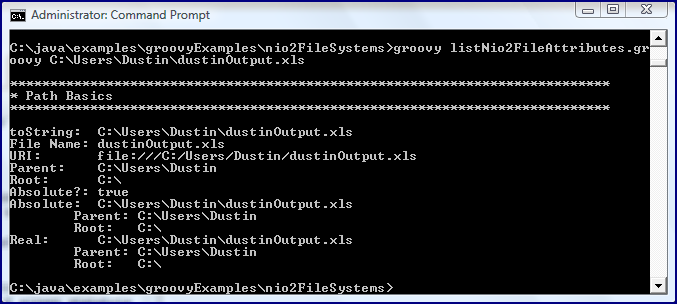
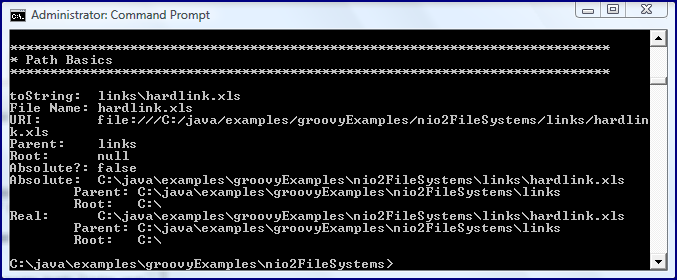
The output is most interesting for differentiating between path, real path, and absolute path by using various examples of different types of paths, so the following screen snapshots will do just that. One file that will be run against each portion of the script will be provided with its absolute path (
C:\Users\Dustin\dustinOutput.xls), with a relative path (
..\..\..\..\Users\Dustin\dustinOutput.xls), with a hard link named
hardlink.xls, and with a soft link named
softlink.xls.
As a side note, the hard and soft links are typically created with the
ln command for Linux (with -s option for soft links and no option for hard links). In Windows/DOS, the
mklink command is typically used (with /H for hard links and no option for soft links). The Windows approach (
mklink) for the files in question in this post is shown in the next screen snapshot.
Because I created the links in a "links" subdirectory, their use will demonstrate both links and relative directories (subdirectory in this case) in action. The next series of screen snapshots demonstrate the last covered Groovy code executed against the four paths (absolute path, relative path, hard link, and soft link) pointing to the same file.
Basic Path Information: Absolute Path ProvidedBasic Path Information: Relative Path ProvidedBasic Path Information: Hard Link Path ProvidedBasic Path Information: Soft Link Path ProvidedSome observations can be made from comparing the output shown immediately above. First, there are sometimes differences between "absolute path" and "real path" (which are documented in the Javadoc, by the way). As the output shows, the "absolute" path version of a provided relative path includes the "relative portions" in it. The "real" path, on the other hand, removes any redundancies to leave the cleanest and shortest possible full path. The path returned for soft links differs between "real" and "absolute" paths as well: the "real" path is again the cleanest and returns the actual path pointed to by the soft link while the "absolute" soft link path provides the full path of the link and not its target. A third observation is that the absolute path was the only one of the four types of provided paths for which a direct "root" was obtained. The others required going to their parent to get the root.
Files CharacteristicsAnother new class introduced by Java 7 NIO.2 is the
Files class. Its Javadoc documentation describes it quite well: "This class consists exclusively of static methods that operate on files, directories, or other types of files." The documentation further explains a dependency on the file system: "In most cases, the methods defined here will delegate to the associated file system provider to perform the file operations."
The next code listing contains another snippet of code from the above script and shows how significant details regarding a particular file or directory can be obtained easily using the static methods on the new
Files class. Nuggets of information regarding the provided
Path instance include things like file size (in bytes), file owner, indication of file or directory, whether it's executable, whether it's hidden, whether it's a symbolic link, and last modified date/time.
import java.nio.file.Files
/**
* Print the basic attributes of the Path provided via methods on the Files
* class.
*
* @param path Path from which attributes available via Files class are to be
* extracted.
*/
def void printFilesBasics(Path path)
{
printHeader("Files Basics")
println "Size: ${Files.size(path)} bytes"
println "Owner: ${Files.getOwner(path)}"
println "Exists? ${Files.exists(path) ? 'yes' : 'no'}"
println "Not Exists? ${Files.notExists(path) ? 'yes' : 'no'}"
println "Regular File? ${Files.isRegularFile(path) ? 'yes' : 'no'}"
println "Readable? ${Files.isReadable(path) ? 'yes' : 'no'}"
println "Executable? ${Files.isExecutable(path) ? 'yes' : 'no'}"
println "Directory? ${Files.isDirectory(path) ? 'yes' : 'no'}"
println "Is Hidden? ${Files.isHidden(path) ? 'yes' : 'no'}"
println "Is Symbolic Link? ${Files.isSymbolicLink(path) ? 'yes' : 'no'}"
println "Last Modified Time: ${Files.getLastModifiedTime(path)}"
}
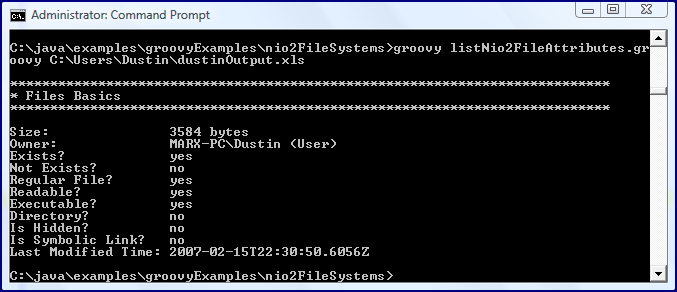
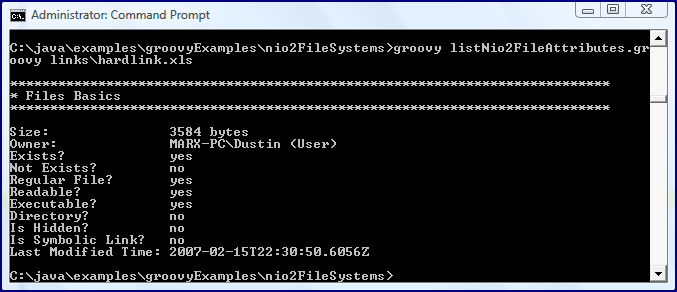
The next series of screen snapshots demonstrates running the portion of the script just shown against the four types of path previously covered (absolute, relative, hard link, and soft link). I throw in a fifth screen snapshot running against an executable file and a sixth screen snapshot running against a directory path that is owned by the Administrative user.
Basic File Information: Absolute PathBasic File Information: Relative PathBasic File Information: Hard Link PathBasic File Information: Soft Link PathBasic File Information: Executable PathBasic File Information: Administrator-Owned DirectoryI have looked at the new
Files class from the perspective of reading characteristics of files and directories. The class supports much more than that, including
creation of directories and
files,
copying directories and files,
moving/renaming directories and files, and accessing
POSIX-compliant file and directory
permissions. The additional methods are so numerous that I plan to cover many of them in a separate post rather than add to this already long post.
File Attributes ViewsEach file system supports certain file attributes views, although all are required to support the
basic file attributes view. The example toward the beginning of this post that called
FileSystem.supportedFileAttributeViews() showed which views are supported on the particular machine I'm using:
acl,
basic,
dos,
owner, and
user. Because it's a Windows machine, it's not surprising that it does NOT support the
posix attributes view.
This code snippet from the overall script is longer because it includes six methods: one that is an overall method for handling file attributes views and one each for the five supported views. Note that once again the
Path is the key to use of these APIs.
/**
* Print the various file attribute views for the provided Path.
*
* @param path Path for which file attribute views are to be printed.
*/
def void printFileAttributeViews(Path path)
{
def views = FileSystems.default.supportedFileAttributeViews()
if (views.contains("acl"))
{
printAclAttributes(path)
}
if (views.contains("basic"))
{
printBasicAttributes(path)
}
if (views.contains("dos"))
{
printDosAttributes(path)
}
if (views.contains("owner"))
{
printOwnerAttributes(path)
}
if (views.contains("user"))
{
printUserAttributes(path)
}
}
/**
* Print Access Control List attributes for provided Path.
*
* @path Path for which ACL attributes are desired.
*/
import java.nio.file.attribute.AclFileAttributeView
def void printAclAttributes(Path path)
{
printHeader("Access Control List Attributes")
def aclView = Files.getFileAttributeView(path, AclFileAttributeView.class)
aclView.acl.each
{ entry ->
println "${entry.principal().name} (${entry.type})"
entry.permissions().each
{ permission ->
println "\t${permission}"
}
}
}
/**
* Print basic file attributes for provided Path.
*
* @param Path for which basic attributes are desired.
*/
import java.nio.file.attribute.BasicFileAttributeView
def void printBasicAttributes(Path path)
{
printHeader("Basic File Attributes")
def basicView = Files.getFileAttributeView(path, BasicFileAttributeView.class)
def basicAttributes = basicView.readAttributes()
basicAttributes.each
{
println "Creation Time: ${it.creationTime()}"
println "Modification Time: ${it.lastModifiedTime()}"
println "Access Time: ${it.lastAccessTime()}"
println "Directory? ${it.isDirectory() ? 'yes' : 'no'}"
println "File? ${it.isRegularFile() ? 'yes' : 'no'}"
println "Other? ${it.isOther() ? 'yes' : 'no'}"
println "Symbolic Link? ${it.isSymbolicLink() ? 'yes' : 'no'}"
println "Size: ${it.size()} bytes"
}
}
/**
* Print DOS file attributes for provided Path.
*
* @param Path for which DOS file attributes are desired.
*/
import java.nio.file.attribute.DosFileAttributeView
def void printDosAttributes(Path path)
{
printHeader("DOS File Attributes")
def dosView = Files.getFileAttributeView(path, DosFileAttributeView.class)
def dosAttributes = dosView.readAttributes()
dosAttributes.each
{
println "Archive? ${it.isArchive() ? 'yes' : 'no'}"
println "Hidden? ${it.isHidden() ? 'yes' : 'no'}"
println "Read-only? ${it.isReadOnly() ? 'yes' : 'no'}"
println "System? ${it.isSystem() ? 'yes' : 'no'}"
}
}
/**
* Print file owner attributes for provided Path.
*
* @param path Path for which file owner attributes are desired.
*/
import java.nio.file.attribute.FileOwnerAttributeView
def void printOwnerAttributes(Path path)
{
printHeader("Owner Attributes")
def ownerView = Files.getFileAttributeView(path, FileOwnerAttributeView.class)
println ownerView.owner
}
/**
* Print user attributes for provided Path.
*
* @param path Path for which user attributes are desired.
*/
import java.nio.file.attribute.UserDefinedFileAttributeView
def void printUserAttributes(Path path)
{
printHeader("User Attributes")
def userView = Files.getFileAttributeView(path, UserDefinedFileAttributeView.class)
userView.list().each
{
println it
}
}
There is some redundancy in these file attributes views in that they provide some of the same details as are discoverable directly on a
Path via the
Path itself or via the static
Files methods acting on the
Path. For example, when the absolute path is run against this portion of the script, its basic file attributes view and dos file attributes view contain much of the same characteristics we've already seen.
The output above demonstrates that we can get file creation time and file access time from the basic file attributes in addition to modification time. Most of the other information in the basic file attributes view is available directly from
Path or from
Files applied to a
Path. The dos file attributes view tells us whether the file is hidden, whether it's archive, whether it's system, and whether it's read-only.
The file attributes view that I find most interesting for new details in the Access Controls List view. The output for this view run on the absolute path is shown next.
This is a pretty granular level of detail regarding the
Access Control List.
The final screen snapshot shows information returned for the file under the owner view and the user attributes view.
Groovy's File-Handling AlternativesEven before the availability of Java 7 NIO.2 additions, Groovy offered several approaches for working with file systems. These included using
Java's older file I/O (such as
File class), using some
Groovy GDK extensions to Java's file I/O classes, using the
underlying operating systems' commands, and using
AntBuilder. The new Java 7 NIO.2 additions, however, provide more power, potential performance, and standardization than ever before for Groovy file handling.
ConclusionThis post has demonstrated a small portion of the
Java 7 NIO.2 additions with coverage of a small number of handy classes and interfaces. I hope to cover some of my other favorite new features in later posts, but this post has covered some of the basics that I believe will lead to better and more efficient Groovy scripts that make use of files and file systems. Of course, not just Groovy will benefit. Other JVM languages and, of course, Java itself should also benefit from a new and improved file handling API.