Thứ Năm, 20 tháng 6, 2013

Common Red Flags in Java Development

In several years of developing, reading, reviewing, and maintaining hundreds of thousands of lines of Java code, I have become accustomed to seeing certain "red flags" in Java code that often (but perhaps not always) imply problems with the code. I'm not talking about practices that are always wrong, but rather am talking about practices that might, in limited circumstances, be appropriate but generally are a sign of something wrong. These "red flags" may at times be innocent, but often warn of an inevitable "heap of hurt" that is inevitably coming. Here I summarize some of these and briefly discuss situations in which they might be okay as well as describing why they typically are not okay.

Many of these "red flags" are significant enough to warrant warnings from code analysis tools such as FindBugs. The popular Java IDEs flag many of these as well. However, I have seen developers miss these more literal flaggings from these tools and IDEs either because they had the options turned off or because they had, out of habit or because not understanding the risk associated with the flag, ignored the warning.

Use of == (rather than .equals) with References

Most Java developers learn to compare primitives with == and to compare reference types with .equals. This is generally an easy rule to remember and typically serves Java developers well. There are times when using == to compare standard Java type references (String, Integer, Long, etc.) will work fine, but counting on the values to be cached so that this works is not a good idea. There are also cases where one might want to check for identity equality rather than content equality and then == is appropriate for comparing references. I prefer Groovy's approach here where == works like .equals and === explicitly and obviously communicates the developer's desire to more strictly compare identities. The same argument applies to the use of != for comparing two references to be a red flag because this will always return true if the two objects being compared do not share the same identify (memory address) even if they share the same content.

Use of .equals (rather than ==) with Enums

Frankly, it often doesn't matter whether the Java developer uses == or .equals with enums. However, I do prefer use of == with enums. The most significant reason for this preference is that use of == with enums eliminates making the possible mistake of comparing an enum to some unrelated object (to which it will never be equal). The Object.equals(Object) method necessarily must accept any Object, but this means the compiler cannot enforce that the passed-in object is actually of the type being compared. I generally prefer static compile time detection of problems over dynamic runtime detection of problems and use of == with enums satisfies this preference. The same arguments, of course, apply to use of != versus !.equals when comparing enums.

Magic Numbers and Literal Strings

I know it's "Computer Science 101," but I still have seen use of "magic numbers" and literal strings in Java code far too often. These cry out as "red flags" for future maintainability and give me serious doubt about the correctness of the current application. Representing these as constants (or better yet as enums when appropriate) in a single location improves future maintainability and also gives me a higher degree of confidence that all code using those values are using the same values. In addition, centralized defined constants and enums make it easy to use an IDE's "Find Usages" feature to find all of the "clients" of those constants.

String Constants

When I see a finite set of related String constants, I often think an enum would serve better. This is especially true for a set of String constants with a high degree of cohesiveness that allows an enum to represent nicely the concept those Strings constitute. The enum provides compile-time static type safety and potential performance advantages over the String constants. In terms of program correctness, it is the compile-time safety that interests me most.

Use of Java's "Goto"

I almost did not include this item on use of branching to labeled code in this post because the truth is that most of the few instances I have seen this used in production code are justifiable. In other words, this item is listed in this post more because of the potential for its abuse and use in the wrong ways than in what I've actually witnessed. In most cases I've seen, the Java developer applying Java's "goto" is doing so to avoid far messier and more difficult to read code. The fact that this is seldom used may be partially to credit for its being used properly. If it was used often, it's likely that most of those uses would be in bad taste.

Depending on Scope for Appropriate References of Variables of the Same Name

This item falls under the category of never really appropriate in my opinion, but definitely workable and even done intentionally by some Java developers some of the time. The best example of this is when a Java developer points a variable passed into a method to another reference during the method's execution. That variable that was pointing to the method parameter temporarily points to whatever alternate it is assigned until the method ends, at which point it falls out of scope. Placing the final keyword in front of the parameter's definition in the method signature will lead to a compiler error for this case and is one of the reasons I like final in front of all my method parameters. To me it's clearer and more readable to simply declare a new variable local to that method because it is only be used locally to that method anyway. More importantly, as the reader of the code, I have no way of knowing if the developer intentionally wanted that parameter's name to be used locally only for a different value or if they had introduced a bug thinking that reassigning that parameter to a new reference would actually change it on the calling side. When I see these, I either work with the original developer or glean from unit tests and production use what the intent is and make it more clear (or fix it if the invoking client's value is intended to be changed).

Mismatched equals(Object) and hashCode() Methods

Although I believe a toString() method should be written for just about every Java class that is written, I don't feel the same way about equals(Object) and hashCode() overrides. I think these should only be written when the class is intended to be used in situations requiring these methods because their existence should imply a certain degree of extra thoroughness in their design and development. In particular, the equals and hashCode methods need to meet their intent and advertised (in Object's API documentation) contracts and need to be aligned with each other. Most IDEs and analysis tools will identify when one method exists without the other. However, I like to make sure that the same attributes use for equals are used for hashCode and I prefer them to be considered in the same order in both methods.

Lack of Javadoc Comments

I like all contract methods (especially public methods) to be commented with Javadoc comments. I have also found it useful to have attributes commented with what they are intended to store. I have heard the excuse for no Javadoc comments when the code is "self-documenting," but I can almost always tell the person making that claim one or more examples of how a simple Javadoc comment can relay the same information as it would take to spend much longer than that deciphering the code. Even longer method names can typically not be long enough to specify all the expected input conditions and output expectations of a given method. I think many Java developers, like me, prefer to read the Javadoc comments when using the JDK rather than reading JDK code. Why then should our own internal code be any different? I do read source code when the comments are insufficient or behavior appears different than what is advertised or when I have reason to believe the comments might be old or shoddy.

I also like to see Javadoc comment for class attributes. Some people prefer to comment the public get/set methods with attribute information, but I don't like that approach as well because it assumes that get/set methods will always be available (an assumption I don't like to make).

Implementation Details in Methods' Javadoc Comments

Although I feel that no Javadoc comments is a red flag, having the wrong type of Javadoc comments is also a red flag. Javadoc comments should not explain the implementation details, but should rather focus on method expectations of clients (parameters) and client expectations of the method (return type and possibly thrown exceptions). In a truly object-oriented system, the implementation should be modifiable underneath the public interface and so it seems inappropriate to place these implementation details in the interface documentation. This is a "red flag" because presence of implementation details in the Javadoc makes me suspicious of the timeliness of the comments. In other words, these are the types of comments that often get outdated and flat-out wrong quickly as code evolves.

Comments in the Source Code

Although lack of comments on the interfaces (typically in Javadoc) is a red flag, the existence of comments within the body of methods and other source code is also a red flag indicating potential issues. If code needs to be commented to understand what it's doing, it is likely that the code is more complicated than it needs to be ("comments are the deodorant for stinky code" is often as true as it is funny). Like many of these "red flags" in this post, there are exceptions when I have seen in-code comments that are informative and in which I cannot think of a better way to present the code to remove the need for those comments. However, I believe in-code (not interface descriptive Javadoc comments) should be relatively rare and should focus on "why" something was done rather than "how" it was done. The code should speak for itself on the details of "how," but typically cannot be written to implicitly explain the "why" (because of customer/management direction, design decision, formal interface requirements, formal algorithm requirements, etc.).

Implementation Inheritance (extends)

I have seen many cases where use of extends (implementation inheritance) is done well and is appropriate for the situation. I've seen many more cases where the opposite is true and implementation inheritance causes more trouble than good. Allen Holub has written that extends is evil and the Gang of Four Design Patterns book has a huge focus on reasons why composition is often preferable to implementation inheritance. The longer that I have developed Java code and, more importantly, the longer I have maintained Java code, the more convinced I have become of the virtues of composition and the vices of implementation inheritance. As I stated, I have seen implementation inheritance used to good effect, but more often than not classes are "shoehorned" into fitting into an inheritance hierarchy and child classes get riddled with UnsupportedOperationExceptions or "noop" implementations because a method they inherit doesn't really apply. Throw in some of the issues with inheritance outlined in Effective Java (such as equals and hashCode methods implementations for inheriting concrete classes) and it can become a real mess. Implementation inheritance is not always bad, but it is often used badly and so is a red flag.

Dead Code

It's never a good thing to have unused code sitting around. It doesn't take too long for people to forget how it was used or why it was used. Not too long after that, developers start to wonder if it was left around for a reason. Dead code not only increases code that must be read and potentially maintained, but in world of coding via IDE completion, dead methods can be easily and accidentally invoked based solely on their name and argument list. Dead code is also often symptomatic of a neglected code base.

Commented Out Code

Commented out code may not be as bad as executable dead code because at least it cannot be accidentally invoked and it is more obvious that it is not being used, but it still is a red flag because it indicates potential code base neglect. Like dead executable code, the more time that passes between the time the code is commented out, the more difficult it is to know why the code was ever there, why it was commented out, and why it wasn't simply removed when no longer needed. Developers may be afraid to remove it because it obviously must have been important to leave in before but no one can remember why.

To-Do Statements

It has become so common to add "to-do" statements to code that modern Java IDEs provide special support and features for them. These features do help because they often put the todo markers in a list for reviewing, but "to-do" comments still remain red flags and can bring with them some of the same problems as dead code and commented out code. I have definitely used "to do" comments for short-term reminders, but I think it is best to include an "expiration date" and contact information with the "to do comment" as well as, if available, the people or events that need to transpire to allow the "to do" to be worked off. Having the expiration date, contact information, and events or people necessary to address the "to do" reduce the likelihood of have "to do" comments in the code because no one remembers exactly what they were for but no one dares remove them because they were something thought important to do at one point. When I see a "to do" statement in code, I cannot help but wonder if the code is somehow lacking in functionality.

Compiler Warnings and IDE/Tool Warnings/Hints/Findings

Obvious examples of Java red flags are the warnings put out by the javac compiler and the findings and hints that IDEs and other code analysis tools provide. Each of these findings and warnings is potentially its own red flag. In fact, many of the red flags I've cited in this post are warned about or hinted about by the javac compiler or by tools and IDEs. Not only do these warnings, hints, and findings directly correspond to many Java code red flags, but their aggregated existence is a huge red flag indicating a potentially neglected code base in which serious warnings (even errors by some definitions) might be lost in the deluge of warnings and hints.

Compiler Warnings and IDE/Tool Warnings/Hints/Findings Turned Off

I definitely don't feel that every issue identified in my Java code by FindBugs is necessarily a bug or a defect. In fact, in some cases, I even disable some of the findings because I don't agree with them and they clutter the FindBugs output. That being said, such deselection of findings should be done carefully to ensure that only true non-findings are ignored and things important to the development team are obvious. In a similar vein, I like to have many of my IDE's warnings turned on, but do have a few turned off. I also don't think it's a good idea to build Java applications with javac's warnings disabled. Disabling these warnings and findings may remove the red flags the presence of the warnings represent, but the action of turning them off is potentially an even larger red flag because these warnings and hints point out so many potential red flags that could be addressed.

Too Clever / Science Fair Projects / Over-Engineered / Premature Optimization

My last category of red flags is the large category of overly complicated software that is often the result of one of the common developer dysfunctional behaviors. Code that is overly clever to the point of not being readable or focuses on flexibility or (premature) optimization when not needed and at the expense of readability often has other problems. Developers who over-engineer their code may be doing this to see if they can or to try something new or just to shake things up, but these are rarely behaviors are rarely conducive to good quality software. Once software becomes too complex and difficult to understand, it is not as likely to be maintained properly and is more likely to have incorrect changes made to it.

At common telltale sign of one example of this category of red flags is when reading code and wondering why in the world the developer did not implement this in a much more obvious and straightforward way. On one hand, you might be impressed that they were aware of and able to apply some advanced feature, but on the other hand you know that this probably was more complex than it should have been. There are many manifestations of this category of red flags, but I seem to commonly see them in a few areas. One area in particular is pushing too much functionality that works perfectly well in static Java code to more dynamic constructs via reflection, Spring or other dependency injection, dynamic proxies, observers, and so forth. All of these things are handy and useful when applied correctly, but I have also seen all of these things overused and frequently abused, making it difficult for developers to follow what's happening in the code.

Conclusion

In this post, I've looked at some of the common Java red flags I see in Java code and in Java development environments. These things are not necessarily wrong or negative when used appropriately, but can be seen as alerts to potentially harmful practices when not used appropriately. When I see these red flags, I don't rush to judgment until I've had a chance to delve slightly deeper to determine if there is trouble brewing underneath these red flags or if they are in a situation in which the tactic is justifiable. More often than not, these red flag are early indicators of impending problems. In some cases, they are the explanation or pointer to serious existing and perhaps previously unexplained problems.

Thứ Bảy, 1 tháng 6, 2013

Book Review: Learning JavaScriptMVC

Packt Publishing invited me to review the recently published Learning JavaScriptMVC by Wojciech Bednarski. I describe my impressions of this book on JavaScriptMVC in this post. Before beginning my review, I'll quote the description of JavaScriptMVC from its web site: "A collection of the best practices and tools for building JavaScript applications" that is "built on top of jQuery." I reviewed the ebook (PDF) version of Learning JavaScriptMVC.

Learning JavaScriptMVC Book Cover

Learning JavaScriptMVC: Learn to build well-structured JavaScript web applications using JavaScriptMVC is a 100+ page book with six chapters. The Preface states that readers should "be familiar with JavaScript, browser APIs, jQuery, HTML5, and CSS." It also states that the book is intended "for anyone who is interested in developing small- and mid-size web applications with the JavaScriptMVC framework, which is based on the most popular JavaScript library – jQuery."

Chapter 1: Getting Started with JavaScriptMVC

The first chapter introduces "JavaScriptMVC (JMVC)" as "a JavaScript open source model-view-controller (MVC) framework" built "on top of the jQuery library." The chapter describes other aspects of JavaScript MVC such as historical details, basic objectives, license information, JavaScriptMVC architecture, the four major components of JavaScriptMVC (StealJS, FuncUnit, jQueryMX, and DocumentJS), and links for more information. A paragraph in this first chapter discusses future plans to rename (DoneJS (jQuery++) and CanJS) and make changes to the JavaScriptMVC framework and to some of its major components.

Chapter 1 includes details on three different approaches for installing JavaScriptMVC. One of the demonstrated approaches is via Vagrant and Oracle VM VirtualBox.

The first chapter also demonstrates using JavaScriptMVC with a sample application that can be compared to a similar sample to-do application built with other web frameworks at https://github.com/tastejs/todomvc/tree/gh-pages/architecture-examples. Several common web development techniques and tools are covered as part of this example: Google Chrome Inspector, jQueryMX, and Embedded JavaScript (EJS).

Chapter 2: DocumentJS

Chapter 2 covers DocumentJS, which it introduces as "a powerful, yet simple tool designed to easily create searchable documentation for any JavaScript codebase." I think it's worth re-emphasizing here that this is an independent tool that can be used with any JavaScript code base and is not limited to use on JavaScriptMVC applications.

Bednarski states in this second chapter that DocumentJS is quickly learned by anyone familiar with JSDoc, YUIDoc, YARD, or other Javadoc documentation tools. He also cites DocumentJS's support for Markdown as one of its advantages. This chapter adds documentation comments (look and feel a lot like Javadoc) to the code introduced for the sample application in Chapter 1 before covering how to generate documentation from these special source code comments.

Chapter 3: FuncUnit

The third chapter is devoted to FuncUnit, which it describes as "a functional testing framework with jQuery-like syntax" that "is built on top of the QUnit unit test framework." The chapter contrasts functional testing to unit testing and demonstrates using related tools Selenium, PhantomJS, and Envjs along with Maven and Jenkins.

Chapter 4: jQueryMX

The fourth chapter focuses on jQueryMX and describes jQueryMX as "a collection of jQuery libraries that provides functionality necessary to implement and organize large JavaScript applications." The chapter covers several jQueryMX plugins such as jQuery.Class (based on John Resig's Simple JavaScript Inheritance), jQuery.Model, and jQuery.View.

Chapter 5: StealJS

Chapter 5 covers StealJS and describes it as an "independent code manager and packaging tool." The chapter also states that "StealJS requires Java 1.6 or greater." The chapter demonstrates using StealJS to load files, to log, to clean/beautify code, and to concatenate and compress code. Related tools mentioned in this chapter include Google Closure and JSLint.

Chapter 6: Building the App

The final chapter's stated goal is "to show how to build a real-word application from concept through design, implementation, documentation, and testing." Along the way, the chapter mentions many process-related issues including use of Trello, Trac, JIRA, and Git. The example in the chapter also demonstrates using IndexedDB, PouchDB, and Sass.

Similarly to the first chapter, the last chapter is code-intensive as the entire application's code base is included in the chapter.

Positives
  • Conciseness - The author limits background details and opinions to sentences rather than the normal paragraphs or pages many authors devote to background and opinions.
  • Code Examples - The book is code-heavy with numerous pages devoted to code listings and to commands for running various tools.
  • Frame of Reference - This book's most useful feature may be that it provides an overall frame of reference for understanding what the JavaScriptMVC framework is. With the overall framework understood at a high level, the reader can go to other resources for additional or more in-depth details.
  • References - The book's conciseness (just over 100 pages total) leaves many details out and so it is helpful that it has numerous references to online resources with additional details.
  • Truth in Advertising - The book's preface stated that this book is intended for readers familiar with "JavaScript, browser APIs, jQuery, HTML5, and CSS." This is not overstated; the heavy use of code (especially JavaScript) means that the book is going to be much more useful to those already familiar with JavaScript and related technologies than those not familiar with those technologies. As the "Learning" part of the title implies, this book is an introductory book rather than a detailed reference book.
Negatives
  • Grammar and Sentence Structure - One of the advantages traditionally associated with books when compared to blogs is better spelling, grammar, and sentence structure in books. This is typically because books (and even articles) typically have much more editorial process than blog posts (the latter of which often have no editorial process). Unfortunately, much of this book felt like very little editing had occurred in the book publication process. There were numerous disjoint sentences and a couple cases where the chosen words did not seem to be used properly in the context in which they were used.
  • Good Online Documentation - This is really not a disadvantage of Learning JavaScriptMVC, but I thought it worth pointing out for those trying to decide whether to purchase the book. The online documentation for JavaScriptMVC seems fairly thorough and clear and might be sufficient for those wanting to learn and use JavaScriptMVC. In fact, the JavaScriptMVC documentation even includes its own To-Do example application. I often prefer having a printed or electronic copy of a book because they have some advantages, but this is also a matter of taste. It is important to reiterate that this book is an introductory book rather than a reference book.
Conclusion

I was happy to read Learning JavaScriptMVC and become more acquainted with JavaScriptMVC and how it fits in with other popular web development technologies and tools. This book seems best suited for developers who are about to use JavaScriptMVC without significant previous experience using that framework but with experience with JavaScript and other common web technologies. Learning JavaScriptMVC provides a different introductory perspective than the well-written online documentation and is filled with code examples demonstrating the concepts.

Thứ Sáu, 31 tháng 5, 2013

Java Happenings in May 2013

This post very briefly summarizes some recent (within the past few weeks) developments in the world of Java.

Yet Another Java Versioning Scheme

Oracle has changed the Java version numbering schema again, this time in an effort "to avoid confusion caused by renumbering releases" because of the "recent increase of security releases" that have already led to skipped numbers and renumbered releases.

The Closure of java.blogs

Atlassian's java.blogs is currently closed, though it seems like this may not be permanent if there is sufficient interest in it being restored and updated. There is a form at the main site available for folks interested in it being restored to make that known.

Kicking the Tires of JDK 8

In Feedback Wanted, Java SE 8, Tori Wieldt provides links for downloading the latest released versions of Java SE 8 under development. She also provides links to the source code and to a list of Java Enhancement Proposals that have been incorporated into the latest JDK 8 releases. There are also links for reporting bugs found with a new release and for obtaining help if problems are encountered trying to use a new release.

JDK8 Javadoc Updates

Jonathan Gibbons's post javadoc TLC summarizes recent JDK8 tools fixes and the effect on Javadoc. I previously blogged on some changes in JDK8 Javadoc and its presentation of class methods.

Android, IntelliJ, and Gradle

Google I/O 2013 recently concluded and there were some big announcements in the Android space related to products that are well-known in the Java community. In particular, IntelliJ-based Android Studio is now offered (currently "early access preview") alongside more mature Eclipse-based Eclipse ADT plug-in and Gradle is now the main Android build system.

JAXconf

JAX Conference will be next week (June 4-5) in the Santa Clara Convention Center.

Java EE 7 Kick-off

The webcast Introducing Java EE 7 has been announced and will be broadcast live. Geertjan Wielenga has posted that NetBeans support for Java EE 7 will be featured in this webcast.

New JDK 7 and JDK 8 Early Access Releases

In Food For Tests: 7u40 Build b26 & 8 Build b91, Dalibor Topic writes of the new Early Access releases of JDK 7 Update 40 and JDK 8 Build b91. One thing of particular note is that the new JDK 8 build has "Nashorn replacing Rhino."

Thứ Tư, 8 tháng 5, 2013

JDK 8's Calendar.Builder

One of the defining characteristics of the brave new world of Java is the increasing prevalence of the builder pattern in the Java space. Groovy, which appears to be the most popular alternative language (to Java) on the JVM, is well-known for its heavy use of the Builder in both the core libraries and in Groovy-supported libraries and frameworks. Josh Bloch brought the pattern to the forefront of Java developer community mindset with coverage of the pattern in Item #2 of the second edition of his highly influential Effective Java. There have been several builders added to the JDK including the addition of Locale.Builder in J2SE 1.7. In this post, I briefly introduce Calendar.Builder coming to JDK 8.

Today, a Java developer typically populates an instance of the Calendar class by either calling one of the "set" methods that accepts a lengthy list of content for the instance or by calling individual "set" methods on the instance one after another. These two typical approaches for populating a Calendar instance are demonstrated in the next two code listings.

Populating Calendar with Single 'set' Method

/**
* Demonstrate pre-JDK 8 method of instantiating Calendar instance using
* "set" method for main fields.
*/
public static void demoCalendarWithSingleSet()
{
final Calendar calendar =
Calendar.getInstance(TimeZone.getTimeZone(timeZoneId),
ENGLISH);
calendar.set(2013, APRIL, 6, 15, 45, 22);
out.println("Calendar via Constructor: " + stringifyCalendar(calendar));
}
Populating Calendar with Multiple Individual 'set' Methods

/**
* Demonstrate pre-JDK 8 method of instantiating Calendar instance using
* individual "set" calls for each pair of field names and values.
*/
public static void demoCalendarWithIndividualSets()
{
final Calendar calendar =
Calendar.getInstance(
TimeZone.getTimeZone(timeZoneId),
ENGLISH);
calendar.set(YEAR, 2013);
calendar.set(MONTH, APRIL);
calendar.set(DATE, 6);
calendar.set(HOUR, 3);
calendar.set(MINUTE, 45);
calendar.set(SECOND, 22);
calendar.set(AM_PM, PM);
out.println("Calendar via set methods: " + stringifyCalendar(calendar));
}

SIDE NOTE: In both of the examples above, I used another increasingly popular feature of modern Java: the static import. The constants such as ENGLISH, YEAR, and SECOND are actually statically imported from classes such as Locale and Calendar. As I have previously written, static imports seem to be increasingly popular with Java developers, especially in light of the trend toward fluent interfaces.

The two "traditional" approaches shown above show different ways to populate the Calendar instance. One extreme is to set each individual field separately while the other is to set all the significant fields with a single "set" method. There are advantages to each approach. The single "set" method has fewer states of an "unfinished" object than the multiple-set approach, but the multiple-set approach is more readable because the name of the value being set is clear based on the first parameter to each "set" method. The single-set approach is a little unwieldy because it takes six integers that can be easily mixed up in order passed because there is no obvious way to differentiate which integer is which other than the implicit order.

Calendar.Builder leverages on the advertised benefits of the Builder as described by Bloch: removes the existence of "inconsistent states partway through [an object's] construction." This is demonstrated in the next code listing.

Calendar.Builder Allows Single-Statement Instantiation with Readable Settings

/**
* Demonstrate using JDK 8's Calendar.Builder to instantiate an instance of
* Calendar using the set methods to set each field individually based on
* field name and value.
*/
public static void demoCalendarWithCalendarBuilderSetFields()
{
final Calendar calendar =
new Calendar.Builder()
.set(YEAR, 2013)
.set(MONTH, APRIL)
.set(DATE, 6)
.set(HOUR, 15)
.set(MINUTE, 45)
.set(SECOND, 22)
.setTimeZone(TimeZone.getTimeZone(timeZoneId))
.setLocale(ENGLISH)
.build();
out.println(
"Calendar via Calendar.Builder 'set' Fields: "
+ stringifyCalendar(calendar));
}

In the above code listing, the Calendar instance is created AND populated in one statement, removing the need to risk an object being in an inconsistent state across multiple statements. This example retains the readability of the traditional individual "set" methods approach [set(int, int)] with the added safety of having the object populated fully immediately at instantiation.

For developers who want to provide fewer individual "set" methods, another opportunity with Calendar.Builder is to use the setDate(int, int, int) and setTimeOfDay(int, int, int) methods as demonstrated in the next code listing.

Calendar.Builder Setting Date and Time as Two Calls

/**
* Demonstrate using JDK 8's Calendar.Builder to instantiate an instance of
* Calendar using the "setDate" and "setTimeOfDay" builder methods.
*/
public static void demoCalendarWithCalendarBuilderSetDaySetTime()
{
final Calendar calendar =
new Calendar.Builder()
.setDate(2013, APRIL, 6)
.setTimeOfDay(15, 45, 22)
.setTimeZone(TimeZone.getTimeZone(timeZoneId))
.setLocale(ENGLISH).build();
out.println(
"Calendar via Calendar.Builder setDate/setTimeOfDay: "
+ stringifyCalendar(calendar));
}

There are fewer characters and lines to type with this approach, but it partially reintroduces the disadvantage of being more likely to have an integer parameter inadvertently switched as each of the two methods takes three integers (or an overloaded version of setTimeOfDay() will take a fourth integer representing milliseconds).

For developers wanting the ultimate flexibility in specifying Calendar parameters during its instantiation, Calendar.Builder provides the method setFields(int ...) that takes an arbitrary length of pairs of integers with the first integer of the pair representing the field to be set and the second integer of the pair representing the value for that field. This method is used in the next code listing.

Specifying Calendar Fields via Calendar.Builder's setFields Method

/**
* Demonstrate using JDK 8's Calendar.Builder to instantiate an instance of
* Calendar using the setFields method that allows providing of Calendar
* fields as key/value pairs.
*/
public static void demoCalendarWithCalendarBuilderSetPairs()
{
final Calendar calendar =
new Calendar.Builder()
.setFields(YEAR, 2013, MONTH, APRIL, DATE, 6, HOUR, 15, MINUTE, 45, SECOND, 22)
.setTimeZone(TimeZone.getTimeZone("timeZoneId"))
.setLocale(ENGLISH)
.build();
out.println(
"Calendar via Calendar.Builder setPairs: "
+ stringifyCalendar(calendar));
}

This setFields(int ...) method brings greater risk of mangling the order of integers used for instantiation of the new instance of Calendar, but using the statically imported Calendar constants does improve readability and reduces the likelihood of mixing the integers incorrectly. If an odd number of integers is provided (meaning that there is an incomplete pair), an IllegalArgumentException is thrown.

Although Calendar.Builder provides some convenience in instantiating and populating an instance of Calendar, anyone fortunate enough to adopt JDK 8 will have access to the new date/time API and so the question might be asked, "Why use Calendar.Builder?" Perhaps the best answer is that there are millions of lines of existing code, libraries, and frameworks out there using and expecting Calendar instances, so it will probably be a long time before the need for Calendar is completely gone (if ever). Fortunately, Calandar.Builder makes it easy to covert an instance of Instant (part of the new Java data/time API) into a Calendar via CalendarBulder.setInstant(long). This is demonstrated in the next code listing.

Converting Instant to Calendar with Calendar.Builder

/**
* Demonstrate using JDK 8's Calendar.Builder to instantiate an instance of
* Calendar based on "now" Instant.
*/
public static void demoCalendarWithCalendarBuilderInstant()
{
final Calendar calendar =
new Calendar.Builder().setInstant(Instant.now().toEpochMilli())
.setTimeZone(TimeZone.getTimeZone(timeZoneId))
.setLocale(ENGLISH)
.build();
out.println("Calendar via Calendar.Builder and Instant: " + stringifyCalendar(calendar));
}

Note that an overloaded version of the setInstant method accepts a Date for instantiating a Calendar. In both cases, whether instantiated with setInstant(long) or setInstant(Date), no other "set" method on Calender.Builder should be called to avoid an IllegalStateException.

It is easy to go the other direction (getting an Instant from a Calendar) using Calendar.toInstant(). Other methods introduced to Calendar with JDK 1.8 are related to providing the current instance's calendar type (as a String) or the set of available calendar types (Set of Strings). When I run Calendar.getAvailableCalendarTypes() on my system, I see these three Strings: "gregory", "japanese", and "buddhist" (the same three calendars documented in Supported Calendars)

Conclusion

Like many Java developers, I'm looking forward to an improved Java data/time API that is built into the standard Java Development Kit. However, I also realize that, especially in large code bases and when using libraries and frameworks expecting Calendar or Date, that I won't be free of Calendar and Date for some time. The introduction of Calendar.Builder in JDK 8 eases that burden a bit.

Thứ Sáu, 26 tháng 4, 2013

Interesting Java Blog Posts in Mid-April 2013

There have been numerous Java-related blog posts in recent days and I reference and summarize four of them here.

Creating a Memory Leak

In the "rather evil post" How to Create a Memory Leak, Ivo Mägi describes and provides code examples of two commons leaks. The first leak covered is related to objects lacking the hashCode()/equals(Object) implementations to be used properly in collections needing them to be correct. The second covered leak is related to the change of handling for String internals in Java 7 Update 6. The second problem is a reminder of the subtle and difficult to diagnose issues that can occur when even minor differences exist between versions of Java used in different environments.

StringBuffer Was Never a Good Idea

Peter Lawrey's blog post Why a synchronized StringBuffer was never a good idea articulates something I've found to be the case: most uses of building up strings do not need to be thread safe. Even when thread safety is needed, Lawrey points out why StringBuffer often is not sufficient.

9 Fallacies of Java Performance

Ben Evans looks at 9 Fallacies of Java Performance including the outdated mantra "Java is slow" and problems with using microbenchmarks to make performance decisions. He points out that "Java performance-tuning intuition is often misleading" and that "we require empirical data and tools to help us visualize and understand the platform's behavior."

Infamous Java Bugs and Pitfalls

Murat Yener has collected some Java-related "bugs and pitfalls" in his post Infamous Java Bugs and Pitfalls such as autoboxing issues and BigDecimal quirks.

Conclusion

The four blog posts on Java cited above have been recently posted and provide good reminders and potentially new information on things to be cognizant of when developing with Java.

Thứ Hai, 22 tháng 4, 2013

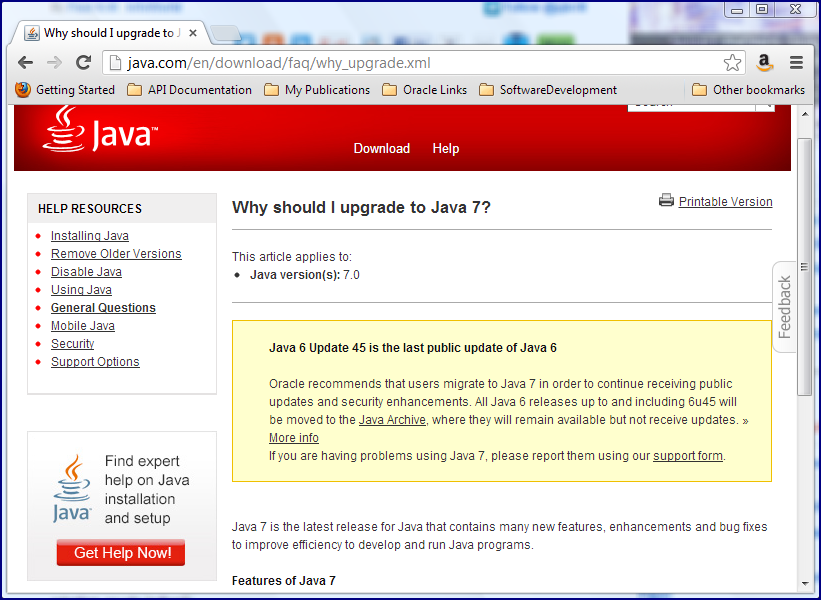
More Reasons to Update to Java 7

In Java SE 7 Update 21 Release and more, Tori Wieldt pointed out that "Oracle has released three updates to Java" this past week: Java 6 Update 45, Java 7 Update 21, and Java SE Embedded 7 Update 21. This The Java Source blog post briefly focuses on "new security features in this release" (more than just security fixes): "new Server JRE package" (tools used commonly for server "without the Java plug-in, auto-update or installer found in the regular JRE package"), removal of low and custom settings from Java Control Panel, and changes to Security Dialogs. Markus Eisele has posted additional details on the new security features in Java 7 Update 21 Security Improvements in Detail.

Whether it be security fixes or security features, the attention paid to security in Java SE 6 and Java SE 7 has come at a price: it looks like Java 8 is likely to be delayed again (this time pushing General Availability to First Quarter 2014). In the blog post Java 8: Secure the train, Mark Reinhold writes, "Maintaining the security of the Java Platform always takes priority over developing new features, and so these efforts have inevitably taken engineers away from working on Java 8. ... As a consequence of this renewed focus on security the Java 8 schedule, with a GA release in early September, is no longer achievable." For people waiting to upgrade from Java 6 to skip to Java 8, this delay of Java 8 is another reason to consider upgrading to Java 7 now.

Although Oracle has been warning of the end of free availability of Java 6 updates since the beginning of the year and extended Public Updates multiple times, Henrik Stahl's post Oracle JDK 7u21 released with new security features states that "we are not planning any more public JDK 6 updates" (past Java 6 Update 45). Users of Java 6 are encouraged to migrate to Java 7 to continue receiving public updates. In his Question-and-Answer formatted post, Stahl also covers alternatives such as access to newer Java 6 releases via the appropriate support license ("Oracle middleware or applications customer") or via separately purchased Java SE support.

Besides access to future public releases of Java SE, there are other reasons to upgrade to Java 7. Some of these are enumerated in 7 reasons to upgrade to Java 7 and the "Features of Java 7" section of "Why should I upgrade to Java 7?"

Thứ Ba, 16 tháng 4, 2013

JDK 8 Javadoc Tweaked For Methods Listings

Since its beginning, Javadoc output has been largely static HTML with navigation links and simple stylesheet styling of its appearance. Java SE 7 saw the first significant change in Javadoc output default appearance in a long time and now it looks like JDK 8 will introduce a new twist on generated Javadoc output. In this post, I look briefly at the more dynamic filtering of methods in Javadoc output by type of method that appears to be available with JDK 8's javadoc tool.

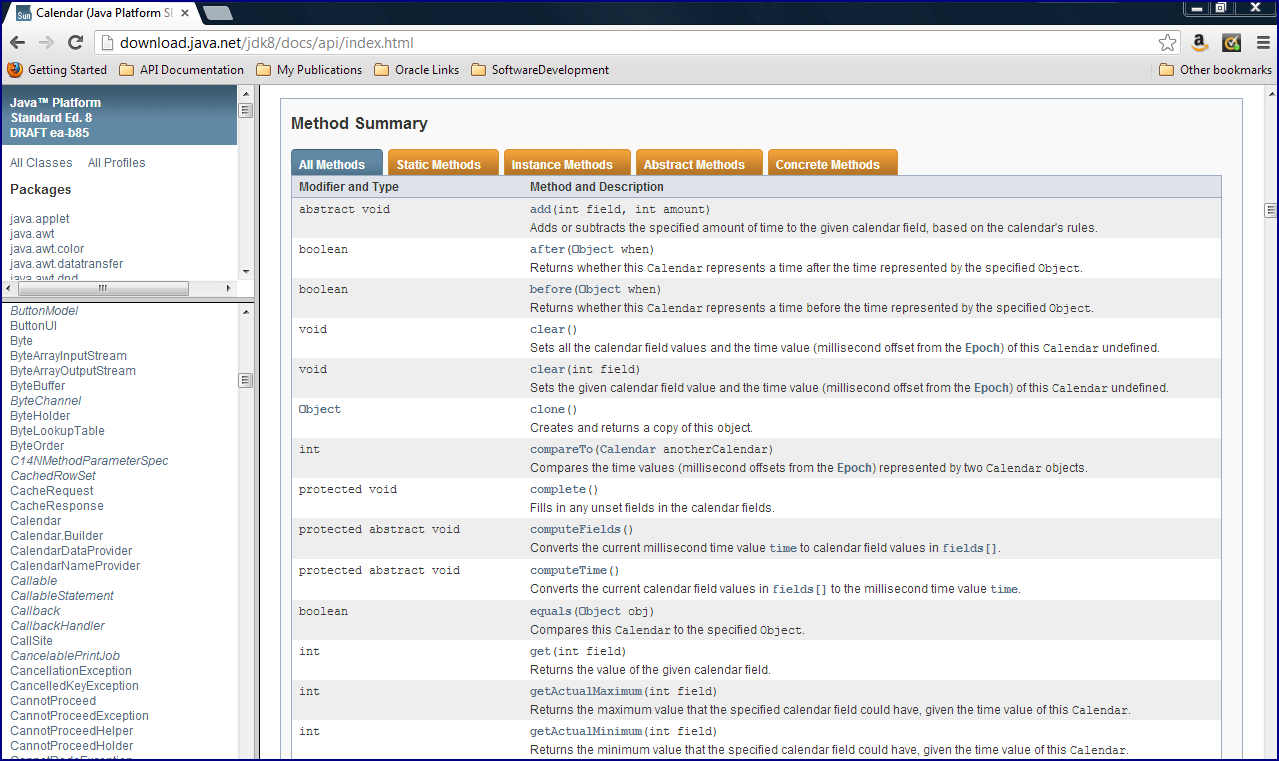
The following two screen snapshots compare the JDK 7 and JDK 8 versions of default Javadoc output for the Calendar class (chosen for its variety of method types).

Although the Javadoc output for JDK 8 has the same overall styles (including orange "tabs" for "Constructors", "Fields", "Methods" and so forth) as Java 7 Javadoc documentation, the methods in the JDK 8 generated documentation have multiple orange tabs above the listing of methods that allow the reader to click on the appropriate tab to see the appropriate subset of methods. The names of the tabs are about as self-explanatory as you could want with names like "All Methods" (all methods on the class), "Static Methods" (class-level methods), "Instance Methods" (object-level methods), "Abstract Methods" (methods without implementation), and "Concrete Methods" (implemented methods).

The next series of screen snapshots demonstrate how clicking on any of these tabs invokes embedded JavaScript code that calls appropriate functions in the script.js file that exists at the root level of the generated Javadoc directory structure.

This is a minor, but still somewhat handy, feature of Javadoc in JDK 8. I have often looked through methods of Javadoc for a class with mixed method types for methods that fit one particular type. Now, rather than needing to scan for keywords such as "static" or "abstract" or for the absence of those same words, I can simply use these "tabs" to filter the types of methods I want to see for a given class.