In my previous blog post, I looked at using JMX as one of multiple methods supported by GlassFish 3 for its administration, monitoring, and management. In this blog post, I look in more detail at monitoring and managing GlassFish 3 via JMX and Groovy. I focus on local connection to GlassFish using the Attach API in this post, but I have covered remote JMX access of GlassFish in a previous post (see also Remote Glassfish V3.1 and the mystical JMX settings). The MBeans used for administration are generally the same in either case.
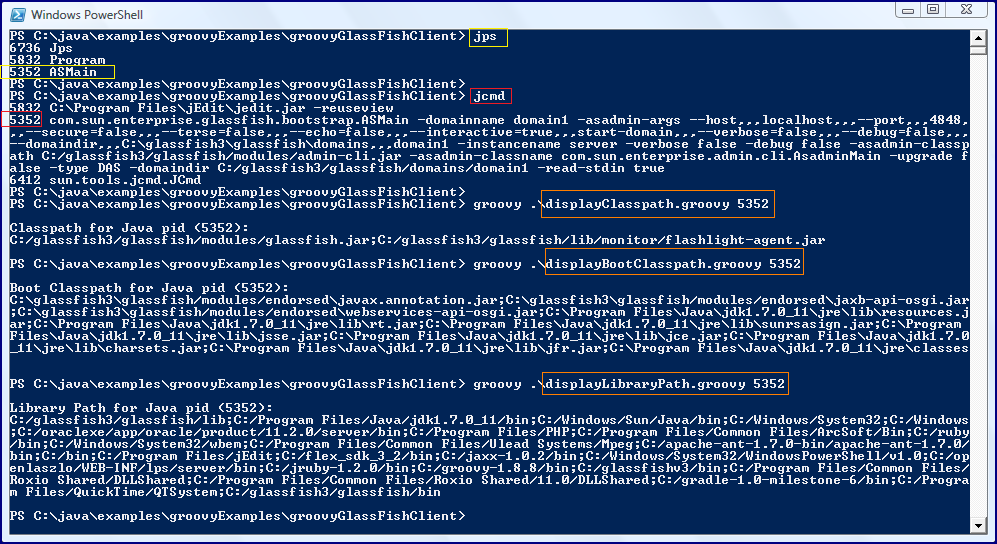
Because I'm using the Attach API in this post's examples to connect to local Java processes that are started by me, I don't need to specify the JMX remote connection properties (java.rmi.server.hostname,com.sun.management.jmxremote.port, and com.sun.management.jmxremote.ssl=false, and com.sun.management.jmxremote.authenticate) for remote access. The easiest way to find Java processes meeting the standard of being on the local machine and being processes that I started is via use of jps (pre-JDK 7 and JDK 7) or jcmd (JDK 7 only), which I show in the next two screen snapshots.
As the above images indicate, GlassFish is running locally with PID (AKA Process ID or pid) 1584.
To begin, I'm going to use Groovy to access the relevant MBeanServerConnection via the Attach API. This is done as shown in the following Groovy code (next two code listings) in which the method retrieveServerConnection(String) accepts the PID and returns the MBeanServerConnection for that Java process. That method uses another method in the code listing, retrieveUrlForPid(String, String), which uses the Attach API to provide a JMXServiceURL for the Java process.
retrieveServerConnection(String)
/**
 * Provide an MBeanServerConnection based on the provided process ID (pid).
 *
 * @param pid Process ID of Java process for which MBeanServerConnection is
 *    desired.
 * @return MBeanServerConnection connecting to Java process identified by pid.
 */
def MBeanServerConnection retrieveServerConnection(String pid)
{
   def connectorAddressStr = "com.sun.management.jmxremote.localConnectorAddress"
   def jmxUrl = retrieveUrlForPid(pid, connectorAddressStr)
   def jmxConnector = JMXConnectorFactory.connect(jmxUrl)
   return jmxConnector.getMBeanServerConnection()
}
retrieveUrlForPid(String, String)
/**
 * Provide JMX URL for attaching to the provided process ID (pid).
 *
 * @param @pid Process ID for which JMX URL is needed to connect.
 * @param @connectorAddressStr String for connecting.
 * @return JMX URL to communicating with Java process identified by pid.
 */
def JMXServiceURL retrieveUrlForPid(String pid, String connectorAddressStr)
{
   // Attach to the target application's virtual machine
   def vm = VirtualMachine.attach(pid)

   // Obtain Connector Address
   def connectorAddress =
      vm.getAgentProperties().getProperty(connectorAddressStr)

   // Load Agent if no connector address is available
   if (connectorAddress == null)
   {
      def agent = vm.getSystemProperties().getProperty("java.home") +
          File.separator + "lib" + File.separator + "management-agent.jar"
      vm.loadAgent(agent)

      // agent is started, get the connector address
      connectorAddress =
         vm.getAgentProperties().getProperty(connectorAddressStr)
   }

   return new JMXServiceURL(connectorAddress);
}
With access to the MBeanServerConnection, I can start to do all types of useful things with Groovy and JMX to manage and monitor the a Java process. For example, the next code listing demonstrates how easy it is to now list the MBeans exposed by the Java process identified by a provided PID.
displayHostedMBeans(MBeanServerConnection)
/**
 * Display MBeans hosted on the provided MBeanServerConnection.
 *
 * @param mbeanServer MBeanServerConnection for which hosted MBeans are to be
 *    provided.
 */
def displayHostedMBeans(MBeanServerConnection mbeanServer)
{
   mbeanServer.queryNames(null, null).each
   {
      println it
   }
}
Running the above Groovy method against my running GlassFish instance with PID 1584 is demonstrated in the next screen snapshot.
The next code listing and associated screen snapshot demonstrate using Groovy and JMX to find not only the exposed MBeans, but to also provide the attributes and operations available on each of those exposed MBeans.
displayHostedMBeansAttributesAndOperations(MBeanServerConnection)
/**
 * Display MBeans hosted on provided MBean Server along with the attributes and
 * operations available on each MBean.
 */
def displayHostedMBeansAttributesAndOperations(MBeanServerConnection mbeanServer)
{
   mbeanServer.queryNames(null, null).each
   { mbeanObjectName ->
      def mbeanInfo = mbeanServer.getMBeanInfo(mbeanObjectName)
      println mbeanObjectName
      println "\tAttributes:"
      mbeanInfo.attributes.each
      { attribute ->
         println "\t\t${attribute.type} ${attribute.name}"
      }
      println "\tOperations:"
      mbeanInfo.operations.each
      { operation ->
         def operationStr = new StringBuilder();
         operationStr << "\t\t" << operation.name << "("
         operation.signature.each
         { parameter ->
            operationStr << parameter.type << " " << parameter.name << ", "
         }
         def operationString = operationStr.contains(",") ? operationStr.substring(0, operationStr.length()-2) : operationStr
         println "${operationString})"
      }
      println ""
   }
}

The previously displayed screen snapshot shows the bootAMX operation available on the amx-support:type=boot-amx MBean. This needs to be run to make other GlassFish-provided AMX MBean available. The next snippet of Groovy code, a method I've named bootAmx(MBeanServerConnection), invokes this bootAMX operation to instruct GlassFish to expose significantly more details via its JMX interface.
bootAmx(MBeanServerConnection)
/**
 * "Boot AMX" on GlassFish.
 *
 * @param mbeanServer MBeanServerConnection to be used to invoke bootAMX
 *    operation.
 */
def bootAmx(MBeanServerConnection mbeanServer)
{
   def amxObjectName = new ObjectName("amx-support:type=boot-amx")
   mbeanServer.invoke(amxObjectName, "bootAMX", null, null)
}
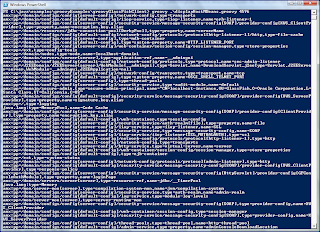
When the simple Groovy just shown is run, GlassFish exposes significant more functionality via JMX. Now that I've "booted AMX," I can rerun displayHostedMBeans(MBeanServerConnection) to see the new MBeans that are available. A portion of this is shown next in the screen snapshot and the small-font text below it contains the entire output.
amx:pp=/domain/configs/config[server-config]/network-config,type=transports
amx:pp=/domain/configs/config[default-config]/iiop-service,type=iiop-listener,name=orb-listener-1
amx:pp=/domain/configs/config[server-config]/security-service/message-security-config[SOAP]/provider-config[XWS_ClientProvider],type=property,name=encryption.key.alias
amx:pp=/domain/resources/jdbc-connection-pool[DerbyPool],type=property,name=serverName
amx:pp=/domain/configs/config[default-config]/network-config/protocols/protocol[http-listener-1]/http,type=file-cache
amx:pp=/domain/configs/config[server-config],type=mdb-container
amx:pp=/domain/configs/config[default-config],type=system-property,name=HTTP_LISTENER_PORT
amx:pp=/domain/configs/config[server-config]/web-container/session-config/session-manager,type=store-properties
amx:pp=/ext,type=config-tools
amx:pp=/domain/nodes,type=node,name=localhost-domain1
amx:pp=/domain/servers/server[server],type=application-ref,name=__admingui
amx:pp=/domain/configs/config[default-config]/network-config/protocols,type=protocol,name=sec-admin-listener
amx:pp=/J2EEDomain/J2EEServer[server]/WebModule[__admingui],type=Servlet,name=DownloadServlet,j2eeType=Servlet,J2EEServer=server,WebModule=__admingui,J2EEApplication=null
amx:pp=/domain/configs/config[server-config]/network-config/transports,type=transport,name=tcp
amx:pp=/domain/configs/config[default-config],type=system-property,name=OSGI_SHELL_TELNET_PORT
amx:pp=/domain/configs/config[server-config],type=thread-pools
amx:pp=/domain/configs/config[server-config]/security-service,type=audit-module,name=default
amx:pp=/domain/secure-admin,type=secure-admin-principal,name="CN=localhost-instance,OU=GlassFish,O=Oracle Corporation,L=Santa Clara,ST=California,C=US"
amx:pp=/domain/configs/config[default-config]/security-service/message-security-config[SOAP]/provider-config[XWS_ServerProvider],type=property,name=signature.key.alias
amx:pp=/,type=logging
java.lang:type=MemoryPool,name=Code Cache
amx:pp=/domain/configs/config[server-config]/security-service/message-security-config[SOAP]/provider-config[ClientProvider],type=property,name=encryption.key.alias
amx:pp=/domain/configs/config[default-config]/web-container,type=session-config
amx:pp=/domain/configs/config[server-config]/security-service/auth-realm[file],type=property,name=file
amx:pp=/domain/configs/config[server-config]/iiop-service,type=iiop-listener,name=SSL
amx:pp=/domain/configs/config[server-config]/security-service,type=message-security-config,name=SOAP
amx:pp=/domain/configs/config[server-config]/iiop-service/iiop-listener[SSL_MUTUALAUTH],type=ssl
amx:pp=/domain/configs/config[default-config]/network-config/protocols/protocol[http-listener-1],type=http
amx:pp=/domain/configs/config[default-config]/network-config,type=transports
amx:pp=/domain/configs/config[server-config]/http-service,type=virtual-server,name=server
amx:pp=/domain/configs/config[default-config]/web-container/session-config/session-manager,type=store-properties
amx:pp=/domain/configs/config[default-config],type=ejb-container
amx:pp=/ext,type=system-status
amx:pp=/domain/configs/config[server-config]/network-config/protocols/protocol[admin-listener],type=http
amx:pp=/domain/configs/config[default-config]/security-service/message-security-config[SOAP]/provider-config[XWS_ClientProvider],type=response-policy
amx:pp=/domain/configs/config[server-config]/security-service/message-security-config[HttpServlet]/provider-config[GFConsoleAuthModule],type=property,name=loginPage
amx:pp=/domain/servers/server[server],type=resource-ref,name=jdbc/__TimerPool
java.lang:type=Memory
amx:pp=/mon/server-mon[server],type=compilation-system-mon,name=jvm/compilation-system
amx:pp=/domain/configs/config[server-config]/security-service,type=auth-realm,name=admin-realm
amx:pp=/domain/configs/config[default-config]/log-service,type=module-log-levels
amx:pp=/mon/server-mon[server],type=server-runtime-mon
amx:pp=/domain/configs/config[server-config]/security-service/message-security-config[SOAP],type=provider-config,name=XWS_ClientProvider
amx:pp=/domain/configs/config[default-config]/web-container/session-config,type=session-manager
amx:pp=/domain/configs/config[default-config]/security-service/message-security-config[SOAP],type=provider-config,name=XWS_ServerProvider
amx:pp=/domain/configs/config[server-config]/thread-pools,type=thread-pool,name=http-thread-pool
amx:pp=/domain/configs/config[default-config]/admin-service,type=property,name=adminConsoleDownloadLocation
amx:pp=/domain/resources/jdbc-connection-pool[DerbyPool],type=property,name=connectionAttributes
amx:pp=/domain/resources/jdbc-connection-pool[__TimerPool],type=property,name=connectionAttributes
amx:pp=/domain/configs/config[default-config]/network-config/protocols,type=protocol,name=pu-protocol
amx:pp=/domain/configs/config[server-config]/network-config,type=protocols
amx:pp=/ext,type=connector-runtime-api-provider
amx:pp=/domain,type=resources
jmxremote:type=jmx-connector-server,protocol=rmi_jrmp,name=system
amx:pp=/domain/configs/config[default-config]/network-config/protocols/protocol[http-listener-2],type=ssl
amx:pp=/domain/configs/config[default-config]/network-config/protocols/protocol[http-listener-2],type=http
amx:pp=/domain/configs/config[default-config]/security-service/message-security-config[SOAP]/provider-config[ServerProvider],type=property,name=signature.key.alias
amx:pp=/,type=ext
amx:pp=/domain/configs/config[default-config]/monitoring-service,type=module-monitoring-levels
amx:pp=/domain/configs/config[server-config]/security-service/message-security-config[SOAP],type=provider-config,name=ClientProvider
amx:pp=/domain/configs/config[server-config]/security-service/message-security-config[HttpServlet]/provider-config[GFConsoleAuthModule],type=property,name=restAuthURL
amx:pp=/domain/configs/config[server-config]/network-config/protocols/protocol[http-listener-1],type=http
amx:pp=/domain/configs/config[server-config]/jms-service,type=jms-host,name=default_JMS_host
amx:pp=/domain/configs/config[server-config]/web-container/session-config/session-manager,type=manager-properties
amx:pp=/domain/configs/config[default-config]/security-service/message-security-config[SOAP]/provider-config[XWS_ServerProvider],type=property,name=debug
amx:pp=/domain/configs/config[default-config]/security-service/message-security-config[SOAP]/provider-config[XWS_ClientProvider],type=property,name=debug
amx:pp=/domain/configs/config[default-config]/network-config/network-listeners,type=network-listener,name=admin-listener
amx:pp=/domain/configs/config[default-config]/security-service/jacc-provider[default],type=property,name=repository
amx:pp=/mon/server-mon[server],type=operating-system-mon,name=jvm/operating-system
amx:pp=/domain/configs/config[default-config]/security-service,type=audit-module,name=default
java.lang:type=MemoryPool,name=Survivor Space
amx:pp=/domain/configs/config[default-config]/network-config,type=protocols
amx:pp=/domain/configs/config[server-config]/network-config/protocols/protocol[http-listener-2],type=ssl
amx:pp=/domain/configs/config[default-config]/thread-pools,type=thread-pool,name=http-thread-pool
amx:pp=/J2EEDomain/J2EEServer[server]/WebModule[__admingui],type=Servlet,name=jsp,j2eeType=Servlet,J2EEServer=server,WebModule=__admingui,J2EEApplication=null
amx:pp=/domain/configs/config[default-config]/network-config/protocols/protocol[pu-protocol],type=port-unification
amx:pp=/domain/configs/config[default-config]/security-service/message-security-config[SOAP]/provider-config[ClientProvider],type=property,name=security.config
amx:pp=/domain/configs/config[default-config],type=system-property,name=HTTP_SSL_LISTENER_PORT
amx:pp=/domain/configs/config[default-config]/http-service,type=virtual-server,name=server
amx:pp=/domain/configs/config[default-config]/security-service/message-security-config[SOAP]/provider-config[XWS_ClientProvider],type=request-policy
amx:pp=/domain/configs/config[server-config],type=iiop-service
amx:pp=/domain/configs/config[default-config]/security-service,type=jacc-provider,name=default
amx:pp=/domain/configs/config[default-config]/web-container/session-config/session-manager,type=manager-properties
amx:pp=/domain/configs/config[server-config]/security-service/message-security-config[SOAP]/provider-config[XWS_ClientProvider],type=request-policy
amx:pp=/domain/configs/config[default-config]/security-service,type=auth-realm,name=certificate
java.nio:type=BufferPool,name=mapped
java.lang:type=Compilation
amx:pp=/,type=runtime
amx:pp=/domain/configs/config[server-config]/monitoring-service,type=module-monitoring-levels
amx:pp=/domain/configs/config[server-config]/security-service/message-security-config[SOAP]/provider-config[ClientProvider],type=property,name=dynamic.username.password
amx:pp=/domain/configs/config[default-config]/security-service/message-security-config[SOAP]/provider-config[ClientProvider],type=property,name=signature.key.alias
amx:pp=/domain/configs/config[default-config]/security-service/message-security-config[SOAP]/provider-config[XWS_ClientProvider],type=property,name=encryption.key.alias
amx-support:type=amx-loader,name=config
amx:pp=/domain/configs/config[default-config]/security-service/message-security-config[SOAP]/provider-config[ClientProvider],type=property,name=dynamic.username.password
amx:pp=/runtime,type=server-runtime,name=server
amx:pp=/domain/configs/config[server-config]/network-config/protocols,type=protocol,name=http-listener-1
amx:pp=/domain,type=system-applications
amx:pp=/domain/configs/config[server-config]/security-service,type=jacc-provider,name=default
amx:pp=/J2EEDomain/J2EEServer[server]/JDBCResource[jdbc/__default]/JDBCDataSource[jdbc/__default],type=JDBCDriver,name=jdbc/__default,j2eeType=JDBCDriver,J2EEServer=server,JDBCResource=jdbc/__default,JDBCDataSource=jdbc/__default
amx:pp=/domain/configs/config[server-config]/security-service/auth-realm[file],type=property,name=jaas-context
amx:pp=/domain/configs/config[server-config]/ejb-container,type=ejb-timer-service
amx:pp=/domain/configs/config[default-config]/security-service,type=auth-realm,name=file
java.lang:type=Runtime
amx:pp=/J2EEDomain/J2EEServer[server]/WebModule[__admingui],type=Servlet,name=default,j2eeType=Servlet,J2EEServer=server,WebModule=__admingui,J2EEApplication=null
amx:pp=/domain/configs/config[default-config],type=web-container
amx:pp=/domain/configs/config[server-config]/security-service/message-security-config[SOAP]/provider-config[ClientProvider],type=property,name=debug
amx:pp=/domain/system-applications/application[__admingui]/module[__admingui],type=engine,name=security
amx:pp=/domain/configs/config[server-config]/admin-service,type=jmx-connector,name=system
amx:pp=/domain/configs/config[default-config]/security-service/message-security-config[SOAP]/provider-config[XWS_ServerProvider],type=response-policy
amx:pp=/ext,type=realms
amx:pp=/,type=query
amx:pp=/domain/configs/config[default-config],type=thread-pools
amx:pp=/domain/configs/config[server-config]/security-service/message-security-config[HttpServlet]/provider-config[GFConsoleAuthModule],type=property,name=loginErrorPage
amx:pp=/domain/configs/config[server-config],type=connector-service
amx:pp=/domain/configs/config[server-config]/security-service/message-security-config[SOAP]/provider-config[ServerProvider],type=property,name=signature.key.alias
amx:pp=/domain/configs/config[default-config]/network-config,type=network-listeners
amx:pp=/J2EEDomain/J2EEServer[server]/JDBCResource[jdbc/__TimerPool]/JDBCDataSource[jdbc/__TimerPool],type=JDBCDriver,name=jdbc/__TimerPool,j2eeType=JDBCDriver,J2EEServer=server,JDBCResource=jdbc/__TimerPool,JDBCDataSource=jdbc/__TimerPool
amx:pp=/domain/configs/config[default-config],type=system-property,name=JMS_PROVIDER_PORT
amx:pp=/domain/configs/config[server-config]/security-service/message-security-config[SOAP]/provider-config[XWS_ServerProvider],type=request-policy
amx:pp=/domain/configs/config[default-config],type=availability-service
amx:pp=/domain/configs/config[default-config]/network-config/protocols/protocol[admin-http-redirect],type=http-redirect
amx:pp=/,type=J2EEDomain,j2eeType=J2EEDomain,name=amx
amx:pp=/domain/configs/config[default-config],type=system-property,name=IIOP_SSL_LISTENER_PORT
amx:pp=/domain/configs/config[default-config]/iiop-service,type=iiop-listener,name=SSL
amx:pp=/domain/configs/config[server-config]/security-service/message-security-config[SOAP]/provider-config[ServerProvider],type=property,name=encryption.key.alias
amx:pp=/domain/configs/config[default-config]/network-config/transports,type=transport,name=tcp
amx:pp=/domain/configs/config[default-config],type=system-property,name=JMX_SYSTEM_CONNECTOR_PORT
amx:pp=/mon/server-mon[server],type=garbage-collector-mon,name=jvm/garbage-collectors/Copy
amx:pp=/domain/configs/config[default-config]/http-service,type=virtual-server,name=__asadmin
amx:pp=/domain/configs/config[server-config]/security-service/message-security-config[SOAP]/provider-config[ClientProvider],type=request-policy
amx:pp=/,type=system-info
amx:pp=/domain/configs/config[default-config],type=group-management-service
amx:pp=/domain/configs/config[default-config]/availability-service,type=web-container-availability
amx:pp=/domain/configs/config[server-config]/group-management-service,type=failure-detection
amx:pp=/domain/configs/config[default-config]/security-service/message-security-config[SOAP]/provider-config[ClientProvider],type=response-policy
java.lang:type=GarbageCollector,name=Copy
amx:pp=/domain/configs/config[server-config],type=java-config
amx:pp=/domain/configs/config[server-config]/security-service/message-security-config[SOAP],type=provider-config,name=ServerProvider
amx:pp=/domain/configs/config[default-config]/network-config/protocols/protocol[http-listener-2]/http,type=file-cache
amx:pp=/domain/configs/config[default-config],type=system-property,name=ASADMIN_LISTENER_PORT
amx:pp=/domain/configs/config[server-config]/security-service/message-security-config[SOAP]/provider-config[ServerProvider],type=request-policy
amx:pp=/domain/configs/config[server-config]/network-config/protocols,type=protocol,name=http-listener-2
amx:pp=/domain/configs/config[default-config]/jms-service,type=jms-host,name=default_JMS_host
amx:pp=/domain/configs/config[default-config]/security-service/message-security-config[SOAP]/provider-config[ClientProvider],type=property,name=debug
amx:pp=/domain/configs/config[default-config]/security-service/message-security-config[SOAP],type=provider-config,name=ServerProvider
amx:pp=/domain/configs/config[default-config]/security-service/message-security-config[SOAP]/provider-config[XWS_ClientProvider],type=property,name=signature.key.alias
amx:pp=/domain/configs/config[default-config]/security-service/message-security-config[SOAP]/provider-config[ServerProvider],type=response-policy
amx:pp=/domain/configs/config[server-config],type=web-container
amx:pp=/domain/configs/config[default-config]/security-service/auth-realm[admin-realm],type=property,name=jaas-context
java.util.logging:type=Logging
amx:pp=/,type=tools
java.lang:type=MemoryPool,name=Eden Space
amx:pp=/domain/configs/config[default-config]/network-config/protocols,type=protocol,name=http-listener-2
com.sun.management:type=HotSpotDiagnostic
amx:pp=/domain/configs/config[default-config]/security-service,type=jacc-provider,name=simple
amx:pp=/domain/configs/config[default-config]/security-service,type=auth-realm,name=admin-realm
amx:pp=/J2EEDomain/J2EEServer[server]/WebModule[__admingui],type=Servlet,name=FacesServlet,j2eeType=Servlet,J2EEServer=server,WebModule=__admingui,J2EEApplication=null
amx:pp=/domain/configs/config[server-config]/admin-service,type=property,name=adminConsoleContextRoot
amx:pp=/domain/configs/config[default-config],type=monitoring-service
amx:pp=/domain/configs/config[server-config]/security-service,type=auth-realm,name=file
amx:pp=/domain/configs/config[server-config]/security-service/auth-realm[admin-realm],type=property,name=jaas-context
amx:pp=/domain/configs/config[server-config]/security-service/audit-module[default],type=property,name=auditOn
amx:pp=/domain/configs/config[server-config]/security-service/message-security-config[SOAP]/provider-config[ClientProvider],type=response-policy
amx:pp=/domain/configs/config[default-config]/security-service/auth-realm[file],type=property,name=jaas-context
amx:pp=/domain/system-applications,type=application,name=__admingui
amx:pp=/domain/configs/config[default-config]/security-service/message-security-config[SOAP]/provider-config[ServerProvider],type=property,name=security.config
amx:pp=/domain/configs/config[default-config]/iiop-service/iiop-listener[SSL],type=ssl
amx:pp=/domain/configs/config[server-config]/security-service/message-security-config[SOAP]/provider-config[XWS_ClientProvider],type=property,name=signature.key.alias
amx:pp=/domain/configs/config[default-config],type=connector-service
amx:pp=/domain/configs/config[server-config],type=ejb-container
amx:pp=/domain/configs/config[default-config]/security-service/message-security-config[SOAP]/provider-config[ServerProvider],type=request-policy
amx:pp=/mon/server-mon[server],type=garbage-collector-mon,name=jvm/garbage-collectors/MarkSweepCompact
amx:pp=/domain/configs/config[default-config]/security-service/audit-module[default],type=property,name=auditOn
amx:pp=/domain,type=secure-admin
amx:pp=/domain/configs/config[default-config]/network-config/protocols,type=protocol,name=http-listener-1
amx:pp=/,type=sample
amx:pp=/domain/configs/config[default-config]/group-management-service,type=failure-detection
amx:pp=/domain/configs/config[default-config]/network-config/network-listeners,type=network-listener,name=http-listener-1
amx:pp=/domain/system-applications/application[__admingui],type=module,name=__admingui
amx:pp=/J2EEDomain/J2EEServer[server]/WebModule[__admingui],type=Servlet,name=ThemeServlet,j2eeType=Servlet,J2EEServer=server,WebModule=__admingui,J2EEApplication=null
amx:pp=/domain/configs/config[default-config]/security-service/message-security-config[SOAP]/provider-config[XWS_ServerProvider],type=request-policy
amx:pp=/domain/configs,type=config,name=default-config
amx:pp=/domain/system-applications/application[__admingui]/module[__admingui],type=engine,name=web
amx:pp=/domain/configs/config[default-config]/security-service/message-security-config[SOAP]/provider-config[XWS_ClientProvider],type=property,name=dynamic.username.password
amx:pp=/domain/configs/config[server-config]/security-service/message-security-config[SOAP]/provider-config[ClientProvider],type=property,name=security.config
java.nio:type=BufferPool,name=direct
amx:pp=/domain/configs/config[server-config]/network-config/network-listeners,type=network-listener,name=http-listener-2
amx:pp=/domain/configs/config[server-config]/iiop-service,type=orb
amx:pp=/domain/configs/config[default-config],type=java-config
amx:pp=/domain,type=property,name=administrative.domain.name
amx:pp=/domain,type=load-balancers
amx:pp=/domain/resources/jdbc-connection-pool[__TimerPool],type=property,name=databaseName
amx:pp=/domain/resources,type=jdbc-connection-pool,name=DerbyPool
amx:pp=/domain/configs/config[default-config]/thread-pools,type=thread-pool,name=thread-pool-1
amx:pp=/domain/configs/config[server-config]/security-service/message-security-config[SOAP]/provider-config[XWS_ServerProvider],type=property,name=encryption.key.alias
amx:pp=/domain/configs/config[default-config],type=diagnostic-service
amx:pp=/domain/configs/config[default-config],type=security-service
amx:pp=/domain/configs/config[default-config],type=system-property,name=IIOP_LISTENER_PORT
amx:pp=/J2EEDomain/J2EEServer[server]/JDBCResource[jdbc/__TimerPool],type=JDBCDataSource,name=jdbc/__TimerPool,j2eeType=JDBCDataSource,J2EEServer=server,JDBCResource=jdbc/__TimerPool
amx:pp=/domain/resources/jdbc-connection-pool[DerbyPool],type=property,name=PortNumber
amx:pp=/domain/configs/config[server-config],type=admin-service
amx:pp=/domain/resources/jdbc-connection-pool[DerbyPool],type=property,name=DatabaseName
amx:pp=/domain/configs/config[default-config]/network-config/protocols/protocol[admin-listener]/http,type=file-cache
amx:pp=/domain/configs/config[server-config]/web-container/session-config,type=session-manager
java.lang:type=MemoryPool,name=Tenured Gen
amx:pp=/domain/configs/config[server-config]/thread-pools,type=thread-pool,name=admin-thread-pool
amx:pp=/domain/configs/config[server-config]/security-service,type=jacc-provider,name=simple
amx:pp=/domain/configs/config[server-config],type=monitoring-service
amx:pp=/domain/configs/config[server-config]/security-service,type=property,name=default-digest-algorithm
amx:pp=/domain/configs/config[default-config],type=network-config
amx:pp=/,type=mon
amx:pp=/domain/configs/config[default-config],type=mdb-container
amx-support:type=boot-amx
amx:pp=/domain/configs/config[default-config],type=transaction-service
amx:pp=/J2EEDomain/J2EEServer[server],type=JDBCResource,name=jdbc/__default,j2eeType=JDBCResource,J2EEServer=server
amx:pp=/domain/configs/config[server-config]/network-config/protocols/protocol[admin-listener]/http,type=file-cache
amx:pp=/domain/configs/config[default-config]/network-config/protocols/protocol[admin-listener],type=http
amx:pp=/domain,type=servers
amx:pp=/domain/configs/config[default-config]/network-config/protocols,type=protocol,name=admin-http-redirect
amx:pp=/domain/servers,type=server,name=server
amx:pp=/domain/configs/config[default-config]/availability-service,type=ejb-container-availability
amx:pp=/domain/configs/config[server-config]/admin-service,type=property,name=ipsRoot
amx:pp=/domain/configs/config[server-config]/security-service/message-security-config[SOAP]/provider-config[XWS_ServerProvider],type=response-policy
amx:pp=/domain/configs/config[server-config]/iiop-service,type=iiop-listener,name=orb-listener-1
java.lang:type=GarbageCollector,name=MarkSweepCompact
amx:pp=/domain/configs/config[server-config]/admin-service,type=das-config
amx:pp=/mon/server-mon[server],type=thread-system-mon,name=jvm/thread-system
amx:pp=/domain/resources,type=jdbc-resource,name=jdbc/__TimerPool
amx:pp=/J2EEDomain/J2EEServer[server]/JDBCResource[jdbc/__default],type=JDBCDataSource,name=jdbc/__default,j2eeType=JDBCDataSource,J2EEServer=server,JDBCResource=jdbc/__default
amx:pp=/domain/configs/config[server-config]/security-service/jacc-provider[default],type=property,name=repository
amx:pp=/domain/configs/config[server-config]/http-service,type=access-log
java.lang:type=ClassLoading
amx:pp=/domain/configs/config[server-config]/network-config/protocols,type=protocol,name=admin-listener
java.lang:type=Threading
amx-support:type=amx-loader,name=j2ee
amx:pp=/domain/configs/config[server-config]/security-service/auth-realm[admin-realm],type=property,name=file
amx:pp=/mon/server-mon[server],type=memory-mon,name=jvm/memory
amx:pp=/domain/configs/config[server-config]/security-service/message-security-config[SOAP]/provider-config[ServerProvider],type=property,name=debug
amx:pp=/domain/configs/config[default-config]/network-config/protocols,type=protocol,name=admin-listener
amx:pp=/domain/configs/config[server-config]/security-service/message-security-config[SOAP]/provider-config[XWS_ClientProvider],type=property,name=debug
amx:pp=/domain/configs/config[server-config]/security-service,type=message-security-config,name=HttpServlet
amx:pp=/domain/configs/config[server-config]/web-container,type=session-config
amx:pp=/domain/resources/jdbc-connection-pool[DerbyPool],type=property,name=User
amx:pp=/domain/configs/config[server-config]/thread-pools,type=thread-pool,name=thread-pool-1
amx:pp=/domain/configs/config[default-config]/security-service/message-security-config[SOAP]/provider-config[ServerProvider],type=property,name=encryption.key.alias
amx:pp=/domain/configs/config[default-config]/http-service,type=access-log
amx:pp=/mon,type=server-mon,name=server
amx:pp=/domain/servers/server[server],type=resource-ref,name=jdbc/__default
amx:pp=/domain/configs/config[default-config],type=http-service
amx:pp=/domain/configs/config[server-config]/security-service/message-security-config[SOAP]/provider-config[ClientProvider],type=property,name=signature.key.alias
amx:pp=/domain/configs/config[server-config]/security-service/message-security-config[SOAP]/provider-config[XWS_ClientProvider],type=property,name=dynamic.username.password
amx:pp=/domain/resources/jdbc-connection-pool[DerbyPool],type=property,name=Password
amx:pp=/domain/configs/config[default-config]/network-config/protocols/protocol[pu-protocol]/port-unification,type=protocol-finder,name=admin-http-redirect
amx:pp=/domain/configs/config[default-config]/security-service/auth-realm[file],type=property,name=file
amx:pp=/domain/configs/config[default-config]/security-service/auth-realm[admin-realm],type=property,name=file
amx:pp=/domain/configs/config[default-config]/iiop-service,type=orb
amx:pp=/domain/configs/config[default-config]/admin-service,type=das-config
amx:pp=/domain/configs,type=config,name=server-config
amx:pp=/domain/configs/config[server-config]/security-service/message-security-config[HttpServlet]/provider-config[GFConsoleAuthModule],type=request-policy
amx:pp=/domain/configs/config[default-config],type=log-service
amx:pp=/domain/configs/config[default-config]/iiop-service,type=iiop-listener,name=SSL_MUTUALAUTH
amx:pp=/domain/configs/config[default-config],type=iiop-service
amx:pp=/domain/configs/config[server-config]/iiop-service,type=iiop-listener,name=SSL_MUTUALAUTH
amx:pp=/domain/configs/config[server-config]/security-service,type=auth-realm,name=certificate
amx:pp=/domain/configs/config[default-config]/security-service/message-security-config[SOAP],type=provider-config,name=ClientProvider
amx:pp=/domain/configs/config[server-config],type=security-service
amx:pp=/domain/configs/config[default-config]/security-service,type=message-security-config,name=SOAP
amx:pp=/mon/server-mon[server],type=runtime-mon,name=jvm/runtime
amx:pp=/domain,type=lb-configs
amx:pp=/J2EEDomain/J2EEServer[server],type=WebModule,name=__admingui,j2eeType=WebModule,J2EEServer=server,J2EEApplication=null
java.lang:type=MemoryPool,name=Perm Gen
amx:pp=/domain/configs/config[server-config]/security-service/message-security-config[HttpServlet],type=provider-config,name=GFConsoleAuthModule
amx:pp=/mon/server-mon[server],type=class-loading-system-mon,name=jvm/class-loading-system
java.lang:type=MemoryManager,name=CodeCacheManager
amx:pp=/domain/resources,type=jdbc-resource,name=jdbc/__default
amx-support:type=mbean-tracker
amx:pp=/domain/configs/config[server-config],type=network-config
amx:pp=/domain/configs/config[server-config]/network-config/protocols/protocol[http-listener-2],type=http
amx:pp=/domain,type=configs
amx:pp=/domain/configs/config[server-config]/http-service,type=virtual-server,name=__asadmin
amx:pp=/domain/configs/config[default-config]/security-service/message-security-config[SOAP],type=provider-config,name=XWS_ClientProvider
amx:pp=/domain/configs/config[default-config]/web-container/session-config,type=session-properties
amx-support:type=amx-loader,name=startup
amx:pp=/domain/configs/config[default-config],type=admin-service
amx:pp=/domain/configs/config[default-config]/network-config/network-listeners,type=network-listener,name=http-listener-2
amx:pp=/domain/configs/config[server-config],type=jms-service
amx:pp=/domain/configs/config[default-config]/network-config/protocols/protocol[sec-admin-listener]/http,type=file-cache
amx:pp=/domain/configs/config[default-config]/network-config/protocols/protocol[sec-admin-listener],type=ssl
amx:pp=/domain,type=clusters
amx:pp=/domain,type=nodes
amx:pp=/domain/configs/config[default-config]/thread-pools,type=thread-pool,name=admin-thread-pool
amx-support:type=AMXConfigLoader
amx:pp=/domain/configs/config[default-config]/ejb-container,type=ejb-timer-service
amx:pp=/domain/configs/config[default-config]/iiop-service/iiop-listener[SSL_MUTUALAUTH],type=ssl
amx:pp=/domain/configs/config[server-config]/network-config/protocols/protocol[http-listener-2]/http,type=file-cache
amx:pp=/domain/resources,type=jdbc-connection-pool,name=__TimerPool
amx:pp=/domain/configs/config[default-config],type=jms-service
amx:pp=/domain/configs/config[default-config]/security-service/message-security-config[SOAP]/provider-config[ClientProvider],type=request-policy
amx:pp=/domain/configs/config[server-config]/network-config/network-listeners,type=network-listener,name=admin-listener
amx:pp=/domain/configs/config[server-config]/security-service/message-security-config[SOAP]/provider-config[XWS_ServerProvider],type=property,name=debug
amx:pp=/domain/configs/config[default-config],type=system-property,name=JAVA_DEBUGGER_PORT
amx:pp=/domain/configs/config[default-config]/security-service/message-security-config[SOAP]/provider-config[XWS_ServerProvider],type=property,name=encryption.key.alias
amx:pp=/domain/configs/config[server-config]/network-config,type=network-listeners
amx:pp=/domain/secure-admin,type=secure-admin-principal,name="CN=localhost,OU=GlassFish,O=Oracle Corporation,L=Santa Clara,ST=California,C=US"
amx:pp=/domain/configs/config[server-config]/network-config/network-listeners,type=network-listener,name=http-listener-1
amx:pp=/domain/configs/config[server-config]/web-container/session-config,type=session-properties
amx:pp=/,type=bulk-access
amx:pp=/domain/configs/config[server-config],type=group-management-service
amx:pp=/domain/configs/config[default-config],type=management-rules
amx:pp=/domain/configs/config[server-config]/security-service/message-security-config[SOAP]/provider-config[XWS_ServerProvider],type=property,name=signature.key.alias
amx:pp=/domain/configs/config[server-config]/security-service/message-security-config[SOAP]/provider-config[XWS_ClientProvider],type=response-policy
amx:pp=/domain/configs/config[default-config]/availability-service,type=jms-availability
amx:pp=/domain/configs/config[default-config]/admin-service,type=jmx-connector,name=system
amx:pp=/domain/configs/config[default-config]/http-service/virtual-server[server],type=property,name=default-web-xml
amx:pp=/domain/configs/config[server-config]/security-service/message-security-config[SOAP]/provider-config[ServerProvider],type=response-policy
amx:pp=/domain/configs/config[server-config]/network-config/protocols/protocol[http-listener-1]/http,type=file-cache
amx:pp=/domain/configs/config[server-config]/admin-service,type=property,name=adminConsoleDownloadLocation
amx:pp=/domain/configs/config[default-config]/network-config/protocols/protocol[sec-admin-listener],type=http
amx:pp=/domain/configs/config[server-config],type=transaction-service
java.lang:type=OperatingSystem
amx:pp=/J2EEDomain/J2EEServer[server],type=JVM,j2eeType=JVM,J2EEServer=server
amx:pp=/,type=pathnames
amx:pp=/domain/configs/config[server-config]/security-service/message-security-config[SOAP]/provider-config[ServerProvider],type=property,name=security.config
amx-support:type=amx-loader,name=ext
amx:pp=/domain/configs/config[server-config]/security-service/message-security-config[SOAP],type=provider-config,name=XWS_ServerProvider
amx:pp=/domain/configs/config[server-config]/security-service/message-security-config[HttpServlet]/provider-config[GFConsoleAuthModule],type=response-policy
amx:pp=/domain/configs/config[default-config]/security-service/message-security-config[SOAP]/provider-config[ServerProvider],type=property,name=debug
amx:pp=/domain/configs/config[default-config]/network-config/protocols/protocol[pu-protocol]/port-unification,type=protocol-finder,name=http-finder
amx:pp=/J2EEDomain/J2EEServer[server],type=JDBCResource,name=jdbc/__TimerPool,j2eeType=JDBCResource,J2EEServer=server
amx:pp=/domain/configs/config[server-config],type=http-service
amx:pp=/,type=domain
amx:pp=/domain/configs/config[default-config]/security-service/message-security-config[SOAP]/provider-config[ClientProvider],type=property,name=encryption.key.alias
amx:pp=/domain,type=applications
amx:pp=/domain/configs/config[default-config],type=system-property,name=IIOP_SSL_MUTUALAUTH_PORT
amx:pp=/domain/configs/config[server-config]/iiop-service/iiop-listener[SSL],type=ssl
amx:pp=/J2EEDomain,type=J2EEServer,name=server,j2eeType=J2EEServer
amx:pp=,type=domain-root
JMImplementation:type=MBeanServerDelegate
As this image and the small-font text demonstrate, "booting AMX" has led to GlassFish exposing significant monitoring and management capabilities via JMX.
Conclusion This post has demonstrated using Groovy to explore the standard JMX MBeans provided by the Java Platform as well as the AMX beans that GlassFish provides. The last Groovy code snippet invokes GlassFish's "bootAMX" operation to unleash significantly more GlassFish JMX-based monitoring and managing capabilities. Although all of this could be accomplished with a GUI-based JMX client such as JConsole or JVisualVM, there are advantages at times to running things in scripts. Using Groovy as demonstrated in this post allows scripts to easily interact with GlassFish for administration.