Hiển thị các bài đăng có nhãn XML. Hiển thị tất cả bài đăng

Thứ Hai, 16 tháng 12, 2013

Searching Subversion Logs with Groovy

There are times when I want to quickly search a Subversion repository by author, by range of revisions, and/or by commit messages. Krzysztof Kotowicz has posted the blog post Grep Subversion log messages with svn-grep that introduces svn-grep, a bash script making use of the command line XML toolkit called xmlstarlet (xmlstarlet is also available on Windows). This is a pretty useful script in and of itself, but it gave me an idea for a Groovy-based script that could run on multiple (all JVM-supported) platforms.

searchSvnLog.groovy

#!/usr/bin/env groovy
//
// searchSvnLog.groovy
//
def cli = new CliBuilder(
usage: 'searchSvnLog.groovy -r <revision1> -p <revision2> -a <author> -s <stringInMessage>')
import org.apache.commons.cli.Option
cli.with
{
h(longOpt: 'help', 'Usage Information', required: false)
r(longOpt: 'revision1', 'First SVN Revision', args: 1, required: false)
p(longOpt: 'revision2', 'Last SVN Revision', args: 1, required: false)
a(longOpt: 'author', 'Revision Author', args: 1, required: false)
s(longOpt: 'search', 'Search String', args: 1, required: false)
t(longOpt: 'target', 'SVN target directory/URL', args: 1, required: true)
}
def opt = cli.parse(args)

if (!opt) return
if (opt.h) cli.usage()

Integer revision1 = opt.r ? (opt.r as int) : null
Integer revision2 = opt.p ? (opt.p as int) : null
if (revision1 != null && revision2 != null && revision1 > revision2)
{
println "It makes no sense to search for revisions ${revision1} through ${revision2}."
System.exit(-1)
}
String author = opt.a ? (opt.a as String) : null
String search = opt.s ? (opt.s as String) : null
String logTarget = opt.t

String command = "svn log -r ${revision1 ?: 1} ${revision2 ?: 'HEAD'} ${logTarget} --xml"
def proc = command.execute()
StringBuilder standard = new StringBuilder()
StringBuilder error = new StringBuilder()
proc.waitForProcessOutput(standard, error)
def returnedCode = proc.exitValue()
if (returnedCode != 0)
{
println "ERROR: Returned code ${returnedCode}"
}

def xmlLogOutput = standard.toString()
def log = new XmlSlurper().parseText(xmlLogOutput)
def logEntries = new TreeMap<Integer, LogEntry>()
log.logentry.each
{ svnLogEntry ->
Integer logRevision = Integer.valueOf(svnLogEntry.@revision as String)
String message = svnLogEntry.msg as String
String entryAuthor = svnLogEntry.author as String
if ( (!revision1 || revision1 <= logRevision)
&& (!revision2 || revision2 >= logRevision)
&& (!author || author == entryAuthor)
&& (!search || message.toLowerCase().contains(search.toLowerCase()))
)
{
def logEntry =
new LogEntry(logRevision, svnLogEntry.author as String,
svnLogEntry.date as String, message)
logEntries.put(logRevision, logEntry)
}
}
logEntries.each
{ logEntryRevisionId, logEntry ->
println "${logEntryRevisionId} : ${logEntry.author}/${logEntry.date} : ${logEntry.message}"
}

One thing that makes this script much easier to write is the ability of Subversion's log command to write its output in XML format with the --xml flag. Although XML has been the subject of significant criticism in recent years, one of the things I've liked about its availability is the widespread tool support for writing and reading XML. Subversion's ability to write certain types of output in XML is a good example of this. Without XML, the script would have required custom parsing code to be written to parse the non-standard SVN log output. Because Subversion supports writing to the standard XML format for its output, any XML-aware tool can read it. In this case, I leveraged Groovy's incredibly easy XML slurping (XML parsing) capability.

The script also uses Groovy's enhanced (GDK) Process class as I briefly described in my recent post Sublime Simplicity of Scripting with Groovy.

Groovy's built-in command-line support (CliBuilder) is used in the script to accept parameters for narrowing the search (such as applicable revisions, authors who committed, or strings to search the commit comments for). The one required parameter is the "target" which can be a file, directory, or URL.

The script references a Groovy class called LogEntry and the code listing for that class is shown next.

LogEntry.groovy

@groovy.transform.Canonical
class LogEntry
{
int revision
String author
String date
String message
}

That simple-looking LogEntry class is much more powerful than it might first appear. Because it's Groovy, there are automatically setter/getter methods available for the four attributes. Thanks to the @Canonical annotation, it also supports a constructor, equals, hashCode, and toString methods. In other words, this class of under ten lines total has accessor and mutator methods as well as common class methods overridden appropriately for it.

Conclusion

Groovy offers numerous features to make script writing easier. In this post, I used an example of "searching" Subversion commits via the Subversion log command (and its --xml option) to demonstrate some of these useful Groovy scripting features (command line parameter parsing, native operating system integration, and easy XML parsing). Along the way, some of Groovy's nice syntax advantages (closures, dynamic typing, GString value placeholders) were also used.

Thứ Bảy, 20 tháng 7, 2013

Escaping XML with Groovy 2.1

When posting source code to my blog, I often need to convert less than signs (<), and greater than signs (>) to their respective entity references so that they are not confused as HTML tags when the browser renders the output. I have often done this using quick search-and-replace syntax like %s/</\&lt;/g and %s/>/\&gt;/g with vim or Perl. However, Groovy 2.1 introduced a method to do this and in this post I demonstrate a Groovy script that makes use of that groovy.xml.XmlUtil.escapeXml(String) method.

escapeXml.groovy

#!/usr/bin/env groovy
/*
* escapeXml.groovy
*
* Requires Groovy 2.1 or later.
*/
if (args.length < 1)
{
println "USAGE: groovy escapeXml.groovy <xmlFileToBeProcessed>"
System.exit(-1)
}
def inputFileName = args[0]
println "Processing ${inputFileName}..."
def inputFile = new File(inputFileName)
String outputFileName = inputFileName + ".escaped"
def outputFile = new File(outputFileName)
if (outputFile.createNewFile())
{
outputFile.text = groovy.xml.XmlUtil.escapeXml(inputFile.text)
}
else
{
println "Unable to create file ${outputFileName}"
}

The XmlUtil.escapeXml method is intended to, as its GroovyDoc states, "escape the following characters " ' & < > with their XML entities." Running source code through it helps to convert symbols to XML entity references that will be rendered properly by the browser. This is particularly helpful with Java code that uses generics, for example.

The Groovydoc states that the following transformations from symbols to corresponding entity references are supported:

SymbolEntity
Reference
"&quot;
'&apos;
&&amp;
<&lt;
>&gt;

One of the advantages of this approach is that I can escape all five of these special symbols in an entire String or file with a single command rather than one symbol at a time.

The Groovydoc for this XmlUtil.escapeXml method also states things that this method does not do:

  • "Does not escape control characters" [use XmlUtil.escapeControlCharacters(String) for this]
  • "Does not support DTDs or external entities"
  • "Does not treat surrogate pairs specially"
  • "Does not perform Unicode validation on its input"

My example above showed a Groovy script file that makes use of XmlUtil.escapeXml(String), but it can also be run inline on the command-line. This is done in DOS, for example, as shown here:


type escapeXml.groovy | groovy -e "println groovy.xml.XmlUtil.escapeXml(System.in.text)"

That command just shown will take the provided file (escapeXml.groovy itself in this case) and render output with the specific symbols replaced with entity references. It could be handled the same way in Linux/Unix with "cat" rather than "type." This is shown in the next screen snapshot.

This blog post has shown how XmlUtil.escapeXml(String) can be used within a script or on the command-line to escape certain commonly problematic XML characters to their entity references. Although not shown here, one could embed such code within a Java application as well.

Thứ Năm, 25 tháng 8, 2011

NetBeans (7.0.1) Has An XML Schema Editor!

Just after clicking on the "Publish Post" button to publish my latest blog post (Adding Common Methods to JAXB-Generated Java Classes (JAXB2 Basics Plugins)), I saw Geertjan Wielenga's post XML Schema Editor in NetBeans IDE 7.0.1. The irony is that I had thought about looking for a NetBeans XSD editor plugin when writing my post on generating Java classes with common methods from XSD files using JAXB and JAXB2 Basic Plugins. However, because my XSD for the example was trivially simple, I simply used NetBeans's general XML-completion capabilities to help me generate the XSD for my example. In this blog post, I look at using the XML Schema Editor plugin mentioned in Geertjan's post with the XSD from my previous post.


Although I've been using NetBeans 7.0 for months now, I ran the update tool on it to start with and am now using NetBeans 7.0.1. I then followed Geertjan's instructions and registered the update center with the URI he provides (http://deadlock.netbeans.org/hudson/job/xml/lastSuccessfulBuild/artifact/build/updates/updates.xml). This is shown in the next screen snapshot.


Once Geertjan's specified update center is registered (I registered it under the name "NetBeans Deadlock"), the "XML Tools" plugin is available in the "Available Plugins" tab as shown in the next screen snapshot.


When I click on the "Install" button in the lower left corner, the NetBeans IDE Installer comes up. What's interesting about the "License Agreement" is that it lists a whole set of useful XML-related functions apparently supported by the plugin, including "XML Schema Support." This is shown in the next screen snapshot.


With the XML Tools plugin installed, it's now time to see how it looks with the XSD file used in my previous post. With the plugin installed, clicking on the XSD file's name in the "Files" window opens up three possible views ("Source", "Schema" and "Design"). The "Design" view is shown in the next screen snapshot.


There is a palette available for graphically designing an XML Schema Definition. This is much nicer than hand-typing it like I did. You can drag an attribute or other element from the palette over onto the design and then type in the appropriate name.

The "Tree View" of the Schema tab of the XSD file is shown in the next screen snapshot.


I like the "Tree View" for quickly ascertaining the hierarchical nature of the XSD. In the same "Schema" tab, the "Columns" view is also available as indicated in the next screen snapshot.


The "Validate XML" feature is also useful in the "Schema" tab. The results of clicking on the icon with two arrows pointing down is shown next.


I don't show the "Source" tab here because it's the standard source code editor window one has for XSDs without the plugin.

I probably would have not found this plugin even if I had looked for it, because I needed the recommendation to register the particular update center called out in Geertjan's post.

It is nice to have an XML Schema Editor in NetBeans. I don't manipulate XSD files very often, but this will make it ever easier and quicker to create and maintain them in the future when I need XSD files. This plugin for handling XML Schema Definitions is a welcome addition to NetBeans's XML support. Thanks, Geertjan, for the tip!

Thứ Ba, 22 tháng 3, 2011

The New XML Stack in JDK 7

In the summary of new JDK 7 features, one of the categories is called Web and its major subcategory is Update the XML Stack. This support is available as of Milestone 12 (M12 AKA "Developer Preview" AKA "beta release") and is described as "Upgrade the JAXP, JAXB, and JAX-WS APIs to the most recent stable versions." In this post, I look at the versions of JAXP, JAXB, and JAX-WS associated with JDK 7 preview release (build 1.7.0-ea-b134).

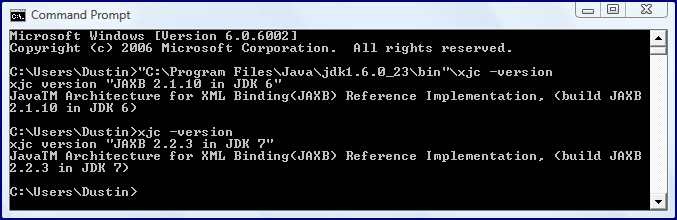
In the article Better JPA, Better JAXB, and Better Annotations Processing with Java SE 6, I wrote about some of the advantages of Java SE 6 having JAXB 2.0 baked into it. It is not uncommon for future versions of Java to include newer versions of dependent libraries and JDK 7 updates JAXB from JAXB 2.1.10 (version since Java SE 6 Update 14) to JAXB 2.2.3 as shown in the next screen snapshot.


As the above screen snapshot shows, the xjc compiler is an easy command-line approach to determining the version of JAXB associated with a particular Java distribution (assuming that xjc is not on the path from a different location). The schemagen tool can also be used to determine the JAXB version.

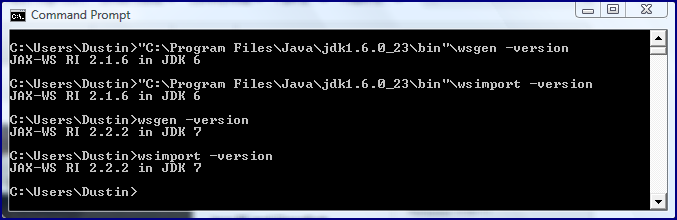
It is similarly easy to determine the version of JAX-WS APIs supported in the Java SE 7 release by asking associated command line tools for their versions. The following screen snapshot demonstrates doing this with the tools wsgen and wsimport.


As indicated in the above screen snapshot, the JDK 1.7.0 b134 release has JAX-WS 2.2.2 associated with it (JAXB 2.1.6 was associated with Java 6 as of Java SE 6 Update 14).

I don't know of an equivalent method to those shown above to determine from the command line what version of JAXP is included with a particular Java distribution. Fortunately, the JDK 7 Documentation includes the JAXP page that states that "the Java Platform, Standard Edition version 7.0 includes JAXP 1.4" and explains that "JAXP 1.4 is a maintenance release of JAXP 1.3 with support for the Streaming API for XML (StAX)."

I expect that the anticipated Release Notes for JDK 7 will formally and conveniently list the versions of these XML-related products included with the JDK distribution.

Thứ Bảy, 19 tháng 2, 2011

Recent Posts of Significant Interest (Java Security, XML, Cloud Computing)

I maintain a list of topics that I would like to blog on sometime in the future. This list continues to grow as I cannot blog quickly enough to keep up with the ideas. In some cases, I simply cannot write the full blog post I'd like in response to a really good blog post and, when enough of them are gathered up, I publish a post like this one that covers multiple blog posts at the same time. In this post, I reference recent online posts that I have really enjoyed on topics such as Java security issues, Javadoc, XML, and cloud computing.


JavaDoc: The unloved child. A pragmatic approach.

One of the things I think it done better in Java than in just about any other language I have used is documentation via Javadoc. I frequently use Javadoc-generated documentation for the Java SE, for the Java EE, and for other products in the Java ecosystem such as JFreeChart and Groovy (which has three!: GDK, Javadoc for Java Classes, and Groovydoc for Groovy and Java Classes). I find using others' Javadoc to generally make it easier to use their APIs (assuming correct documentation!) and I like the ability to have ready access to API documentation online and in my favorite IDE. I also enjoy being able to document how to use my APIs, packages, and classes, in package descriptions. This allows the clients of my APIs to see examples of how to use my API and nicely includes the documentation in the same area/file as the source code itself. In the post JavaDoc: The unloved child. A pragmatic approach., Markus Eisele concisely describes why Javadoc is useful and suggests some tips for making writing and maintaining of Javadoc comments more effective.


XML: Contrary to popular belief, it doesn't always kill babies

We software developers (as a whole) seem to be prone to violent swings between positions on things. Derek Thurn's post XML: Contrary to popular belief, it doesn't always kill babies does a nice job of pointing out how this happened with XML (loved and revered for a while and now not discussed in polite company). As with most of these extreme shifts, neither extreme was appropriate. XML was overhyped for a while and was used in many unnatural ways, but now developers in general (if the blogosphere is at all indicative) seem to wish to avoid XML without regard to the problem. I believe the appropriate position is somewhere in between. Thurn's post briefly discusses situations where alternatives like JSON and YAML are preferable to XML and the outlines two situations where he believes XML is appropriate (and I agree). I also like that Thurn states "XPath turned out to be a godsend" (something I have found as well in my work with XQuery and other things areas where XPath support is useful). It's also very difficult to argue with Thurn's use of SOAP as an example of "terrible things" people have done with XML.


10 Reasons to Say “No” to Cloud Computing?

I like posts that challenge the Lemming Effect. The previously discussed XML post challenges the potential lemming behavior of avoiding XML regardless of whether the situation warrants it or not and is an example of bucking the lemmings' general direction avoiding something (negative reaction). On the other side, it can be just as useful to avoid thoughtless following of lemmings to adopt something (positive reaction). I like 10 Reasons to Say “No” to Cloud Computing? because the author starts out with this:
I have been writing about the benefits of migrating to the Cloud in previous articles but it is also important to highlight in which circumstances the Cloud Computing route may not be the appropriate one.

When I first read this paragraph, I was afraid this post was going to be another one of those that would have ten reasons such as "you want to do things the hard way" and "you like a good challenge." Fortunately, this post turned out to be what was really advertised. The ten reasons are good ones to think about and I also appreciate the author's pointing out that "Cloud Computing is NOT an all-or-nothing decision." No tool or methodology can be all things to all people all the time and I suspect anyone who claims their favorite to do just that. It is much more useful to read from an evangelist of an approach about where that approach fits or does not fit and this post fits into that more useful category. Some people think cloud computing is not a good idea, but it (or portions of it) can be useful when applied correctly in the appropriate situations.


Java Security

Two recent articles of interest related to Java security are RSA: Java is the Most Vulnerable Browser Plug-in and Google extensions could aid Java security.

In "RSA: Java is the Most Vulnerable Browser Plug-in," Sean Michael Kerner reports that Qualys CTO Wolfgang Kandek stated that 42% of monitored web users had "vulnerable out-of-date" Java plug-ins and that this plug-in was the most frequently out-of-date and vulnerable of those measured. Other plug-ins that were vulnerable due to being frequently out of date include Adobe Reader, Apple QuickTime, and Adobe Flash. As I read this, the ranking is not of how vulnerable one plug-in is as compared to another, but how vulnerable they are because they are out-of-date. Kerner also points out that Cisco had reported that Java vulnerabilities are now more exploited than those in Adobe Acrobat and Reader.

Joab Jackson writes that Google Contracts (Contracts for Java or cofoja), which is often advertised as and thought of as an approach for making it easier to appropriately use methods (above and beyond what the previously mentioned Javadoc provides), can also help make Java code more secure. He states that this project based off of Modern Jass can provide some of the same security benefits to Java that Eiffel developers claim are inherent in Eiffel's support for Design by Contract (DbC).


Conclusion

There are far too many interesting and insightful posts about software development to keep up with all of them. In this post, I've tried to summarize and publicize some recent posts that I believe are worth a look if you have not read them already.

Thứ Bảy, 5 tháng 2, 2011

Generating XML Schema with schemagen and Groovy

I have previously blogged on several utilitarian tools that are provided with the Java SE 6 HotSpot SDK such as jstack, javap, and so forth. I focus on another tool in the same $JAVA_HOME/bin (or %JAVA_HOME%\bin directory: schemagen. Although schemagen is typically used in conjunction with web services and/or JAXB, it can be useful in other contexts as well. Specifically, it can be used as an easy way to create a starting point XML Schema Definition (XSD) for someone who is more comfortable with Java than with XML Schema.

We'll begin with a simple Java class called Person to demonstrate the utility of schemagen. This is shown in the next code listing.

package dustin.examples;

public class Person
{
private String lastName;

private String firstName;

private char middleInitial;

private String identifier;

/**
* No-arguments constructor required for 'schemagen' to create XSD from
* this Java class. Without this "no-arg default constructor," this error
* message will be displayed when 'schemagen' is attempted against it:
*
* error: dustin.examples.Person does not have a no-arg default
* constructor.
*/
public Person() {}

public Person(final String newLastName, final String newFirstName)
{
this.lastName = newLastName;
this.firstName = newFirstName;
}

public Person(
final String newLastName,
final String newFirstName,
final char newMiddleInitial)
{
this.lastName = newLastName;
this.firstName = newFirstName;
this.middleInitial = newMiddleInitial;
}

public String getLastName()
{
return this.lastName;
}

public void setLastName(final String newLastName)
{
this.lastName = newLastName;
}

public String getFirstName()
{
return this.firstName;
}

public void setFirstName(final String newFirstName)
{
this.firstName = newFirstName;
}

public char getMiddleInitial()
{
return this.middleInitial;
}
}

The class above is very simple, but is adequate for the first example of employing schemagen. As the comment on the no-arguments constructor in the above code states, a constructor without arguments (sometimes called a "default constructor") must be available in the class. Because other constructors are in this class, it is required that a no-args constructor be explicitly specified. I also intentionally provided get/set (accesor/mutator) methods for some of the fields, only an accessor for one of the fields, and neither for a field to demonstrate that schemagen requires get/set methods to be specified if the schema it generates includes a reference to those attributes.

The next screen snapshot demonstrates the most simple use of schemagen in which the generated XML schema file (.xsd) is generated with the default name of schema1.xsd (there is no current way to control this directly with schemagen) and is placed in the same directory from which the schemagen command is run (output location can be dictated with the -d option).


The generated XSD is shown next.

schema1.xsd
<?xml version="1.0" encoding="UTF-8" standalone="yes"?>
<xs:schema version="1.0" xmlns:xs="http://www.w3.org/2001/XMLSchema">

<xs:complexType name="person">
<xs:sequence>
<xs:element name="firstName" type="xs:string" minOccurs="0"/>
<xs:element name="lastName" type="xs:string" minOccurs="0"/>
</xs:sequence>
</xs:complexType>
</xs:schema>

This is pretty convenient, but is even easier with Groovy. Suppose that one wanted to generate an XSD using schemagen and did not care about or need the original Java class. The following very simple Groovy class could be used. Very little effort is required to write this, but it's compiled .class file can be used with schemagen.

package dustin.examples;

public class Person2
{
String lastName;

String firstName;

char middleInitial;

String identifier;
}

When the above Groovy class is compiled with groovyc, its resulting Person2.class file can be viewed through another useful tool (javap) located in the same directory as schemagen. This is shown in the next screen snapshot. The most important observation is that get/set methods have been automatically generated by Groovy.


When the groovyc-generated .class file is run through schemagen, the XSD is generated and is shown next.

<?xml version="1.0" encoding="UTF-8" standalone="yes"?>
<xs:schema version="1.0" xmlns:xs="http://www.w3.org/2001/XMLSchema">

<xs:complexType name="person2">
<xs:sequence>
<xs:element name="firstName" type="xs:string" minOccurs="0"/>
<xs:element name="identifier" type="xs:string" minOccurs="0"/>
<xs:element name="lastName" type="xs:string" minOccurs="0"/>
<xs:element name="middleInitial" type="xs:unsignedShort"/>
</xs:sequence>
</xs:complexType>
</xs:schema>

Because I did not explicitly state that Groovy's automatic get/set methods should not be applied, all attributes are represented in the XML. Very little Groovy, but XSD nonetheless.

It is interesting to see what happens when the attributes of the Groovy class are untyped. The next Groovy class listing does not explicitly type the class attributes.

package dustin.examples;

public class Person2
{
def lastName;

def firstName;

def middleInitial;

def identifier;
}

When schemagen is run against the above class with untyped attributes, the output XSD looks like this:

<?xml version="1.0" encoding="UTF-8" standalone="yes"?>
<xs:schema version="1.0" xmlns:xs="http://www.w3.org/2001/XMLSchema">

<xs:complexType name="person2">
<xs:sequence>
<xs:element name="firstName" type="xs:anyType" minOccurs="0"/>
<xs:element name="identifier" type="xs:anyType" minOccurs="0"/>
<xs:element name="lastName" type="xs:anyType" minOccurs="0"/>
<xs:element name="middleInitial" type="xs:anyType" minOccurs="0"/>
</xs:sequence>
</xs:complexType>
</xs:schema>

Not surprisingly, the Groovy class with the untyped attributes leads to an XSD with elements of anyType. It is remarkably easy to generate Schema with schemagen from a Groovy class, but what if I don't want an attribute of the class to be part of the generated schema? Explicitly specifying an attribute as private communicates to Groovy to not automatically generate get/set methods and hence schemagen will not generate XSD elements for those attributes. The next Groovy class shows two attributes explicitly defined as private and the resultant XSD from running schemagen against the compiled Groovy class is then shown.

package dustin.examples;

public class Person2
{
String lastName;

String firstName;

/** private modifier prevents auto Groovy set/get methods */
private String middleInitial;

/** private modifier prevents auto Groovy set/get methods */
private String identifier;
}

<?xml version="1.0" encoding="UTF-8" standalone="yes"?>
<xs:schema version="1.0" xmlns:xs="http://www.w3.org/2001/XMLSchema">

<xs:complexType name="person2">
<xs:sequence>
<xs:element name="firstName" type="xs:string" minOccurs="0"/>
<xs:element name="lastName" type="xs:string" minOccurs="0"/>
</xs:sequence>
</xs:complexType>
</xs:schema>

Groovy makes it really easy to generate an XSD. The Groovy code required to do so is barely more than a list of attributes and their data types.


Conclusion

The schemagen tool is a highly useful tool most commonly used in conjunction with web services and with JAXB, but I have found several instances where I have needed to create a "quick and dirty" XSD file for a variety of purposes. Taking advantage of Groovy's automatically generated set/get methods and other Groovy conciseness makes it really easy to generate a simple XSD.

Thứ Sáu, 27 tháng 11, 2009

Slurping XML with Groovy

In the early days of using Java in conjunction with XML, it often seemed more difficult than it should be to use the Java programming language with the XML markup language. Besides the non-trivial and often differently implemented DOM and SAX APIs, simply finding the correct version of Xerces (and later, Crimson) without having too many conflicting versions of that library was also a common problem. This environment led to the creation and successively received JDOM project. Later developments such as the introduction of the standard Java XML parsing API of JAXP (JDK 1.4) and the inclusion of JAXB in Java SE 6 (and other Java/XML binding libraries available separately) would make parsing and working with XML in Java much easier. Groovy continues these advances in ease of Java/XML integration. In this blog post, I look at how use of Groovy's XmlSlurper makes XML parsing refreshingly easy and almost transparent.

The following simple XML code will be used to demonstrate Groovy's XmlSlurper. The XML file for this example is called RockAndRoll.xml.

RockAndRoll.xml

<Albums>
<Album title="Frontiers" artist="Journey" year="1983">
<Song title="Separate Ways" peak="8" />
<Song title="Send Her My Love" peak="23" />
<Song title="Faithfully" peak="12" />
</Album>
<Album title="Hysteria" artist="Def Leppard" year="1987">
<Song title="Hysteria" peak="10" />
<Song title="Animal" peak="19" />
<Song title="Women" />
<Song title="Pour Some Sugar On Me" peak="2" />
<Song title="Love Bites" peak="1" />
<Song title="Armageddon It" peak="3" />
<Song title="Rocket" peak="15" />
</Album>
<Album title="The Joshua Tree" artist="U2" year="1987">
<Song title="With or Without You" peak="1" />
<Song title="I Still Haven't Found What I'm Looking For" peak="1" />
<Song title="Where The Streets Have No Name" peak="13" />
<Song title="In God's Country" peak="14" />
</Album>
<Album title="Songs from the Big Chair" artist="Tears for Fears" year="1985">
<Song title="Shout" peak="1" />
<Song title="Everybody Wants to Rule the World" peak="1" />
<Song title="Head Over Heels" peak="3" />
<Song title="Mothers Talk" peak="27" />
</Album>
</Albums>


The next code snippet shows some Groovy code using XMLSlurper to print out some details based on this source XML. The Groovy script in this case is called slurpXml.groovy.

slurpXml.groovy

#!/usr/bin/env groovy
// slurpXml.groovy
// Demonstrates use of Groovy's XML slurping.
//

albums = new XmlSlurper().parse("RockAndRoll.xml")

albums.Album.each
{
println "${it.@artist}'s album ${it.@title} was released in ${it.@year}."
it.Song.each
{
println "\tFeaturing ${it.@title} that peaked in the U.S. at ${it.@peak}"
}
}


As the Groovy code above demonstrates, only a few lines of code are required to parse the XML and to print out its results as part of longer strings. The single line new XmlSlurper().parse("RockAndRoll.xml") is all it takes to parse the source XML. Then the variable to which those results are assigned (in this case, albums) provides access to the XML content via familiar syntax.

When the Groovy code above is executed, its results look like those shown in the following screen snapshot.


The Groovy User Guide has a section devoted to coverage of Reading XML Using Groovy's XmlSlurper. This section points out additional issues related to using Groovy's XmlSlurper such as dealing with XML tag names that include hyphens (use double quotes around name with hyphen included) and namespace matching details.

Conclusion

Because Groovy really is Java, Groovy can make use of the plethora of XML handling APIs for Java. However, Groovy can and does go beyond this and provides even easier-to-use APIs for XML manipulation. Groovy's XmlSlurper is an example of how Groovy makes XML reading/parsing/slurping easier than ever.

Additional References

Besides the Groovy User Guide section on XmlSlurper, there are many other online resources that cover use of XmlSlurper. I list some of them here.

Reading XML Using Groovy's XmlSlurper

Groovy: Processing Existing XML (6 March 2009)

Practically Groovy: Building, Parsing, and Slurping XML (19 May 2009)

Nothing Makes You Want Groovy More than XML (12 March 2008)

Updating XML with XmlSlurper

Groovy XMLSlurper

Thứ Ba, 27 tháng 1, 2009

Java Properties in XML

Java properties have been a staple of Java development for many years. Even today, Java properties are used in popular frameworks and tools such as the Spring Framework and Ant. Most of the Java properties that I have seen used frequently follow the tried-and-true name=value paradigm. However, since J2SE 5, it has been easy to load (and save) properties in XML format.

In my experience, the typical properties file looks something like that shown next.

examples.properties


url.blog.dustin=http://marxsoftware.blogspot.com/
url.javaworld=http://www.javaworld.com/
url.coloradosoftwaresummit=http://www.softwaresummit.com/
url.otn=http://www.oracle.com/technology/index.html
url.rmoug=http://www.rmoug.org/


J2SE 5 made it easy to load properties from XML (and store properties to XML). The Javadoc-based API documentation for the Properties class discusses both formats. This documentation shows the DTD used to define the Properties XML grammar:


<?xml version="1.0" encoding="UTF-8"?>
<!-- DTD for properties -->
<!ELEMENT properties ( comment?, entry* ) >
<!ATTLIST properties version CDATA #FIXED "1.0">
<!ELEMENT comment (#PCDATA) >
<!ELEMENT entry (#PCDATA) >
<!ATTLIST entry key CDATA #REQUIRED>


The DTD shows us that properties stored in XML must have <properties> as the root element required of well-formed XML and can have zero or one <comment> elements nested in this root tag. We also learn from this DTD that zero to many elements name <entry> are allowed and that an entry element may contain a data body and a single attribute named key. Based on this DTD, we could write a compatible XML-based properties file by hand, but an even easier way to see one is to read in a traditional properties file of name/value pairs and store it back out in XML format. This is exactly what the next Java class, PropertiesExamples, does.

PropertiesExamples.java


package dustin.properties;

import java.io.FileInputStream;
import java.io.FileNotFoundException;
import java.io.FileOutputStream;
import java.io.IOException;
import java.io.OutputStream;
import java.util.Properties;

public class PropertiesExamples
{
/** No-arguments constructor. */
public PropertiesExamples() {}

/**
* Get traditional properties in name=value format.
*
* @param filePathAndName Path and name of properties file (without the
* .properties extension).
* @return Properties read in from provided file.
*/
public Properties loadTraditionalProperties(
final String filePathAndName)
{
final Properties properties = new Properties();
try
{
final FileInputStream in = new FileInputStream(filePathAndName);
properties.load(in);
in.close();
}
catch (FileNotFoundException fnfEx)
{
System.err.println("Could not read properties from file " + filePathAndName);
}
catch (IOException ioEx)
{
System.err.println(
"IOException encountered while reading from " + filePathAndName);
}
return properties;
}

/**
* Store provided properties in XML format.
*
* @param sourceProperties Properties to be stored in XML format.
* @param out OutputStream to which to write XML formatted properties.
*/
public void storeXmlProperties(
final Properties sourceProperties,
final OutputStream out)
{
try
{
sourceProperties.storeToXML(out, "This is easy!");
}
catch (IOException ioEx)
{
System.err.println("ERROR trying to store properties in XML!");
}
}

/**
* Store provided properties in XML format to provided file.
*
* @param sourceProperties Properties to be stored in XML format.
* @param pathAndFileName Path and name of file to which XML-formatted
* properties will be written.
*/
public void storeXmlPropertiesToFile(
final Properties sourceProperties,
final String pathAndFileName)
{
try
{
FileOutputStream fos = new FileOutputStream(pathAndFileName);
storeXmlProperties(sourceProperties, fos);
fos.close();
}
catch (FileNotFoundException fnfEx)
{
System.err.println("ERROR writing to " + pathAndFileName);
}
catch (IOException ioEx)
{
System.err.println(
"ERROR trying to write XML properties to file " + pathAndFileName);
}
}

/**
* Runs main examples.
*
* @param arguments Command-line arguments; none anticipated.
*/
public static void main(final String[] arguments)
{
final PropertiesExamples me = new PropertiesExamples();
final Properties inputProperties =
me.loadTraditionalProperties("examples.properties");
me.storeXmlPropertiesToFile(inputProperties, "examples-xml.properties");
}
}


The class shown above reads in the properties file listed earlier and then writes it back out in XML format. The actual lines of code doing most of the work are small in number, but the many checked exceptions associated with file input/output make the code base much larger.

When this code is run, the following output is generated:

examples-xml.properties


<?xml version="1.0" encoding="UTF-8" standalone="no"?>
<!DOCTYPE properties SYSTEM "http://java.sun.com/dtd/properties.dtd">
<properties>
<comment>This is easy!</comment>
<entry key="url.coloradosoftwaresummit">http://www.softwaresummit.com/</entry>
<entry key="url.rmoug">http://www.rmoug.org/</entry>
<entry key="url.blog.dustin">http://marxsoftware.blogspot.com/</entry>
<entry key="url.javaworld">http://www.javaworld.com/</entry>
<entry key="url.otn">http://www.oracle.com/technology/index.html</entry>
</properties>


This generated XML file contains the same name/value pairs as the traditional properties file shown earlier, can be read in like the traditional version using the Properties.loadFromXML, and includes the comment that was passed to the Properties.storeToXML method.

Conclusion

It is fairly straightforward to load properties from XML and to store them as XML. However, the XML is essentially limited to the same paradigm of name/value pairs as traditional properties files. Therefore, we are unable to take advantage of XML's hierarchical nature to use relationships more complex than one key (name) to one value. The primary reason one might use Java's support for XML-based properties is if XML was being used for other tools or frameworks and the properties in XML were more accessible to the other tool or framework.

Thứ Ba, 11 tháng 11, 2008

Generate XML Schemas from XML with inst2xsd

In an earlier blog entry, I wrote about using Trang to generate XML Schema from an XML source document. In this blog entry, I will look at using Apache XMLBeans's tool called inst2xsd to also generate XML Schema from a source XML file.

In most cases, one would expect to define an XML Schema and then generate XML that is compliant with that schema. However, I have been surprised at the number of times that I have needed to approach XML and XML Schema from a "backwards" perspective. This is usually the case when I am provided with XML from another source and want to use a framework or tool that relies upon an XSD to work properly. For example, if I want to use JAXB's xjc binding compiler to generate Java classes but only have an example XML file and no XSD, a tool like inst2xsd is very helpful for generating that XSD.

The inst2xsd tool is part of Apache XMLBeans and so can be downloaded from one of the Apache download mirrors. The entire ZIP file is relatively small and the tool is located in the bin directory of the unzipped contents.

An attractive feature of inst2xsd is its simplicity. The following screen snapshot shows its relatively simple command usage. This output can be obtained by running inst2xsd without any options or source XML files or by running it with the -help option.


inst2xsd Help/Usage


As the usage/help information indicates, there are multiple XML Schema design patterns that can be employed when using inst2xsd to generate XML Schema files from source XML. The Sun document Introducing Design Patterns in XML Schema provides an overview of the three XML Schema design patterns that inst2xsd supports (Russian Doll, Salami Slice, and Venetian Blind [default in inst2xsd]) and also covers a fourth called Garden of Eden. The same four XML Schema design patterns are also covered in this presentation.

To demonstrate use of inst2xsd, a source XML file is required. The next code listing shows a simple XML file that will be used as the source in this example.


publications.xml


<?xml version="1.0"?>
<publications>

<publication title="Applying Flash to Java: Flex and OpenLaszlo"
publicationDate="2008-10-20"
publisher="Colorado Software Summit"
url="http://softwaresummit.org/2008/speakers/marx.htm"
description="Using Flex and OpenLaszlo with Java EE.">
<topics>
<topic>Flash</topic>
<topic>Java</topic>
<topic>Flex</topic>
<topic>OpenLaszlo</topic>
<topic>RIA</topic>
<topic>Web</topic>
</topics>
</publication>

<publication title="Java Management Extensions (JMX) Circa 2008"
publicationDate="2008-10-21"
publisher="Colorado Software Summit"
url="http://softwaresummit.org/2008/speakers/marx.htm"
description="JMX in 2008 is simpler, more open, and more useful.">
<topics>
<topic>Java Management Extensions</topic>
<topic>JMX</topic>
<topic>Java</topic>
<topic>Spring Framework</topic>
<topic>Web Services</topic>
</topics>
</publication>

<publication title="Basic Java Persistence API Best Practices">
<topics>
<topic>Java</topic>
<topic>JPA</topic>
<topic>ORM</topic>
<topic>Oracle</topic>
<topic>RDBMS</topic>
<topic>Best Practices</topic>
</topics>
</publication>

<publication title="Add Some Spring to Your Oracle JDBC Access"
publicationDate="2005-11"
publisher="Oracle Technology Network"
url="http://www.oracle.com/technology/pub/articles/marx_spring.html"
description="Use Spring Framework JDBC support with Oracle DB.">
<topics>
<topic>Spring Framework</topic>
<topic>Oracle</topic>
<topic>Java</topic>
<topic>JDBC</topic>
<topic>RDBMS</topic>
</topics>
</publication>

<publication title="More JSP Best Practices"
publicationDate="2003-07-25"
publisher="JavaWorld"
url="http://www.javaworld.com/javaworld/jw-07-2003/jw-0725-morejsp.html"
description="More and updated tips for better JavaServer Pages.">
<topics>
<topic>JavaServer Pages</topic>
<topic>JSP</topic>
<topic>Best Practices</topic>
<topic>Maintainability</topic>
<topic>Web</topic>
</topics>
</publication>

<publication title="JSP Best Practices"
publicationDate="2001-11-29"
publisher="JavaWorld"
url="http://www.javaworld.com/javaworld/jw-11-2001/jw-1130-jsp.html"
description="Tips for reusable and maintainable JavaServer Pages.">
<topics>
<topic>JavaServer Pages</topic>
<topic>JSP</topic>
<topic>Best Practices</topic>
<topic>Maintainability</topic>
<topic>Web</topic>
</topics>
</publication>

</publications>


The next screen snapshot shows the inst2xsd command run four times. These four commands specify the three available design patterns (Russian Doll via 'rd', Salami Slice via 'ss', and Venetian Blind via 'vb') as well as the default (no design explicitly specified), which really is equivalent to running it with Venetian Blind specified. The other options used in these commands include explicit specification of the output directory for the generated XSD files and specification of the prefix of the generated file names.


Running inst2xsd with All Available Design Patterns


The next three code listings show the output from running inst2xsd as shown above. Note that I don't show the results of running the default design pattern because they are exactly the same as explicitly specifying Venetian Blind with the 'vb' setting.


russian_doll_schema0.xsd


<?xml version="1.0" encoding="UTF-8"?>
<xs:schema attributeFormDefault="unqualified" elementFormDefault="qualified" xmlns:xs="http://www.w3.org/2001/XMLSchema">
<xs:element name="publications">
<xs:complexType>
<xs:sequence>
<xs:element name="publication" maxOccurs="unbounded" minOccurs="0">
<xs:complexType>
<xs:sequence>
<xs:element name="topics">
<xs:complexType>
<xs:sequence>
<xs:element type="xs:string" name="topic" maxOccurs="unbounded" minOccurs="0"/>
</xs:sequence>
</xs:complexType>
</xs:element>
</xs:sequence>
<xs:attribute type="xs:string" name="title" use="optional"/>
<xs:attribute type="xs:string" name="publicationDate" use="optional"/>
<xs:attribute type="xs:string" name="publisher" use="optional"/>
<xs:attribute type="xs:anyURI" name="url" use="optional"/>
<xs:attribute type="xs:string" name="description" use="optional"/>
</xs:complexType>
</xs:element>
</xs:sequence>
</xs:complexType>
</xs:element>
</xs:schema>


salami_slice_schema0.xsd


<?xml version="1.0" encoding="UTF-8"?>
<xs:schema attributeFormDefault="unqualified" elementFormDefault="qualified" xmlns:xs="http://www.w3.org/2001/XMLSchema">
<xs:element name="topic" type="xs:string"/>
<xs:element name="topics">
<xs:complexType>
<xs:sequence>
<xs:element ref="topic" maxOccurs="unbounded" minOccurs="0"/>
</xs:sequence>
</xs:complexType>
</xs:element>
<xs:element name="publications">
<xs:complexType>
<xs:sequence>
<xs:element ref="publication" maxOccurs="unbounded" minOccurs="0"/>
</xs:sequence>
</xs:complexType>
</xs:element>
<xs:element name="publication">
<xs:complexType>
<xs:sequence>
<xs:element ref="topics"/>
</xs:sequence>
<xs:attribute type="xs:string" name="title" use="optional"/>
<xs:attribute type="xs:string" name="publicationDate" use="optional"/>
<xs:attribute type="xs:string" name="publisher" use="optional"/>
<xs:attribute type="xs:anyURI" name="url" use="optional"/>
<xs:attribute type="xs:string" name="description" use="optional"/>
</xs:complexType>
</xs:element>
</xs:schema>


venetian_blind_schema0.xsd


<?xml version="1.0" encoding="UTF-8"?>
<xs:schema attributeFormDefault="unqualified" elementFormDefault="qualified" xmlns:xs="http://www.w3.org/2001/XMLSchema">
<xs:element name="publications" type="publicationsType"/>
<xs:complexType name="publicationType">
<xs:sequence>
<xs:element type="topicsType" name="topics"/>
</xs:sequence>
<xs:attribute type="xs:string" name="title" use="optional"/>
<xs:attribute type="xs:string" name="publicationDate" use="optional"/>
<xs:attribute type="xs:string" name="publisher" use="optional"/>
<xs:attribute type="xs:anyURI" name="url" use="optional"/>
<xs:attribute type="xs:string" name="description" use="optional"/>
</xs:complexType>
<xs:complexType name="publicationsType">
<xs:sequence>
<xs:element type="publicationType" name="publication" maxOccurs="unbounded" minOccurs="0"/>
</xs:sequence>
</xs:complexType>
<xs:complexType name="topicsType">
<xs:sequence>
<xs:element type="xs:string" name="topic" maxOccurs="unbounded" minOccurs="0"/>
</xs:sequence>
</xs:complexType>
</xs:schema>


The above examples demonstrate how easy it is to generate an XML Schema definition file from an XML source file according to the desired XML Schema design pattern. One can choose the advantages and features he or she desires in a schema and choose the pattern that most closely satisfies those expectations. If you're wondering where the names Russian Doll, Salami Slice, and Venetian Blinds come from in this context or, more specifically, what they have to do with XML Schemas, see this explanation. That same document also explains why different design patterns may be preferable for different situations.

The examples already covered demonstrate the central value of inst2xsd. However, it does have some other nice features as well. For example, as indicated in the usage information shown earlier, the -validate option can be used to validate the source XML against the just-generated XML Schema as part of the XML Schema generation process. This is shown in the next screen snapshot.


Validating Source XML with Generated XML Schema


There is also a -verbose option to see a whole lot of output as part of the XML Schema generation process. Finally, it is worth noting that inst2xsd also requires well-formed XML to generate an XSD. When the source XML is not well-formed, an error message like one of the following will often be displayed:

XML Source Prolog Missing Closing Question Mark


XML Source Not Well-Formed Due to Never-Closed Tag


The Apache XMLBeans tool inst2xsd is a simple but highly useful tool for generating XML Schema files from source XML. The tool allows different XML Schema design patterns to be employed. Once the XML Schema file is generated, it can be manually modified to be more descriptive or more narrow in its definitions.

Thứ Hai, 18 tháng 2, 2008

Use Trang to Generate XML Schema

Trang has been around for a while and is a useful utility for converting between types of XML Schema. In fact, the most recent version for download at the Trang site is version 20030619 (note the date embedded in the version name).

Besides being useful for converting between XML schema definitions, Trang is also useful for generating a new XML schema definition from one or more source XML files. In fact, this use of Trang is the focus of this blog entry. In this blog entry, I will demonstrate how simple it is to apply Trang to generation of W3C XML Schema and DTD definitions from a source XML file.

Oracle provides the highly useful Java OracleXMLQuery class for querying the relational database and provide the query results in XML format. The OracleXMLQuery class provides the setRowsetTag(String) method to specify the Java String to be used as the root tag of the generated XML file containing the query results. Likewise, the OracleXMLQuery.setRowTag(String) method allows one to specify the String label provided for each row element tag in the generated XML file.

The XML below was generated using OracleXMLQuery with the rowset tag specified as "Employees" and the row tag specified as "Employee." The query used to generate this XML was run against the HR schema and is shown next.
SELECT employee_id, first_name, last_name, department_name
FROM employees, departments
WHERE employees.department_id = departments.department_id


The XML generated by OracleXMLQuery is shown next.

employees.xml - XML Generated with OracleXMLQuery
<?xml version = '1.0'?>
<Employees>
<Employee num="1">
<EMPLOYEE_ID>200</EMPLOYEE_ID>
<FIRST_NAME>Jennifer</FIRST_NAME>
<LAST_NAME>Whalen</LAST_NAME>
<DEPARTMENT_NAME>Administration</DEPARTMENT_NAME>
</Employee>
<Employee num="2">
<EMPLOYEE_ID>201</EMPLOYEE_ID>
<FIRST_NAME>Michael</FIRST_NAME>
<LAST_NAME>Hartstein</LAST_NAME>
<DEPARTMENT_NAME>Marketing</DEPARTMENT_NAME>
</Employee>
<Employee num="3">
<EMPLOYEE_ID>202</EMPLOYEE_ID>
<FIRST_NAME>Pat</FIRST_NAME>
<LAST_NAME>Fay</LAST_NAME>
<DEPARTMENT_NAME>Marketing</DEPARTMENT_NAME>
</Employee>
<Employee num="4">
<EMPLOYEE_ID>114</EMPLOYEE_ID>
<FIRST_NAME>Den</FIRST_NAME>
<LAST_NAME>Raphaely</LAST_NAME>
<DEPARTMENT_NAME>Purchasing</DEPARTMENT_NAME>
</Employee>
<Employee num="5">
<EMPLOYEE_ID>119</EMPLOYEE_ID>
<FIRST_NAME>Karen</FIRST_NAME>
<LAST_NAME>Colmenares</LAST_NAME>
<DEPARTMENT_NAME>Purchasing</DEPARTMENT_NAME>
</Employee>
<Employee num="6">
<EMPLOYEE_ID>115</EMPLOYEE_ID>
<FIRST_NAME>Alexander</FIRST_NAME>
<LAST_NAME>Khoo</LAST_NAME>
<DEPARTMENT_NAME>Purchasing</DEPARTMENT_NAME>
</Employee>
<Employee num="7">
<EMPLOYEE_ID>116</EMPLOYEE_ID>
<FIRST_NAME>Shelli</FIRST_NAME>
<LAST_NAME>Baida</LAST_NAME>
<DEPARTMENT_NAME>Purchasing</DEPARTMENT_NAME>
</Employee>
<Employee num="8">
<EMPLOYEE_ID>117</EMPLOYEE_ID>
<FIRST_NAME>Sigal</FIRST_NAME>
<LAST_NAME>Tobias</LAST_NAME>
<DEPARTMENT_NAME>Purchasing</DEPARTMENT_NAME>
</Employee>
<Employee num="9">
<EMPLOYEE_ID>118</EMPLOYEE_ID>
<FIRST_NAME>Guy</FIRST_NAME>
<LAST_NAME>Himuro</LAST_NAME>
<DEPARTMENT_NAME>Purchasing</DEPARTMENT_NAME>
</Employee>
<Employee num="10">
<EMPLOYEE_ID>203</EMPLOYEE_ID>
<FIRST_NAME>Susan</FIRST_NAME>
<LAST_NAME>Mavris</LAST_NAME>
<DEPARTMENT_NAME>Human Resources</DEPARTMENT_NAME>
</Employee>
<Employee num="11">
<EMPLOYEE_ID>198</EMPLOYEE_ID>
<FIRST_NAME>Donald</FIRST_NAME>
<LAST_NAME>OConnell</LAST_NAME>
<DEPARTMENT_NAME>Shipping</DEPARTMENT_NAME>
</Employee>
<Employee num="12">
<EMPLOYEE_ID>199</EMPLOYEE_ID>
<FIRST_NAME>Douglas</FIRST_NAME>
<LAST_NAME>Grant</LAST_NAME>
<DEPARTMENT_NAME>Shipping</DEPARTMENT_NAME>
</Employee>
<Employee num="13">
<EMPLOYEE_ID>120</EMPLOYEE_ID>
<FIRST_NAME>Matthew</FIRST_NAME>
<LAST_NAME>Weiss</LAST_NAME>
<DEPARTMENT_NAME>Shipping</DEPARTMENT_NAME>
</Employee>
<Employee num="14">
<EMPLOYEE_ID>121</EMPLOYEE_ID>
<FIRST_NAME>Adam</FIRST_NAME>
<LAST_NAME>Fripp</LAST_NAME>
<DEPARTMENT_NAME>Shipping</DEPARTMENT_NAME>
</Employee>
<Employee num="15">
<EMPLOYEE_ID>122</EMPLOYEE_ID>
<FIRST_NAME>Payam</FIRST_NAME>
<LAST_NAME>Kaufling</LAST_NAME>
<DEPARTMENT_NAME>Shipping</DEPARTMENT_NAME>
</Employee>
<Employee num="16">
<EMPLOYEE_ID>123</EMPLOYEE_ID>
<FIRST_NAME>Shanta</FIRST_NAME>
<LAST_NAME>Vollman</LAST_NAME>
<DEPARTMENT_NAME>Shipping</DEPARTMENT_NAME>
</Employee>
<Employee num="17">
<EMPLOYEE_ID>124</EMPLOYEE_ID>
<FIRST_NAME>Kevin</FIRST_NAME>
<LAST_NAME>Mourgos</LAST_NAME>
<DEPARTMENT_NAME>Shipping</DEPARTMENT_NAME>
</Employee>
<Employee num="18">
<EMPLOYEE_ID>125</EMPLOYEE_ID>
<FIRST_NAME>Julia</FIRST_NAME>
<LAST_NAME>Nayer</LAST_NAME>
<DEPARTMENT_NAME>Shipping</DEPARTMENT_NAME>
</Employee>
<Employee num="19">
<EMPLOYEE_ID>126</EMPLOYEE_ID>
<FIRST_NAME>Irene</FIRST_NAME>
<LAST_NAME>Mikkilineni</LAST_NAME>
<DEPARTMENT_NAME>Shipping</DEPARTMENT_NAME>
</Employee>
<Employee num="20">
<EMPLOYEE_ID>127</EMPLOYEE_ID>
<FIRST_NAME>James</FIRST_NAME>
<LAST_NAME>Landry</LAST_NAME>
<DEPARTMENT_NAME>Shipping</DEPARTMENT_NAME>
</Employee>
<Employee num="21">
<EMPLOYEE_ID>128</EMPLOYEE_ID>
<FIRST_NAME>Steven</FIRST_NAME>
<LAST_NAME>Markle</LAST_NAME>
<DEPARTMENT_NAME>Shipping</DEPARTMENT_NAME>
</Employee>
<Employee num="22">
<EMPLOYEE_ID>129</EMPLOYEE_ID>
<FIRST_NAME>Laura</FIRST_NAME>
<LAST_NAME>Bissot</LAST_NAME>
<DEPARTMENT_NAME>Shipping</DEPARTMENT_NAME>
</Employee>
<Employee num="23">
<EMPLOYEE_ID>130</EMPLOYEE_ID>
<FIRST_NAME>Mozhe</FIRST_NAME>
<LAST_NAME>Atkinson</LAST_NAME>
<DEPARTMENT_NAME>Shipping</DEPARTMENT_NAME>
</Employee>
<Employee num="24">
<EMPLOYEE_ID>131</EMPLOYEE_ID>
<FIRST_NAME>James</FIRST_NAME>
<LAST_NAME>Marlow</LAST_NAME>
<DEPARTMENT_NAME>Shipping</DEPARTMENT_NAME>
</Employee>
<Employee num="25">
<EMPLOYEE_ID>132</EMPLOYEE_ID>
<FIRST_NAME>TJ</FIRST_NAME>
<LAST_NAME>Olson</LAST_NAME>
<DEPARTMENT_NAME>Shipping</DEPARTMENT_NAME>
</Employee>
<Employee num="26">
<EMPLOYEE_ID>133</EMPLOYEE_ID>
<FIRST_NAME>Jason</FIRST_NAME>
<LAST_NAME>Mallin</LAST_NAME>
<DEPARTMENT_NAME>Shipping</DEPARTMENT_NAME>
</Employee>
<Employee num="27">
<EMPLOYEE_ID>134</EMPLOYEE_ID>
<FIRST_NAME>Michael</FIRST_NAME>
<LAST_NAME>Rogers</LAST_NAME>
<DEPARTMENT_NAME>Shipping</DEPARTMENT_NAME>
</Employee>
<Employee num="28">
<EMPLOYEE_ID>135</EMPLOYEE_ID>
<FIRST_NAME>Ki</FIRST_NAME>
<LAST_NAME>Gee</LAST_NAME>
<DEPARTMENT_NAME>Shipping</DEPARTMENT_NAME>
</Employee>
<Employee num="29">
<EMPLOYEE_ID>136</EMPLOYEE_ID>
<FIRST_NAME>Hazel</FIRST_NAME>
<LAST_NAME>Philtanker</LAST_NAME>
<DEPARTMENT_NAME>Shipping</DEPARTMENT_NAME>
</Employee>
<Employee num="30">
<EMPLOYEE_ID>137</EMPLOYEE_ID>
<FIRST_NAME>Renske</FIRST_NAME>
<LAST_NAME>Ladwig</LAST_NAME>
<DEPARTMENT_NAME>Shipping</DEPARTMENT_NAME>
</Employee>
<Employee num="31">
<EMPLOYEE_ID>138</EMPLOYEE_ID>
<FIRST_NAME>Stephen</FIRST_NAME>
<LAST_NAME>Stiles</LAST_NAME>
<DEPARTMENT_NAME>Shipping</DEPARTMENT_NAME>
</Employee>
<Employee num="32">
<EMPLOYEE_ID>139</EMPLOYEE_ID>
<FIRST_NAME>John</FIRST_NAME>
<LAST_NAME>Seo</LAST_NAME>
<DEPARTMENT_NAME>Shipping</DEPARTMENT_NAME>
</Employee>
<Employee num="33">
<EMPLOYEE_ID>140</EMPLOYEE_ID>
<FIRST_NAME>Joshua</FIRST_NAME>
<LAST_NAME>Patel</LAST_NAME>
<DEPARTMENT_NAME>Shipping</DEPARTMENT_NAME>
</Employee>
<Employee num="34">
<EMPLOYEE_ID>141</EMPLOYEE_ID>
<FIRST_NAME>Trenna</FIRST_NAME>
<LAST_NAME>Rajs</LAST_NAME>
<DEPARTMENT_NAME>Shipping</DEPARTMENT_NAME>
</Employee>
<Employee num="35">
<EMPLOYEE_ID>142</EMPLOYEE_ID>
<FIRST_NAME>Curtis</FIRST_NAME>
<LAST_NAME>Davies</LAST_NAME>
<DEPARTMENT_NAME>Shipping</DEPARTMENT_NAME>
</Employee>
<Employee num="36">
<EMPLOYEE_ID>143</EMPLOYEE_ID>
<FIRST_NAME>Randall</FIRST_NAME>
<LAST_NAME>Matos</LAST_NAME>
<DEPARTMENT_NAME>Shipping</DEPARTMENT_NAME>
</Employee>
<Employee num="37">
<EMPLOYEE_ID>144</EMPLOYEE_ID>
<FIRST_NAME>Peter</FIRST_NAME>
<LAST_NAME>Vargas</LAST_NAME>
<DEPARTMENT_NAME>Shipping</DEPARTMENT_NAME>
</Employee>
<Employee num="38">
<EMPLOYEE_ID>180</EMPLOYEE_ID>
<FIRST_NAME>Winston</FIRST_NAME>
<LAST_NAME>Taylor</LAST_NAME>
<DEPARTMENT_NAME>Shipping</DEPARTMENT_NAME>
</Employee>
<Employee num="39">
<EMPLOYEE_ID>181</EMPLOYEE_ID>
<FIRST_NAME>Jean</FIRST_NAME>
<LAST_NAME>Fleaur</LAST_NAME>
<DEPARTMENT_NAME>Shipping</DEPARTMENT_NAME>
</Employee>
<Employee num="40">
<EMPLOYEE_ID>182</EMPLOYEE_ID>
<FIRST_NAME>Martha</FIRST_NAME>
<LAST_NAME>Sullivan</LAST_NAME>
<DEPARTMENT_NAME>Shipping</DEPARTMENT_NAME>
</Employee>
<Employee num="41">
<EMPLOYEE_ID>183</EMPLOYEE_ID>
<FIRST_NAME>Girard</FIRST_NAME>
<LAST_NAME>Geoni</LAST_NAME>
<DEPARTMENT_NAME>Shipping</DEPARTMENT_NAME>
</Employee>
<Employee num="42">
<EMPLOYEE_ID>184</EMPLOYEE_ID>
<FIRST_NAME>Nandita</FIRST_NAME>
<LAST_NAME>Sarchand</LAST_NAME>
<DEPARTMENT_NAME>Shipping</DEPARTMENT_NAME>
</Employee>
<Employee num="43">
<EMPLOYEE_ID>185</EMPLOYEE_ID>
<FIRST_NAME>Alexis</FIRST_NAME>
<LAST_NAME>Bull</LAST_NAME>
<DEPARTMENT_NAME>Shipping</DEPARTMENT_NAME>
</Employee>
<Employee num="44">
<EMPLOYEE_ID>186</EMPLOYEE_ID>
<FIRST_NAME>Julia</FIRST_NAME>
<LAST_NAME>Dellinger</LAST_NAME>
<DEPARTMENT_NAME>Shipping</DEPARTMENT_NAME>
</Employee>
<Employee num="45">
<EMPLOYEE_ID>187</EMPLOYEE_ID>
<FIRST_NAME>Anthony</FIRST_NAME>
<LAST_NAME>Cabrio</LAST_NAME>
<DEPARTMENT_NAME>Shipping</DEPARTMENT_NAME>
</Employee>
<Employee num="46">
<EMPLOYEE_ID>188</EMPLOYEE_ID>
<FIRST_NAME>Kelly</FIRST_NAME>
<LAST_NAME>Chung</LAST_NAME>
<DEPARTMENT_NAME>Shipping</DEPARTMENT_NAME>
</Employee>
<Employee num="47">
<EMPLOYEE_ID>189</EMPLOYEE_ID>
<FIRST_NAME>Jennifer</FIRST_NAME>
<LAST_NAME>Dilly</LAST_NAME>
<DEPARTMENT_NAME>Shipping</DEPARTMENT_NAME>
</Employee>
<Employee num="48">
<EMPLOYEE_ID>190</EMPLOYEE_ID>
<FIRST_NAME>Timothy</FIRST_NAME>
<LAST_NAME>Gates</LAST_NAME>
<DEPARTMENT_NAME>Shipping</DEPARTMENT_NAME>
</Employee>
<Employee num="49">
<EMPLOYEE_ID>191</EMPLOYEE_ID>
<FIRST_NAME>Randall</FIRST_NAME>
<LAST_NAME>Perkins</LAST_NAME>
<DEPARTMENT_NAME>Shipping</DEPARTMENT_NAME>
</Employee>
<Employee num="50">
<EMPLOYEE_ID>192</EMPLOYEE_ID>
<FIRST_NAME>Sarah</FIRST_NAME>
<LAST_NAME>Bell</LAST_NAME>
<DEPARTMENT_NAME>Shipping</DEPARTMENT_NAME>
</Employee>
<Employee num="51">
<EMPLOYEE_ID>193</EMPLOYEE_ID>
<FIRST_NAME>Britney</FIRST_NAME>
<LAST_NAME>Everett</LAST_NAME>
<DEPARTMENT_NAME>Shipping</DEPARTMENT_NAME>
</Employee>
<Employee num="52">
<EMPLOYEE_ID>194</EMPLOYEE_ID>
<FIRST_NAME>Samuel</FIRST_NAME>
<LAST_NAME>McCain</LAST_NAME>
<DEPARTMENT_NAME>Shipping</DEPARTMENT_NAME>
</Employee>
<Employee num="53">
<EMPLOYEE_ID>195</EMPLOYEE_ID>
<FIRST_NAME>Vance</FIRST_NAME>
<LAST_NAME>Jones</LAST_NAME>
<DEPARTMENT_NAME>Shipping</DEPARTMENT_NAME>
</Employee>
<Employee num="54">
<EMPLOYEE_ID>196</EMPLOYEE_ID>
<FIRST_NAME>Alana</FIRST_NAME>
<LAST_NAME>Walsh</LAST_NAME>
<DEPARTMENT_NAME>Shipping</DEPARTMENT_NAME>
</Employee>
<Employee num="55">
<EMPLOYEE_ID>197</EMPLOYEE_ID>
<FIRST_NAME>Kevin</FIRST_NAME>
<LAST_NAME>Feeney</LAST_NAME>
<DEPARTMENT_NAME>Shipping</DEPARTMENT_NAME>
</Employee>
<Employee num="56">
<EMPLOYEE_ID>104</EMPLOYEE_ID>
<FIRST_NAME>Bruce</FIRST_NAME>
<LAST_NAME>Ernst</LAST_NAME>
<DEPARTMENT_NAME>IT</DEPARTMENT_NAME>
</Employee>
<Employee num="57">
<EMPLOYEE_ID>103</EMPLOYEE_ID>
<FIRST_NAME>Alexander</FIRST_NAME>
<LAST_NAME>Hunold</LAST_NAME>
<DEPARTMENT_NAME>IT</DEPARTMENT_NAME>
</Employee>
<Employee num="58">
<EMPLOYEE_ID>107</EMPLOYEE_ID>
<FIRST_NAME>Diana</FIRST_NAME>
<LAST_NAME>Lorentz</LAST_NAME>
<DEPARTMENT_NAME>IT</DEPARTMENT_NAME>
</Employee>
<Employee num="59">
<EMPLOYEE_ID>106</EMPLOYEE_ID>
<FIRST_NAME>Valli</FIRST_NAME>
<LAST_NAME>Pataballa</LAST_NAME>
<DEPARTMENT_NAME>IT</DEPARTMENT_NAME>
</Employee>
<Employee num="60">
<EMPLOYEE_ID>105</EMPLOYEE_ID>
<FIRST_NAME>David</FIRST_NAME>
<LAST_NAME>Austin</LAST_NAME>
<DEPARTMENT_NAME>IT</DEPARTMENT_NAME>
</Employee>
<Employee num="61">
<EMPLOYEE_ID>204</EMPLOYEE_ID>
<FIRST_NAME>Hermann</FIRST_NAME>
<LAST_NAME>Baer</LAST_NAME>
<DEPARTMENT_NAME>Public Relations</DEPARTMENT_NAME>
</Employee>
<Employee num="62">
<EMPLOYEE_ID>176</EMPLOYEE_ID>
<FIRST_NAME>Jonathon</FIRST_NAME>
<LAST_NAME>Taylor</LAST_NAME>
<DEPARTMENT_NAME>Sales</DEPARTMENT_NAME>
</Employee>
<Employee num="63">
<EMPLOYEE_ID>177</EMPLOYEE_ID>
<FIRST_NAME>Jack</FIRST_NAME>
<LAST_NAME>Livingston</LAST_NAME>
<DEPARTMENT_NAME>Sales</DEPARTMENT_NAME>
</Employee>
<Employee num="64">
<EMPLOYEE_ID>179</EMPLOYEE_ID>
<FIRST_NAME>Charles</FIRST_NAME>
<LAST_NAME>Johnson</LAST_NAME>
<DEPARTMENT_NAME>Sales</DEPARTMENT_NAME>
</Employee>
<Employee num="65">
<EMPLOYEE_ID>175</EMPLOYEE_ID>
<FIRST_NAME>Alyssa</FIRST_NAME>
<LAST_NAME>Hutton</LAST_NAME>
<DEPARTMENT_NAME>Sales</DEPARTMENT_NAME>
</Employee>
<Employee num="66">
<EMPLOYEE_ID>174</EMPLOYEE_ID>
<FIRST_NAME>Ellen</FIRST_NAME>
<LAST_NAME>Abel</LAST_NAME>
<DEPARTMENT_NAME>Sales</DEPARTMENT_NAME>
</Employee>
<Employee num="67">
<EMPLOYEE_ID>173</EMPLOYEE_ID>
<FIRST_NAME>Sundita</FIRST_NAME>
<LAST_NAME>Kumar</LAST_NAME>
<DEPARTMENT_NAME>Sales</DEPARTMENT_NAME>
</Employee>
<Employee num="68">
<EMPLOYEE_ID>172</EMPLOYEE_ID>
<FIRST_NAME>Elizabeth</FIRST_NAME>
<LAST_NAME>Bates</LAST_NAME>
<DEPARTMENT_NAME>Sales</DEPARTMENT_NAME>
</Employee>
<Employee num="69">
<EMPLOYEE_ID>171</EMPLOYEE_ID>
<FIRST_NAME>William</FIRST_NAME>
<LAST_NAME>Smith</LAST_NAME>
<DEPARTMENT_NAME>Sales</DEPARTMENT_NAME>
</Employee>
<Employee num="70">
<EMPLOYEE_ID>170</EMPLOYEE_ID>
<FIRST_NAME>Tayler</FIRST_NAME>
<LAST_NAME>Fox</LAST_NAME>
<DEPARTMENT_NAME>Sales</DEPARTMENT_NAME>
</Employee>
<Employee num="71">
<EMPLOYEE_ID>169</EMPLOYEE_ID>
<FIRST_NAME>Harrison</FIRST_NAME>
<LAST_NAME>Bloom</LAST_NAME>
<DEPARTMENT_NAME>Sales</DEPARTMENT_NAME>
</Employee>
<Employee num="72">
<EMPLOYEE_ID>168</EMPLOYEE_ID>
<FIRST_NAME>Lisa</FIRST_NAME>
<LAST_NAME>Ozer</LAST_NAME>
<DEPARTMENT_NAME>Sales</DEPARTMENT_NAME>
</Employee>
<Employee num="73">
<EMPLOYEE_ID>145</EMPLOYEE_ID>
<FIRST_NAME>John</FIRST_NAME>
<LAST_NAME>Russell</LAST_NAME>
<DEPARTMENT_NAME>Sales</DEPARTMENT_NAME>
</Employee>
<Employee num="74">
<EMPLOYEE_ID>146</EMPLOYEE_ID>
<FIRST_NAME>Karen</FIRST_NAME>
<LAST_NAME>Partners</LAST_NAME>
<DEPARTMENT_NAME>Sales</DEPARTMENT_NAME>
</Employee>
<Employee num="75">
<EMPLOYEE_ID>147</EMPLOYEE_ID>
<FIRST_NAME>Alberto</FIRST_NAME>
<LAST_NAME>Errazuriz</LAST_NAME>
<DEPARTMENT_NAME>Sales</DEPARTMENT_NAME>
</Employee>
<Employee num="76">
<EMPLOYEE_ID>148</EMPLOYEE_ID>
<FIRST_NAME>Gerald</FIRST_NAME>
<LAST_NAME>Cambrault</LAST_NAME>
<DEPARTMENT_NAME>Sales</DEPARTMENT_NAME>
</Employee>
<Employee num="77">
<EMPLOYEE_ID>149</EMPLOYEE_ID>
<FIRST_NAME>Eleni</FIRST_NAME>
<LAST_NAME>Zlotkey</LAST_NAME>
<DEPARTMENT_NAME>Sales</DEPARTMENT_NAME>
</Employee>
<Employee num="78">
<EMPLOYEE_ID>150</EMPLOYEE_ID>
<FIRST_NAME>Peter</FIRST_NAME>
<LAST_NAME>Tucker</LAST_NAME>
<DEPARTMENT_NAME>Sales</DEPARTMENT_NAME>
</Employee>
<Employee num="79">
<EMPLOYEE_ID>151</EMPLOYEE_ID>
<FIRST_NAME>David</FIRST_NAME>
<LAST_NAME>Bernstein</LAST_NAME>
<DEPARTMENT_NAME>Sales</DEPARTMENT_NAME>
</Employee>
<Employee num="80">
<EMPLOYEE_ID>152</EMPLOYEE_ID>
<FIRST_NAME>Peter</FIRST_NAME>
<LAST_NAME>Hall</LAST_NAME>
<DEPARTMENT_NAME>Sales</DEPARTMENT_NAME>
</Employee>
<Employee num="81">
<EMPLOYEE_ID>153</EMPLOYEE_ID>
<FIRST_NAME>Christopher</FIRST_NAME>
<LAST_NAME>Olsen</LAST_NAME>
<DEPARTMENT_NAME>Sales</DEPARTMENT_NAME>
</Employee>
<Employee num="82">
<EMPLOYEE_ID>154</EMPLOYEE_ID>
<FIRST_NAME>Nanette</FIRST_NAME>
<LAST_NAME>Cambrault</LAST_NAME>
<DEPARTMENT_NAME>Sales</DEPARTMENT_NAME>
</Employee>
<Employee num="83">
<EMPLOYEE_ID>155</EMPLOYEE_ID>
<FIRST_NAME>Oliver</FIRST_NAME>
<LAST_NAME>Tuvault</LAST_NAME>
<DEPARTMENT_NAME>Sales</DEPARTMENT_NAME>
</Employee>
<Employee num="84">
<EMPLOYEE_ID>156</EMPLOYEE_ID>
<FIRST_NAME>Janette</FIRST_NAME>
<LAST_NAME>King</LAST_NAME>
<DEPARTMENT_NAME>Sales</DEPARTMENT_NAME>
</Employee>
<Employee num="85">
<EMPLOYEE_ID>157</EMPLOYEE_ID>
<FIRST_NAME>Patrick</FIRST_NAME>
<LAST_NAME>Sully</LAST_NAME>
<DEPARTMENT_NAME>Sales</DEPARTMENT_NAME>
</Employee>
<Employee num="86">
<EMPLOYEE_ID>158</EMPLOYEE_ID>
<FIRST_NAME>Allan</FIRST_NAME>
<LAST_NAME>McEwen</LAST_NAME>
<DEPARTMENT_NAME>Sales</DEPARTMENT_NAME>
</Employee>
<Employee num="87">
<EMPLOYEE_ID>159</EMPLOYEE_ID>
<FIRST_NAME>Lindsey</FIRST_NAME>
<LAST_NAME>Smith</LAST_NAME>
<DEPARTMENT_NAME>Sales</DEPARTMENT_NAME>
</Employee>
<Employee num="88">
<EMPLOYEE_ID>160</EMPLOYEE_ID>
<FIRST_NAME>Louise</FIRST_NAME>
<LAST_NAME>Doran</LAST_NAME>
<DEPARTMENT_NAME>Sales</DEPARTMENT_NAME>
</Employee>
<Employee num="89">
<EMPLOYEE_ID>161</EMPLOYEE_ID>
<FIRST_NAME>Sarath</FIRST_NAME>
<LAST_NAME>Sewall</LAST_NAME>
<DEPARTMENT_NAME>Sales</DEPARTMENT_NAME>
</Employee>
<Employee num="90">
<EMPLOYEE_ID>162</EMPLOYEE_ID>
<FIRST_NAME>Clara</FIRST_NAME>
<LAST_NAME>Vishney</LAST_NAME>
<DEPARTMENT_NAME>Sales</DEPARTMENT_NAME>
</Employee>
<Employee num="91">
<EMPLOYEE_ID>163</EMPLOYEE_ID>
<FIRST_NAME>Danielle</FIRST_NAME>
<LAST_NAME>Greene</LAST_NAME>
<DEPARTMENT_NAME>Sales</DEPARTMENT_NAME>
</Employee>
<Employee num="92">
<EMPLOYEE_ID>164</EMPLOYEE_ID>
<FIRST_NAME>Mattea</FIRST_NAME>
<LAST_NAME>Marvins</LAST_NAME>
<DEPARTMENT_NAME>Sales</DEPARTMENT_NAME>
</Employee>
<Employee num="93">
<EMPLOYEE_ID>165</EMPLOYEE_ID>
<FIRST_NAME>David</FIRST_NAME>
<LAST_NAME>Lee</LAST_NAME>
<DEPARTMENT_NAME>Sales</DEPARTMENT_NAME>
</Employee>
<Employee num="94">
<EMPLOYEE_ID>166</EMPLOYEE_ID>
<FIRST_NAME>Sundar</FIRST_NAME>
<LAST_NAME>Ande</LAST_NAME>
<DEPARTMENT_NAME>Sales</DEPARTMENT_NAME>
</Employee>
<Employee num="95">
<EMPLOYEE_ID>167</EMPLOYEE_ID>
<FIRST_NAME>Amit</FIRST_NAME>
<LAST_NAME>Banda</LAST_NAME>
<DEPARTMENT_NAME>Sales</DEPARTMENT_NAME>
</Employee>
<Employee num="96">
<EMPLOYEE_ID>101</EMPLOYEE_ID>
<FIRST_NAME>Neena</FIRST_NAME>
<LAST_NAME>Kochhar</LAST_NAME>
<DEPARTMENT_NAME>Executive</DEPARTMENT_NAME>
</Employee>
<Employee num="97">
<EMPLOYEE_ID>100</EMPLOYEE_ID>
<FIRST_NAME>Steven</FIRST_NAME>
<LAST_NAME>King</LAST_NAME>
<DEPARTMENT_NAME>Executive</DEPARTMENT_NAME>
</Employee>
<Employee num="98">
<EMPLOYEE_ID>102</EMPLOYEE_ID>
<FIRST_NAME>Lex</FIRST_NAME>
<LAST_NAME>De Haan</LAST_NAME>
<DEPARTMENT_NAME>Executive</DEPARTMENT_NAME>
</Employee>
<Employee num="99">
<EMPLOYEE_ID>110</EMPLOYEE_ID>
<FIRST_NAME>John</FIRST_NAME>
<LAST_NAME>Chen</LAST_NAME>
<DEPARTMENT_NAME>Finance</DEPARTMENT_NAME>
</Employee>
<Employee num="100">
<EMPLOYEE_ID>108</EMPLOYEE_ID>
<FIRST_NAME>Nancy</FIRST_NAME>
<LAST_NAME>Greenberg</LAST_NAME>
<DEPARTMENT_NAME>Finance</DEPARTMENT_NAME>
</Employee>
<Employee num="101">
<EMPLOYEE_ID>111</EMPLOYEE_ID>
<FIRST_NAME>Ismael</FIRST_NAME>
<LAST_NAME>Sciarra</LAST_NAME>
<DEPARTMENT_NAME>Finance</DEPARTMENT_NAME>
</Employee>
<Employee num="102">
<EMPLOYEE_ID>112</EMPLOYEE_ID>
<FIRST_NAME>Jose Manuel</FIRST_NAME>
<LAST_NAME>Urman</LAST_NAME>
<DEPARTMENT_NAME>Finance</DEPARTMENT_NAME>
</Employee>
<Employee num="103">
<EMPLOYEE_ID>113</EMPLOYEE_ID>
<FIRST_NAME>Luis</FIRST_NAME>
<LAST_NAME>Popp</LAST_NAME>
<DEPARTMENT_NAME>Finance</DEPARTMENT_NAME>
</Employee>
<Employee num="104">
<EMPLOYEE_ID>109</EMPLOYEE_ID>
<FIRST_NAME>Daniel</FIRST_NAME>
<LAST_NAME>Faviet</LAST_NAME>
<DEPARTMENT_NAME>Finance</DEPARTMENT_NAME>
</Employee>
<Employee num="105">
<EMPLOYEE_ID>206</EMPLOYEE_ID>
<FIRST_NAME>William</FIRST_NAME>
<LAST_NAME>Gietz</LAST_NAME>
<DEPARTMENT_NAME>Accounting</DEPARTMENT_NAME>
</Employee>
<Employee num="106">
<EMPLOYEE_ID>205</EMPLOYEE_ID>
<FIRST_NAME>Shelley</FIRST_NAME>
<LAST_NAME>Higgins</LAST_NAME>
<DEPARTMENT_NAME>Accounting</DEPARTMENT_NAME>
</Employee>
</Employees>


Note that this generated XML has the "Employees" root tag and "Employee" row tags just as we specified with OracleXMLQuery. The rest of the XML elements are named based on the names of the columns in the SELECT statement and are all in uppercase. These individual element names correspond with the four columns in the SELECT clause.

It is useful to have the XML shown above generated by OracleXMLQuery, but XML is often much more useful if we have a schema defining it. This is especially true if using technologies such as web services that require an XML schema. When you have example XML files but lack a schema definition for them, Trang comes to the rescue.

The next screen snapshot (click on image to see larger version) displays the Trang help menu when unzipped from its downloadable ZIP file and executed with the Java launcher using the java -jar trang.jar command (trang.jar is an executable JAR) without any options.


To generate a W3C XML Schema that defines the generated XML shown above, run the executable trang.jar command again, but this time specify an input file (the generated XML shown above) and specify an output file after that. In this case, I am running this command as: java -jar trang.jar employees.xml employees.xsd. Trang detects that I want the a W3C XML Schema definition generated for the provided XML file because it recognizes the first listed argument as an XML file based on its extension (.xml) and recognizes the target format based on its extension (.xsd). The Trang manual also explains that you can use explicit options to specify the types of conversions to take place if you don't want to rely solely on file extensions.

When the executable JAR trang.jar is executed as described above, the XSD file is generated that describes the input XML file. That generated XSD file is shown next:

employees.xsd - W3C XML Schema Generated by Trang
<?xml version="1.0" encoding="UTF-8"?>
<xs:schema xmlns:xs="http://www.w3.org/2001/XMLSchema" elementFormDefault="qualified">
<xs:element name="Employees">
<xs:complexType>
<xs:sequence>
<xs:element maxOccurs="unbounded" ref="Employee"/>
</xs:sequence>
</xs:complexType>
</xs:element>
<xs:element name="Employee">
<xs:complexType>
<xs:sequence>
<xs:element ref="EMPLOYEE_ID"/>
<xs:element ref="FIRST_NAME"/>
<xs:element ref="LAST_NAME"/>
<xs:element ref="DEPARTMENT_NAME"/>
</xs:sequence>
<xs:attribute name="num" use="required" type="xs:integer"/>
</xs:complexType>
</xs:element>
<xs:element name="EMPLOYEE_ID" type="xs:integer"/>
<xs:element name="FIRST_NAME" type="xs:string"/>
<xs:element name="LAST_NAME" type="xs:string"/>
<xs:element name="DEPARTMENT_NAME" type="xs:string"/>
</xs:schema>


Without much effort on my part, I have a W3C XML Schema file that describes my generated XML. In practical terms, I am likely still going to need to narrow down some of the definitions because it is no surprise that Trang cannot detect more granular datatypes than general types like xs:string. So, I will almost certainly need to create more granular schema types if desired. However, this gives me a compliant starting point to add more specific details as desired.

We are not limited to generating W3C XML Schema with Trang. We can also generate the older, less descriptive Document Type Definition (DTD) with the command: java -jar trang.jar employees.xml employees.dtd. The next listing demonstrates a DTD generated with just such a command.

employees.dtd - Generated by Trang
<?xml encoding="UTF-8"?>

<!ELEMENT Employees (Employee)+>
<!ATTLIST Employees
xmlns CDATA #FIXED ''>

<!ELEMENT Employee (EMPLOYEE_ID,FIRST_NAME,LAST_NAME,DEPARTMENT_NAME)>
<!ATTLIST Employee
xmlns CDATA #FIXED ''
num #REQUIRED>

<!ELEMENT EMPLOYEE_ID (#PCDATA)>
<!ATTLIST EMPLOYEE_ID
xmlns CDATA #FIXED ''>

<!ELEMENT FIRST_NAME (#PCDATA)>
<!ATTLIST FIRST_NAME
xmlns CDATA #FIXED ''>

<!ELEMENT LAST_NAME (#PCDATA)>
<!ATTLIST LAST_NAME
xmlns CDATA #FIXED ''>

<!ELEMENT DEPARTMENT_NAME (#PCDATA)>
<!ATTLIST DEPARTMENT_NAME
xmlns CDATA #FIXED ''>


Trang also allows generation of regular RelaxNG and compact RelaxNG schema definition formats as well. The simple changes to the command to get these two formats as well as the output from each are shown next.

employees.rng - Generated with java -jar trang.jar employees.xml employees.rng
<?xml version="1.0" encoding="UTF-8"?>
<grammar ns="" xmlns="http://relaxng.org/ns/structure/1.0" datatypeLibrary="http://www.w3.org/2001/XMLSchema-datatypes">
<start>
<element name="Employees">
<oneOrMore>
<element name="Employee">
<attribute name="num">
<data type="integer"/>
</attribute>
<element name="EMPLOYEE_ID">
<data type="integer"/>
</element>
<element name="FIRST_NAME">
<text/>
</element>
<element name="LAST_NAME">
<text/>
</element>
<element name="DEPARTMENT_NAME">
<text/>
</element>
</element>
</oneOrMore>
</element>
</start>
</grammar>


employees.rnc - Generated with java -jar trang.jar employees.xml employees.rnc
default namespace = ""

start =
element Employees {
element Employee {
attribute num { xsd:integer },
element EMPLOYEE_ID { xsd:integer },
element FIRST_NAME { text },
element LAST_NAME { text },
element DEPARTMENT_NAME { text }
}+
}


With the two above examples of RELAX NG schema generation covered, the screen in which all four of these commands were run to generate XML Schema, DTD, RELAX NG, and compact RELAX NG are shown in the next screenshot. Note that there is no obvious output of the generated files, but the files will be found in the directory. For organizational purposes, I had my employees.xml file in a subdirectory called "input" and that is specified as part of the input file name.


Trang allows for multiple XML files to be specified as input as long as they are all passed in before the schema file that you want generated. This is useful if you want to generate one of the four schema types for a collection of related but not necessarily exactly the same XML source documents.

Another common use of Trang, especially in years past, was to migrate existing DTDs to W3C XML Schema. DTDs are necessarily less descriptive than W3C XML Schema, but such a conversion could at least get one started on a compliant Schema that could have greater description added.

Finally, in earlier versions of Java SE 6 there was a bug that prevented Trang from working correctly. However, I ran the examples shown here in Java SE 6, confirming that this bug has been fixed and closed.

The following are some links to Trang-related resources. Some of these were cited above as embedded links.